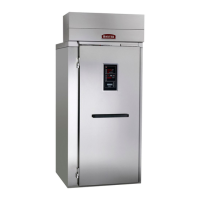
This document describes the operation and care of Baxter Proofer and Retarder/Proofer cabinets.
Function Description
The Baxter Proofer and Retarder/Proofer cabinets are designed to proof racks of dough products under controlled temperature and humidity conditions prior to baking. Standard proofers are equipped for proofing dough only. Retarder/Proofers, on the other hand, offer additional functionality: they can gradually thaw frozen dough and operate like a refrigerator to keep the interior cool, providing an excellent environment for storing dough. The cooler temperature slows yeast fermentation, preventing dough from rising. The Automatic Retard/Proof feature allows for programming retard and proof times in a single operation, offering flexibility.
Important Technical Specifications
Proofer Models:
- PW1E
- PW1S
- PW2E
- PW2S
- PW3S
- RPW1S
- RPW2E
- RPW2S
Proofing Temperature and Humidity (Typical Settings):
- Temperature: 95°F (35°C)
- Humidity: 85%
- Proofing Time: 45 to 60 minutes (product dependent)
- Dry-proofing: Set humidity to the lowest setting.
Example Proofing Settings:
- Rolls: 95°F (35°C), 85% Humidity, 55 min.
- French Crust Bread 14 oz.: 90°F (32°C), 90% Humidity, 45 min.
- French Crust Bread 10 oz.: 90°F (32°C), 85% Humidity, 45 min.
- Bagels: 85°F (29°C), 85% Humidity, 50 min.
- Croissants: 75°F (24°C), 70% Humidity, 30 min.
Retarding Temperature:
- Recommended: 36°F to 38°F (2°C to 3°C)
- Thawing Frozen Dough: Approximately 6 hours minimum.
- Storage: Up to 48 hours.
- Humidity Control: Not offered in Retard operation; a fixed humidity value is used.
Parameter Setup Defaults:
- P0 (Software Version Number): 0001
- P1 (Fahrenheit or Celsius): F (Fahrenheit)
- P2 (Temp Offset for Calib.): 15 (0 offset, Min 0, Max 30)
- P3 (Hum Offset for Calib.): 15 (0 offset, Min 0, Max 30)
- P4 (Minimum Temp for Proof): 65°F
- P5 (Maximum Temp for Proof): 115°F
- P6 (Minimum Humid for Proof): 25%
- P7 (Maximum Humid for Proof): 95%
- P8 (Dummy): Not used
- P9 (Preheat without humidity): 1 (disabled, 0=enable). Preset T=105°F, 15 min timeout.
- P10 (Minimum Temp for Retard): 34°F
- P11 (Maximum Temp for Retard): 50°F
- P12 (Rest Time): 30 (Min 5 min, Max 480 min)
- P13 (Recovery Time): 60 (Min 30 min, Max 480 min)
- P14 (1=AM/PM, 0 = Military Time): 1 (AM/PM)
- P15 (1= 7Day, 0= Single Day): 0 (Single Day)
- P16 (Defrost Every xx (hours)): 6 (Max 10 hrs)
- P17 (Defrost FOR xx (minutes)): 10 (Max 60 min)
Modular Design: Available in one-, two-, or three-section roll-in models.
Usage Features
Control Panel Configurations: Standard Proofer and Retarder/Proofer.
Proof Mode (Standard Proofer):
- ON/OFF Button: Starts/stops proof mode.
- TEMP UP/DOWN Arrows: Sets desired temperature.
- TEMP WINDOW: Displays current temperature.
- %HUMIDITY UP/DOWN Arrows: Sets desired humidity.
- %HUMIDITY WINDOW: Displays current humidity.
- Timer Functionality: Four individual timers (1-4).
- TIMER NUMBER UP Arrow: Selects a timer.
- START/STOP Button: Activates/deactivates selected timer.
- TIMERS UP/DOWN Arrows: Sets desired time for selected timer.
- TIMERS WINDOW: Displays remaining hours and minutes.
- Humidity Display Note: If actual humidity is <26%, displays 25%. If >25%, displays actual humidity.
Retarder/Proofer Advanced Controls:
- Manual Proof Operation: Similar to standard proofer.
- Manual Retard Operation:
- Sets temperature (34°F - 50°F).
- Sets timer.
- No humidity control; fixed humidity value used.
- Defrost cycle can be set via Parameter Setup Mode; "DEFR" flashes during active defrost.
- Automatic Retard and Proof Operation (Auto Mode):
- Programs Retard and Proof in one operation (single day or seven days).
- "Rest Period" and "Recover Time" are setup times before proof stage.
- After one cycle, unit runs Proofer mode; operator must resume next day's program.
- Allows review/edit of settings, activation/deactivation of daily programs.
- Programming is based on Proof cycle completion Time/Day, starting with Sunday.
Operating Parameter Setup:
- Accessed by holding TIMER NUMBER arrow button and pressing ON/OFF button (or HUMIDITY UP and ON/OFF simultaneously if timer keys are unavailable).
- Allows customization of temperature offsets, humidity offsets, min/max proof/retard temperatures, rest/recovery times, time format, daily/weekly cycles, and defrost settings.
Proofer Model Selection (Bootloader):
- Allows changing the proofer model (Config 1: Proofer (PW), Config 2: Retarder/Proofer (RPW), Config 3: Dehumidifying Proofer (DPC1S)).
- Accessed by turning off the proofer, then holding HUMIDITY DOWN, TEMPERATURE UP, and ON/OFF buttons for 5 seconds until "conF" is displayed.
- Configuration is saved by pressing ON/OFF.
Firmware Update (Bootloader):
- Requires a FAT formatted flash drive with "proofer.bin" file.
- Accessed by turning off the proofer, inserting flash drive, then holding HUMIDITY DOWN, TEMPERATURE UP, and ON/OFF buttons for 5 seconds until "conF" is displayed.
- Press TEMP UP/DOWN until "LoAd" is displayed, then HUMIDITY UP to start.
- Displays "UPdt", "Strt", then "Succ" for successful update or "Err" for failure.
Control Board Power Up:
- Bootloader launches each time power is applied.
- Displays configuration mode number (1, 2, or 3) in HUMIDITY display for several seconds.
LCD Contrast Adjustment:
- Accessed by entering bootloader mode (as above).
- While in bootloader, hold HUMIDITY DOWN and press TEMP UP.
- Use HUMIDITY UP/DOWN to adjust contrast.
- Press TEMP UP to save and exit.
Maintenance Features
General Maintenance:
- WARNING: Disconnect electrical power and follow lockout/tagout procedures before maintenance.
- Bi-annual Check (every 6 months): Authorized service personnel should check air duct, drain, heater plate, spray nozzle, and refrigeration coils (if applicable).
Light Bulbs:
- Replace with 40-watt incandescent appliance-type bulb(s) ONLY.
Shut Down:
- Remove all product.
- Turn off proofer.
- Clean the proofing chamber.
Cleaning:
- Interior: Wash stainless steel interior with a clean cloth moistened in warm, soapy water. Rinse with clear water and dry with a clean cloth.
- Exterior: Clean daily with a clean, damp cloth.
- Sensitive Parts: Use care when cleaning around probes and sensors.
- Prohibited Cleaners: Do not use cleaners containing grit, abrasive materials, bleach, harsh chemicals, or chlorinated cleaners. Do not use steel wool on stainless steel surfaces.
- Cleaning Method: NEVER spray down the proofer with water, steam, or power wash.
- New Cleaning Formulas: Be cautious; test in an inconspicuous place first.
Service and Parts Information:
- Contact an authorized service office for repairs or adjustments.
Troubleshooting Guide:
- Machine will not turn on:
- Verify power cord is plugged in.
- Verify main power supply is on.
- Contact local authorized service office.
- Machine will not heat up:
- Verify temperature is set properly.
- Contact local authorized service office.
- Machine will not humidify air:
- Verify humidity is set properly.
- Verify water supply is turned on.
- Contact local authorized service office.
- Machine will not cool:
- Verify temperature is set properly.
- Contact local authorized service office.



 To Next Page
 General