Lagoon CTC Fan Installation Instructions
7 | P a g e
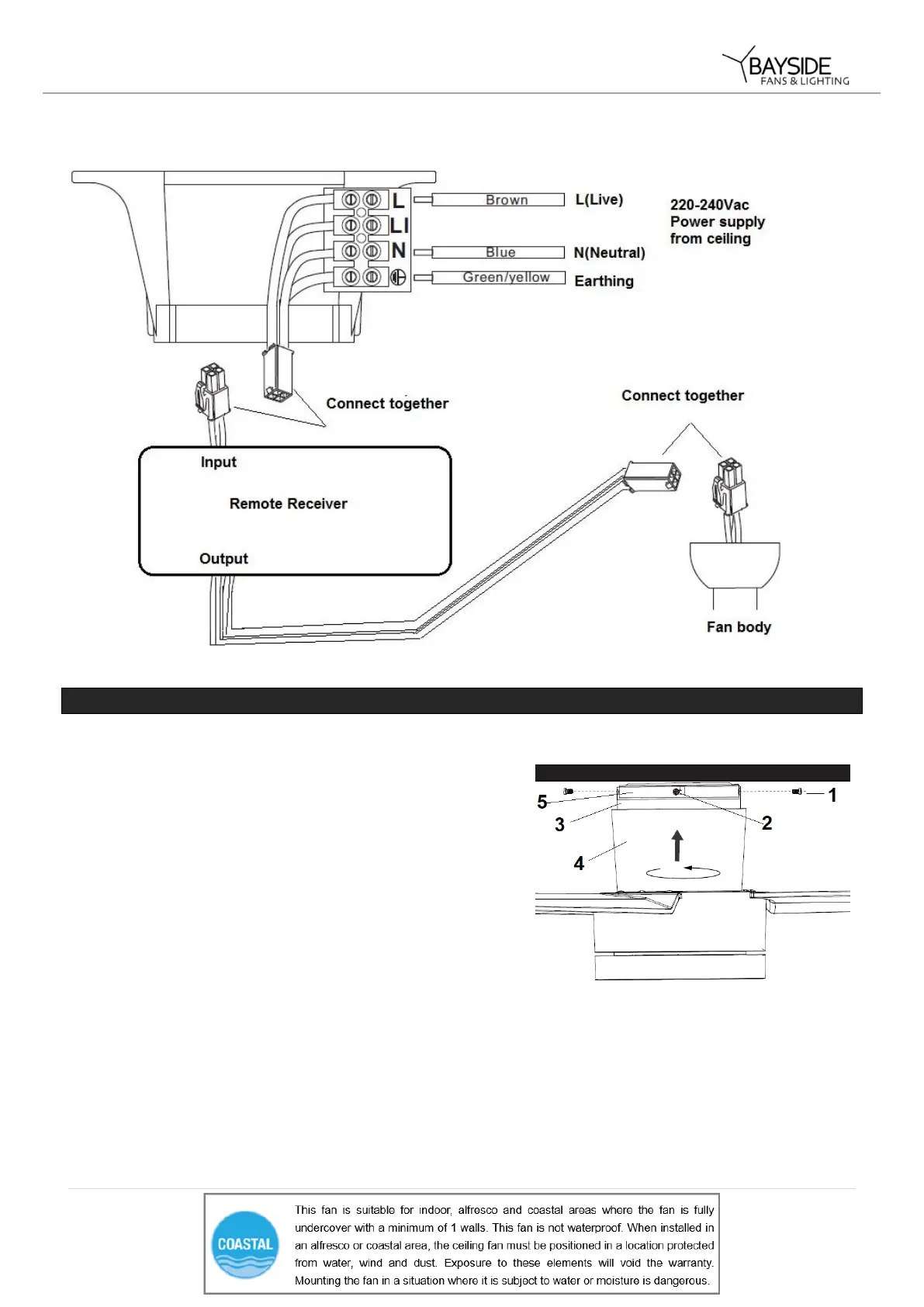
2/ Remote with plugs
FINISHING THE INSTALLATION
• Loosen two screws (1) from the mounting bracket (5).
• Loosen two screws (2) by half thread from the mounting
bracket (5).
• Lift the hanging canopy (3) of the fan assembly up to
the mounting bracket and let the L-shape slot on the
hanging canopy go through the screws (2) on the
mounting bracket. Turn the hanging canopy until it locks
in place at the end section of the L-shape slot and
secure it by tightening the two screws (1). Avoid
damaging the electrical wiring prepared previously.
• Finally attach the canopy cover (4) to the mounting
bracket, secure it by pushing the hooks of the canopy
cover into the slot holes of the hanging canopy and turn
it anti clockwise.


 To Next Page