EasyManua.ls Logo

bca BC Link 2.0 - User Manual

bca BC Link 2.0
11 pages
Print Icon
To Next Page IconTo Next Page
Loading...
Owner
s Manual

Other manuals for bca BC Link 2.0

Question and Answer IconNeed help?

Do you have a question about the bca BC Link 2.0 and is the answer not in the manual?

Summary

Disclaimer and Component Overview

Disclaimer

Details inherent risks in action sports and emphasizes product limitations for communication.

Component Outline

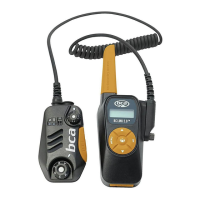
Identifies and illustrates the key parts of the BC Link 2.0 radio base unit and Smart Mic.

Getting Started with BC Link 2.0

Charging the Battery

Instructions on how to charge the radio's battery using a micro-USB port and recharger.

Connecting the Smart Mic

Steps for connecting the Smart Mic to the radio base unit via its cord.

Attaching to a Backpack

Guidance on how to securely attach the Smart Mic and radio to a backpack for use.

Basic Functions of BC Link 2.0

User Interface and Controls

Explains the radio's user interface, including button functions and menu navigation.

Screen Icons Guide

Details the meaning of various icons displayed on the BC Link 2.0 screen.

Channel Management and Key Lock

Presetting Channels

Instructions on how to preset custom channels and privacy codes for group communication.

Selecting Preset Channels

How to choose between the pre-set channels (A-F) using the Smart Mic dial.

Key Lock Functionality

Explains how to activate and deactivate the key lock feature on the base unit.

Operational Features

Battery Power Display

Details how to check the remaining battery charge percentage on the display.

Communication Basics

Guidelines for effective communication, including PTT button usage and group settings.

Advanced Functions

Covers advanced features like transmit power, button sounds, Roger beep, and weather channels.

Detailed Feature Explanations

Weather Channel Information

Information on accessing and using weather channels, including frequencies.

Battery Power Indicator

Explanation of the battery icon and how it reflects voltage and usage.

Earphone Jack Usage

Details about the earphone jack and compatibility with standard audio plugs.

Field Use Recommendations

Guidance for efficient use of the BC Link 2.0 in various field and emergency situations.

Technical Specifications and Warranty

Technical Specifications

Lists product dimensions, weight, battery life, range, and power specifications.

FCC Licensing and Industry Canada

Compliance information regarding FCC Rules and Industry Canada regulations.

Limited Warranty Details

Information about the three-year limited warranty, coverage, and exclusions.

Warranty Service and Limitations

Warranty Limitations

Exclusions from warranty coverage, including product alteration, damage, or acts of God.

Obtaining Warranty Service

Procedure for obtaining warranty service, including RA numbers and contact information.

Summary

Disclaimer and Component Overview

Disclaimer

Details inherent risks in action sports and emphasizes product limitations for communication.

Component Outline

Identifies and illustrates the key parts of the BC Link 2.0 radio base unit and Smart Mic.

Getting Started with BC Link 2.0

Charging the Battery

Instructions on how to charge the radio's battery using a micro-USB port and recharger.

Connecting the Smart Mic

Steps for connecting the Smart Mic to the radio base unit via its cord.

Attaching to a Backpack

Guidance on how to securely attach the Smart Mic and radio to a backpack for use.

Basic Functions of BC Link 2.0

User Interface and Controls

Explains the radio's user interface, including button functions and menu navigation.

Screen Icons Guide

Details the meaning of various icons displayed on the BC Link 2.0 screen.

Channel Management and Key Lock

Presetting Channels

Instructions on how to preset custom channels and privacy codes for group communication.

Selecting Preset Channels

How to choose between the pre-set channels (A-F) using the Smart Mic dial.

Key Lock Functionality

Explains how to activate and deactivate the key lock feature on the base unit.

Operational Features

Battery Power Display

Details how to check the remaining battery charge percentage on the display.

Communication Basics

Guidelines for effective communication, including PTT button usage and group settings.

Advanced Functions

Covers advanced features like transmit power, button sounds, Roger beep, and weather channels.

Detailed Feature Explanations

Weather Channel Information

Information on accessing and using weather channels, including frequencies.

Battery Power Indicator

Explanation of the battery icon and how it reflects voltage and usage.

Earphone Jack Usage

Details about the earphone jack and compatibility with standard audio plugs.

Field Use Recommendations

Guidance for efficient use of the BC Link 2.0 in various field and emergency situations.

Technical Specifications and Warranty

Technical Specifications

Lists product dimensions, weight, battery life, range, and power specifications.

FCC Licensing and Industry Canada

Compliance information regarding FCC Rules and Industry Canada regulations.

Limited Warranty Details

Information about the three-year limited warranty, coverage, and exclusions.

Warranty Service and Limitations

Warranty Limitations

Exclusions from warranty coverage, including product alteration, damage, or acts of God.

Obtaining Warranty Service

Procedure for obtaining warranty service, including RA numbers and contact information.

bca BC Link 2.0 Specifications

General IconGeneral
Brandbca
ModelBC Link 2.0
CategoryTwo-Way Radio
LanguageEnglish