3
Getting started
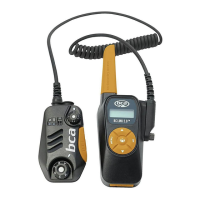
In the BC Link 2.0 package, you will find the radio base unit, Smart Mic with connection
cord, recharger, micro-USB cable, and quick reference card. To start, check the attachment
of the Smart Mic and recharge the battery.
Charging battery
To charge the battery, attach the micro-USB cable to the micro-USB port in the battery.
You can use any powered USB port to recharge, but use of the recharger provided with
the package is recommended. If you are using the recharger provided with the package,
the LED light on the top of the recharger will be red when the battery is charging; it will
turn green when fully charged.
NOTE: After recharging the battery, make sure to put the protective cap back on the micro-
USB charging port. This is vital to make sure that snow or condensation does not enter the
battery compartment.
Connecting Smart Mic
Connect the Smart Mic by rotating the cord lock screw and removing the cord connector
from the slot.
Attaching to backpack
To attach to a backpack, fasten the alligator clip on the back of the Smart Mic to your
shoulder or sternum strap. Then place the radio base unit inside your backpack or clip it
to your waist belt. If your backpack has a hydration sleeve built into the shoulder strap, it
may be possible to run the cable through the sleeve. First detach the Smart Mic from the
radio base unit as described above. Then run the Smart Mic connection cord through the
hydration sleeve until it reaches the inside of the pack. Reattach the cord to the side of the
base unit and tighten the attachment screw.


 To Next Page