7
You can find the corresponding frequency of the closest weather station here:
http://www.nws.noaa.gov/nwr/nwrbro.htm . That frequency corresponds to the weather
channels listed below:
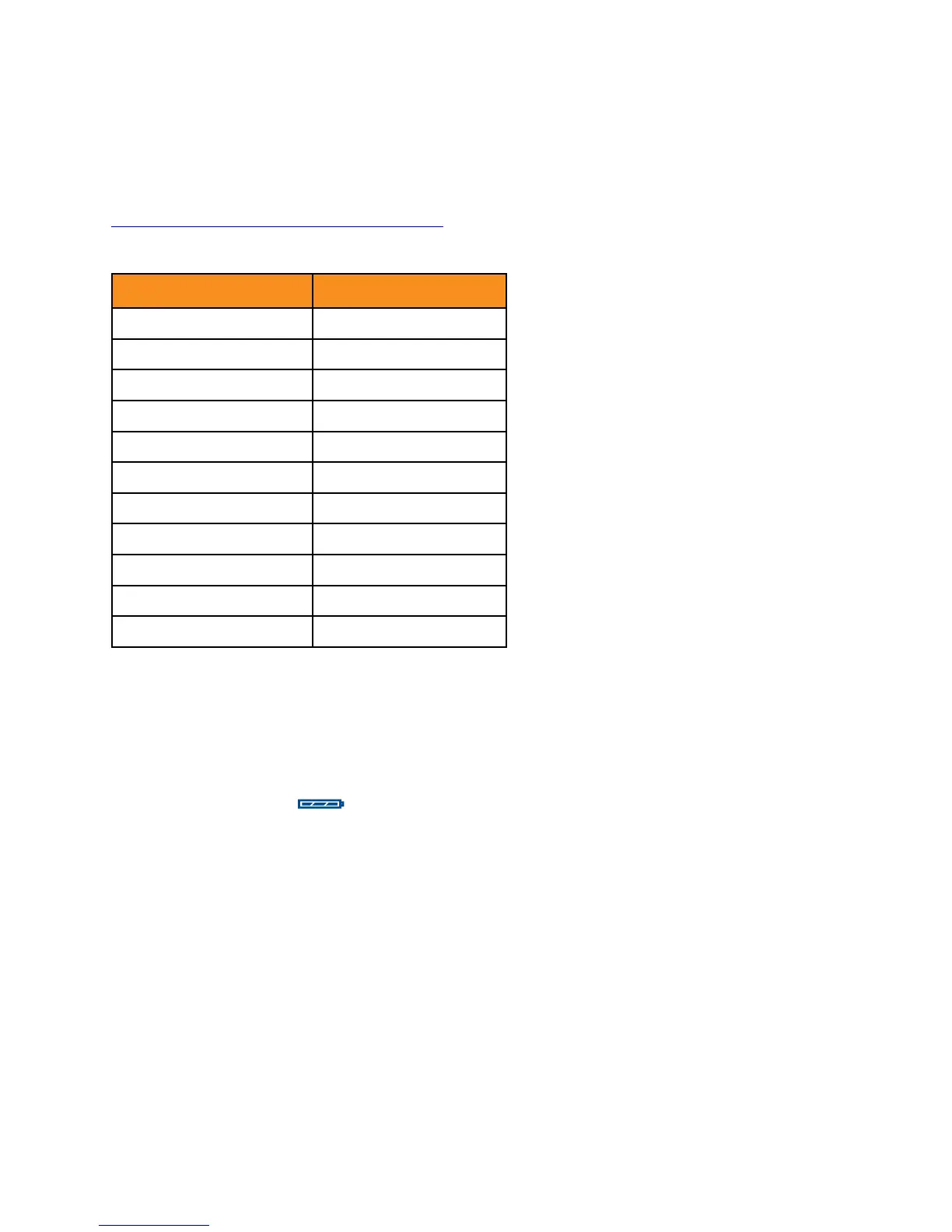
Weather Channel Frequency (MHz)
1 162.550
2 162.400
3 162.475
4 162.425
5 162.450
6 162.500
7 162.525
8 161.650
9 161.775
10 161.750
11 162.000
Once you have selected your preferred weather channel, wait five seconds or press
OK. Reception from these stations depends on weather conditions and the presence of
obstacles such as mountains, buildings, and trees between the transmitter and receiver.
Battery power indicator
The battery power icon is in the upper left corner of the base unit display. Note that
the battery power indicator is based on battery voltage: it will drop when the battery is
loaded. For example, it will indicate fewer bars when the radio is transmitting.
Earphone
An earphone jack is located next to the cable on the Smart Mic. It will accommodate any
standard 3.5mm TS or TRS earphone plug. Make sure the protective cap is inserted when a
headphone is not in use.
Using your radio in the field
For recommendations on how to most efficiently use your BC Link 2.0 in the field and for
emergencies please see the Education tab at http://www.backcountryaccess.com/product/
bc-link-2/ .


 To Next Page