5
1 Operating instructions
1.1 Preliminary switch on
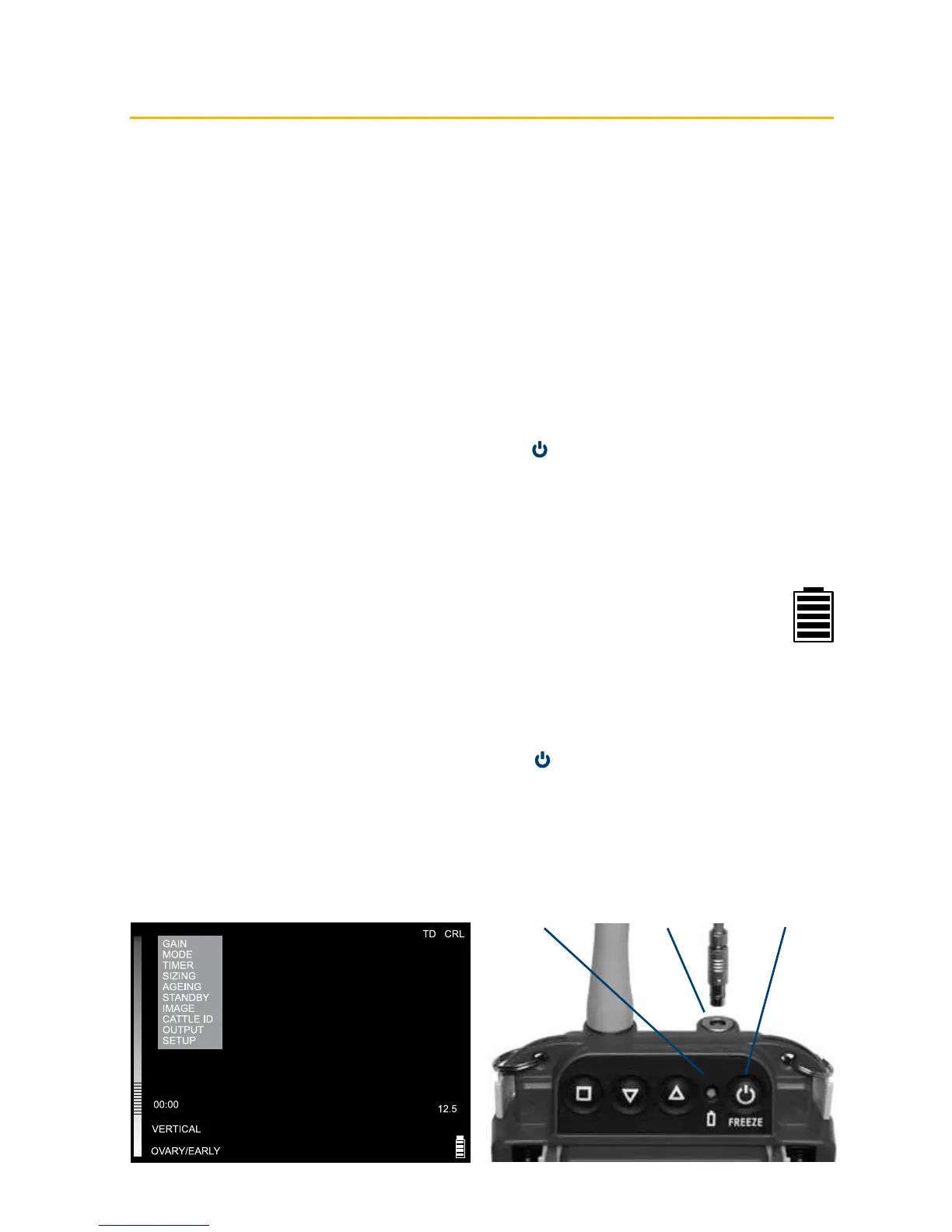
Ensure that the external battery is securely latched to the top of the scanner.
If a remote display is used, switch on the scanner ensuring the correct receive channel is selected. If
a cable connection is required, attach the plug to the user connector port on top of the scanner (Fig1).
Check the plug and socket are free from debris. Align the dots on the plug and socket and push to click
in place.
1.2 Power
Topower the scanner on, press and hold the Power button
(Fig 2) until the scanner beeps.
Thecontrol panel LED (Fig 3) will illuminate green.
The external battery charge level is indicated on the Battery LED while the scanner is switched on.
On power-up, the scanner will perform a system initialisation, displaying the Main Menu, current
operating mode and battery level indicator. In addition, a grey bar will be visible down the left side of
the display (Fig 3).
The on-screen battery indicator gives a more accurate indication of the battery charge
remaining in the external battery (Fig 4). If viewing on a display headset, the headset may
need to be switched on separately. The scanner will beep a second time, indicating system
initialisation is complete and the system is ready to function.
Note: The scanner will power on with the same settings it had when last switched off.
To switch the scanner off, press and hold the Power button until the scanner beeps twice.
Fig 4
Fig 3 Fig 1 Fig 2



 To Next Page