FUNCTION INTRODUCTION
• 88 Key (A1~C9) strength standard piano
• 880 timbre (true 140 timbre), 600 rhythm (true
128 rhythm), 100 demonstration songs
• 128 Polyphony
• Digital tube display
• Accompaniment volume control key
• Speed control keys
• Shift control keys
• Mode selection key (timbre, rhythm)
• Recording and playback functions
• Synthetic chords
• Demonstrate the function of singing together
• Metronome function
• Double keyboard function, double timbre
function
• Keyboard drum function
• Start/stop, sync function keys, insert
• Soft pedal, Delay pedal, Damper pedal
USING POWER ADAPTOR
Do not use any other power supply adaptor other than the one supplied with this unit. Connect one side
to the power supply socket on the back-panel and the other side to an outlet.
NOTE: The input voltage (DC 15V) should be compatible with the outlet power.
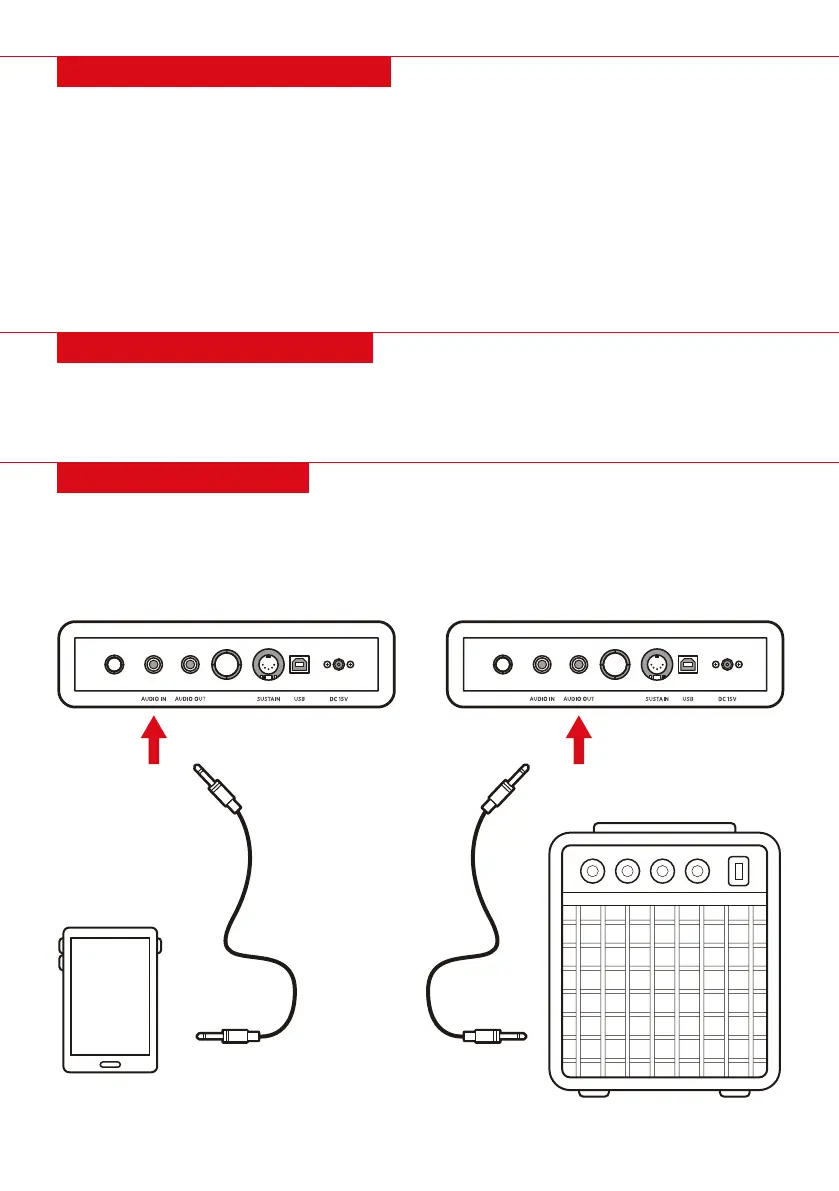
THE CONNECTIONS
AUDIO INPUT INTERFACE
Before the audio signal is connected to the
product, be sure to turn down the volume of the
audio source first. After the connection is
completed, the volume can return to desired level.
AUDIO OUTPUT TERMINAL
Before you connect the audio amplifier, be sure to
turn down the volume on the digital piano. Once
the connection is complete, the volume can be
returned to desired level.
| 5


 To Next Page