AUTOMATIC ACCOMPANIMENT
1. Press the “start”/stop” button to start playing
2. Press the “chord” button to enter the chord state
- Use Single-Multifingered chord patterns
3. Play Chords
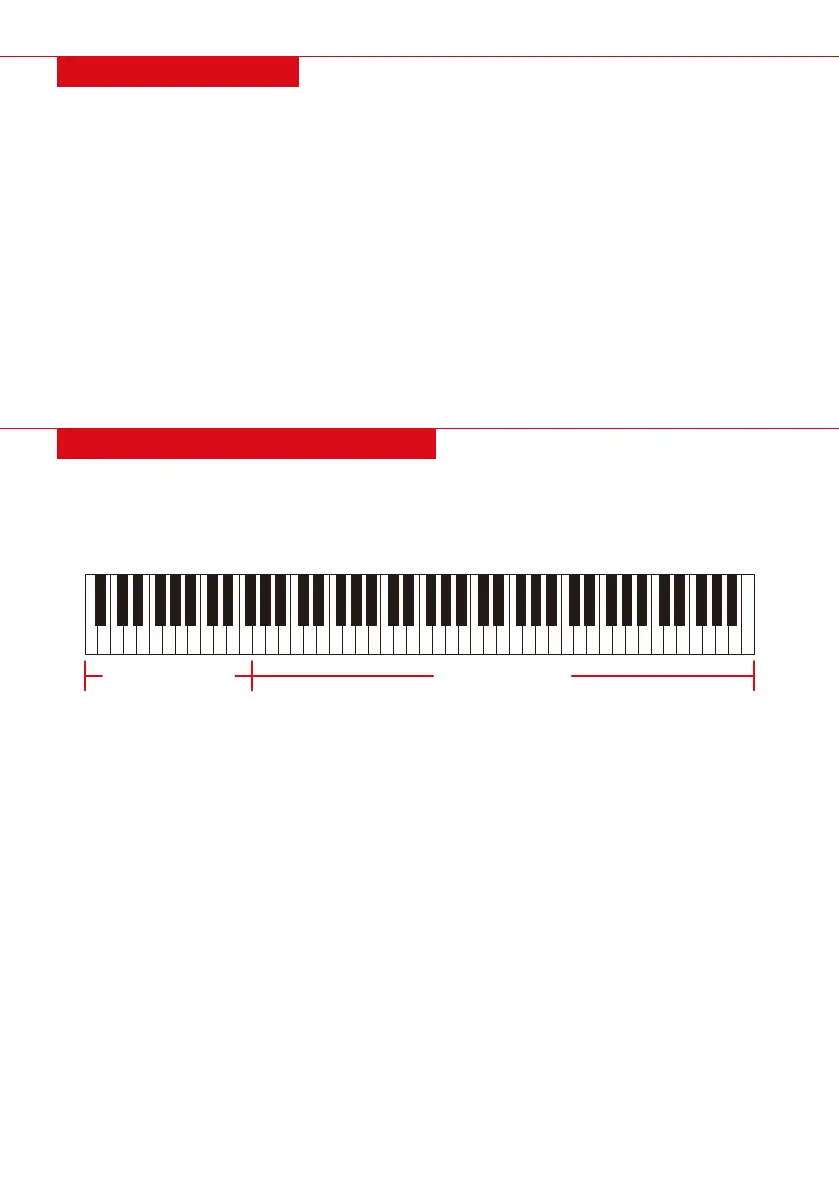
- Press on the keyboard (1-22 keys from left)
4. Press the “chord” button again to end chord state
COMPREHENSIVE CHORD ACCOMPANIMENT
CHORD KEYBOARD KEYBOARD MELODY
START SIMULTANEOUSLY
This product can be configured to play a rhythm at the same time of accompaniment chords.
NOTE: Before you begin, first choose the rhythm, set the tempo value, and select chords for
accompaniment.
1. In chord state, press the “sync” button to enter the synchronous startup standby state.
2. Play the chords and the accompaniment will start playing automatically.
3. To end “Sync” mode, press “start/stop” button
HOW TO PLAY DEMO SONGS
This product contains 100 built-in demo songs (see list of demo songs).
1. Find desired song number from demo song list
2. Press the “demo” button to enter demo song type
3. Select the song by pressing the “+” or “-“ keys
4. Press the “demo” key again or “start/stop” key to stop play and exit the mode
NOTE: Demo Songs are (0-99) and will continue to play in sequence until you exit the mode.
BASIC OPERATION
HOW TO PLAY
1. Press the “power” button to the on position.
The display screen will light up and go into
normal playing mode.
2. Adjust the volume to desired level
3. Play music on the keyboard.
HOW TO CHOOSE THE TONE/TIMBRE
This product has 800 built-in tones/timbres.
Please follow the steps below to select
desired tone.
1. Find the desired timbre in the timbre list.
2. Press the Tone to entre Tone mode.
3. Select your desired Tone by selecting “+” or
“-” key.
NOTE: Tone numbers are (0-799)
HOW TO CHOOSE A RHYTHM
There are 600 rhythms built into this product.
Follow the steps below to select desired Rhythm.
1. Press the Rhythm key to enter the
Rhythm mode.
2. Select the desired Rhythm by pressing the “+”
or “-“ key.
3. Press “start/stop” to play Rhythm.
4. To stop the Rhythm, press “Start/Stop” again.
NOTE: Rhythm numbers are (0-599)
HOW TO ADJUST THE TEMPO
1. Press the Tempo key to enter the Tempo
adjustment mode.
2. Select desired tempo by selecting “+” or “-“
| 7


 To Next Page