20
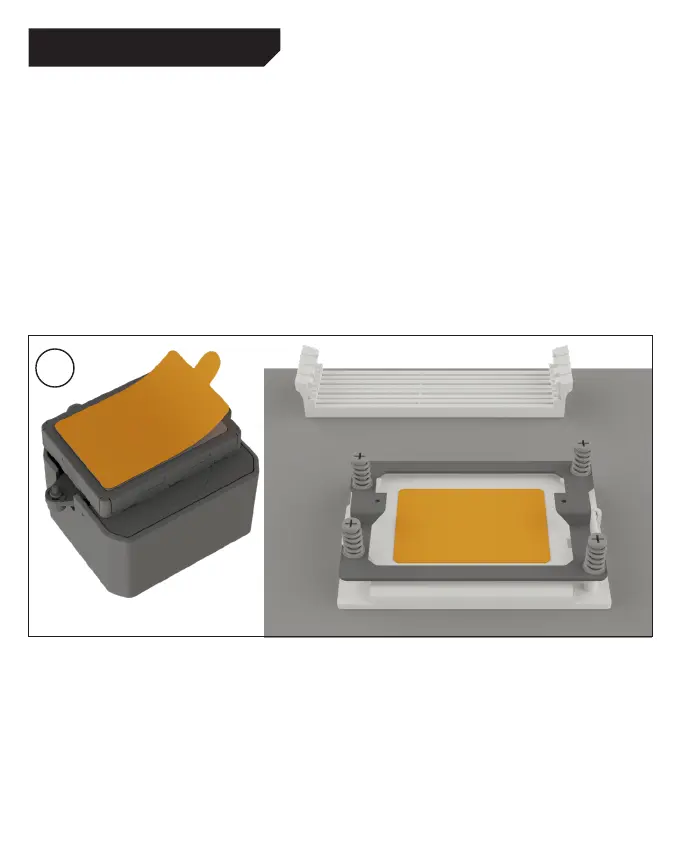
Umieść ramę montażową AMD Threadripper nad
gniazdem. Lekko dokręć wszystkie śruby.
Закріпіть монтажну рамку AMD Threadripper на сокеті,
затягнувши усі гвинти без надмірних зусиль.
將AMD Threadripper安裝框架放置在插座上,輕輕擰緊
所有螺絲。
Закрепите монтажную рамку AMD Threadripper на
сокете, затянув все винты без чрезмерных усилий.
AMD Threadripper マウントフレームをソケットの上に配置す
る。すべてのネジを軽く締める。
将AMD Threadripper安装框架放置在插座上,轻轻拧紧
所有螺钉。
First peel off the protective film from the underside of
the cooler. Apply thermal paste on the CPU surface.
Caution: The thermal paste supplied should not be
swallowed. If any is swallowed, drink lots of water and
urgently seek the advice of a doctor. Store it beyond
the reach of children. Avoid contact with skin and eyes.
Entferne zunächst die Schutzfolie von der Unterseite
des Kühlers.Trage die Wärmeleitpaste auf die
CPU-Oberfläche auf.
Vorsicht: Die mitgelieferte Wärmeleitpaste ist nicht
zum Verzehr geeignet. Bei Verzehr ausreichend Wasser
trinken und umgehend einen Arzt aufsuchen. Außer-
halb der Reichweite von Kindern aufbewahren. Vermeide
Haut und Augenkontakt.
2
AMD THREADRIPPER (420mm & 360mm)



 To Next Page