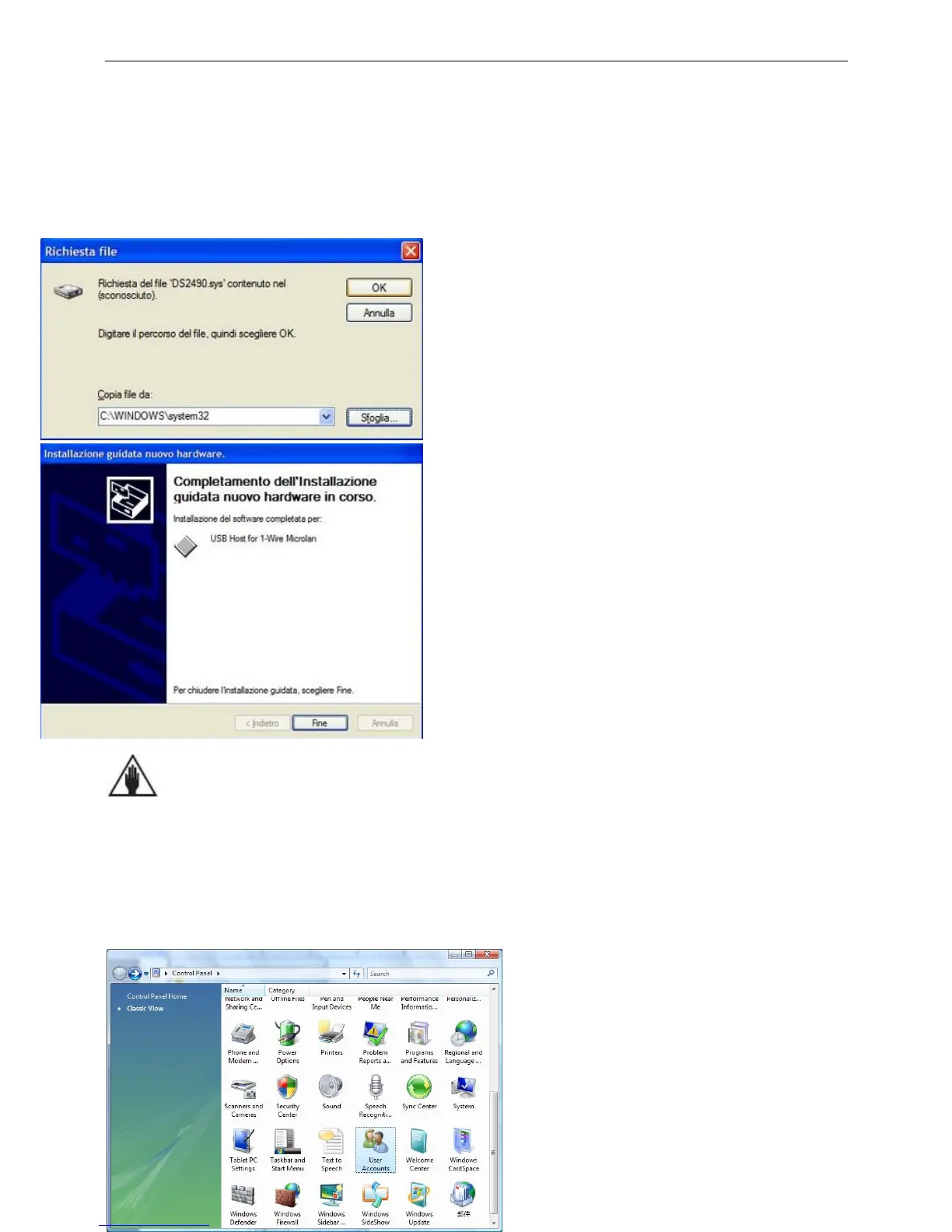
This window asks for the path to choose the driver for the
USB unit, model DS9490. Press the Browse button, in the
folder C:\Program Files\Be-Tech\Smart Safe
V2009.07\Driver and then choose the file
ds2490winusb_x86.inf, press the button OK to continue
installation.
The installation of the driver is now complete. Press Fine
button to complete the installation.
NOTICE
There are two kinds of driver software in the RW-32 folder, the WinUSB_32 folder is used for the 32 bit
computer, the WinUSB_64 folder is used for the 64 bit computer.
For Windows Vista
User Account Control (UAC) can help you prevent unauthorized changes to your computer. It works by
prompting you for permission when a task requires administrative rights, such as installing software or
changing settings that affect other users. But it will block many drivers so that a lot of software can’t use in
Vista. User should turn UAC off before installing smart safe software. The follow procedure will show you ho
to turn User Account Control off.
Open User Accounts by clicking the Start button,
clicking Control Panel, clicking User Accounts
and Family Safety (or clicking User Accounts,
if you are connected to a network domain), and
then clicking User Accounts.



 To Next Page