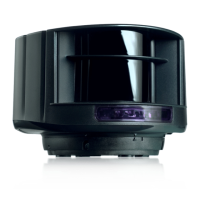
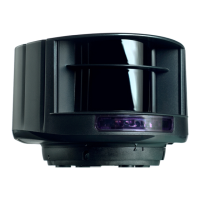
The LZR-H110 is a laser scanner designed for use with barriers and gates, functioning as a movement and presence detector to initiate opening and closing processes. It utilizes time-of-flight measurement technology to achieve a maximum detection range of 5.0 m x 6.5 m (16.5 ft x 21 ft). The device incorporates both IR and visible laser diodes. The IR laser operates at a wavelength of 905 nm with a maximum output pulse power of 75 W (Class 1 according to IEC 60825-1), while the visible laser operates at 650 nm with a maximum output CW power of 3 mW (Class 3R according to IEC 60825-1). The visible laser beams are typically inactive during normal functioning but can be activated by the installer for setup.
Important Technical Specifications:
- Detection Mode: Motion and presence
- Remission Factor: > 2%
- Angular Resolution: 0.3516°
- Supply Voltage: 10-35 VDC (sensor side)
- Power Consumption: < 5 W
- Peak Current @ Power-on: 1.8 A (max. 80 ms @ 35 V)
- Cable Length: 10 m (30 ft)
- Response Time: Typ. 200 ms (adjustable) for motion detection, typ. 20 ms (max. 80 ms) for presence detection.
- Output: 2 electronic relays (galvanic-isolated, polarity-free) with max. switching voltage of 35 VDC / 24 VAC and max. switching current of 80 mA (resistive). Switching time is ton=5 ms; toFF=5 ms. Output resistance is typ 30 Ω, voltage drop on output < 0.7 V @ 20 mA, and leakage current < 10 μΑ.
- Input: 1 optocoupler (galvanic-isolated, polarity-free) with max. contact voltage of 30 VDC (over-voltage protected). Voltage threshold: Log. H: >8 VDC, Log. L: <3 VDC.
- LED Signal: 1 blue LED for power-on status, 2 bi-coloured LEDs for detection/output status (green = no detection, red = detection).
- Dimensions: 5.0 in (D) x 3.6 in (W) x 2.75 in (H) (mounting bracket + 0.55 in)
- Material: PC/ASA, Black color.
- Mounting Angles: -45°, 0°, 45° on bracket. Rotation angles on bracket: -5° - +5° (lockable). Tilt angles on bracket: -3° - 3°.
- Protection Degree: IP65
- Temperature Range: -30 - 60 °C if unpowered, -10 - 60 °C if unpowered.
- Humidity: 0 - 95% non-condensing.
- Vibrations: < 2G.
- Pollution on Front Screen: Max. 30% homogenous.
Usage Features:
The LZR-H110 is designed for easy installation and setup, primarily using a remote control.
- Remote Control Adjustments: The sensor can be unlocked and adjusted via remote control. An access code (1 to 4 digits) may be required if the first LED flashes quickly after unlocking. To end an adjustment session, the sensor should always be locked.
- Parameter Adjustment: Individual or multiple parameters can be adjusted using the remote control.
- Value Checking: Current parameter values can be checked, with the number of flashes indicating the value.
- Factory Reset: The sensor can be restored to factory default values.
- Access Code Management: An access code can be saved (recommended for sensors installed close to each other) or deleted.
- Mounting: The sensor is installed on a pole using an LBA mounting support. The bracket is secured with 4 screws to prevent vibrations. After plugging in the connector and positioning the cable, the protection cover is closed. The housing is then positioned on the bracket, and the sensor is rotated until two triangles on the housing face each other.
- Positioning: Visible laser beams can be activated via remote control to verify the lateral position and ensure the beam is visible on the opposite pole. The tilt angle of the detection field can be adjusted with a hex key. The mounting bracket position can be locked to prevent vibrations.
- Mounting Side Selection: The correct mounting side (LEFT or RIGHT) can be chosen. The sensor can operate with or without a reference point. If a reference point (surface of min. 15 cm) is used, the sensor automatically adjusts the safety field.
- Safety Field (Presence) Teach-in: The safety field can be precisely adapted by launching a teach-in process (30 seconds). During teach-in, the sensor learns the environment and records reference distances. If a person walks along the detection area, the sensor memorizes the walk path outline, storing it as a new detection field. The shortest distance measured by each laser beam defines the field limit. The field can be increased or decreased by 10 cm.
- Opening Field (Motion) Teach-in: Similar to the safety field, the opening field can be adapted via a teach-in process (45 seconds). The sensor learns the environment and adjusts the field based on detected objects or walk paths.
- Field Dimensions Adjustment: Both safety and opening fields can be adjusted to achieve a rectangular shape by setting WIDTH and DEPTH parameters.
- Optional Remote Control Adjustments:
- Max. Presence Time: Configurable from 5 seconds to infinite, determining how long the sensor remains in presence detection mode after motion.
- Detection Trajectory: Various unidirectional and bidirectional detection patterns can be selected, including approaching/going away, approaching in any direction, approaching towards barrier/gate, approaching within width of barrier/gate, approaching towards central zone, approaching towards centre, approaching towards right side, and approaching towards left side.
- Detection Delay: Adjustable from 100 milliseconds to 900 milliseconds.
- Safety Field Redirection: Configures Relay 1 and Relay 2 for motion, motion or presence, or motion + presence detection.
- Output Configuration: Configures Relay 1 and Relay 2 as A-NO (active, normally open) or P-NC (passive, normally closed).
- Immunity: Adjustable between low and high settings.
- Magic Wand: Allows launching teach-in for safety field or opening field, and restoring factory values or activating visible laser beams.
Maintenance Features:
- Cleaning: The front screens should be wiped regularly with a clean and damp cloth. Aggressive cleaning products should not be used.
- Environmental Considerations:
- Avoid extreme vibrations.
- Do not cover the front screens.
- Avoid moving objects and light sources in the detection field.
- Avoid the presence of smoke and fog in the detection field.
- Avoid condensation.
- Avoid direct exposure to high-pressure cleaning.
- Avoid exposure to sudden and extreme temperature changes.
- Keep the sensor permanently powered in environments where the temperature can descend below 0°C.
- Troubleshooting: The manual provides a comprehensive troubleshooting guide based on LED signals (No blue LED, Detection LED remains green, Detection LED remains red, Orange LED flashing and detection LEDs are red, Orange LED is on) and sensor behavior (Sensor does not respond to remote control, Sensor does not unlock). Solutions include checking power supply, activating LEDs, adjusting field size, launching teach-in, verifying sensor position, cleaning screens, checking battery, and avoiding reflective objects.
The manufacturer emphasizes that the sensor should only be used as a movement and presence detector for gates and barriers, and any other use, especially on industrial doors, is outside its permitted purpose. Installation and setup should only be performed by trained and qualified personnel. The manufacturer is not responsible for incorrect installations or inappropriate adjustments.

 Need help?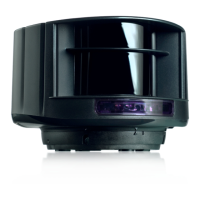

 To Next Page
 General