
 Need help?
Do you have a question about the Beam 250 and is the answer not in the manual?
Keep dry, clean fan/mesh/lens, avoid solvents, place in stable, non-humid environments, avoid high temps and vibration.
Mount horizontally/inclined/upside down. Ensure stability, use safety ropes, and keep pedestrians clear during installation.
Describes panel display, status bar (signal, bulb, fault), and support for DMX/RDM protocols.
Explains navigating the touch display, selecting menu items, and inputting parameter values using sliders or buttons.
Details setting DMX address, working modes (DMX, self-propelled, voice, scene), and panel display options.
Lists DMX channels 1-16 and their functions, including Pan, Tilt, Color, Gobo, Frost, Strobe, Dimmer, etc.
Covers bulb not lighting, dim beam, blurred patterns, intermittent operation, and console control failures.
Focuses on power, cords, dust, mounting, safety ropes, working time limits, and preventing overheating.
Explains RDM basics, host requirements, signal amplifier compatibility, and using impedance matching resistors.
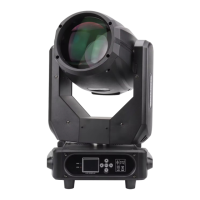
This document outlines the operation, maintenance, and precautions for the Beam 250 moving head light, a professional lighting fixture designed for various applications. The manual emphasizes safe and correct usage to ensure optimal performance and longevity of the device.
The Beam 250 is a moving head light that supports both DMX and RDM protocols, offering flexible control options. It features a color display with touch operation, similar to an Android operating system, for intuitive menu navigation and parameter adjustments. The fixture can be operated in four distinct modes: DMX mode, self-propelled mode, voice control mode, and scene mode, catering to diverse lighting requirements and control preferences.
The device's channel description details a comprehensive range of functions, including Pan, Tilt, Pan fine, Tilt fine, P/T speed, Frost, Strobe, Dimmer, Color, Gobo, Prism 1, Prism 2, Prism Rot, Rainbow, Focus, and Lamp/Reset. These channels allow for precise control over the light's movement, beam characteristics, and color effects, enabling dynamic and versatile lighting designs. The Lamp/Reset channel provides specific control values for turning the lamp off, turning it on, and performing a full reset of all motors.
The Beam 250 offers a user-friendly interface with a TFT display and touch area for easy interaction. Users can select menu items and input parameter values by tapping on the screen. The system allows for quick value adjustments using a slider or precise tuning with "Up" and "Down" buttons. Changes can be applied immediately to the lamp without saving, or saved to internal memory for application upon the next power-on.
Address setting is optimized for convenience, allowing users to quickly calculate the next or previous address code based on the current setting and channel data. The fixture automatically identifies its current channel number and filters out invalid address codes. Remote address setting is also possible via the RDM protocol, enhancing operational flexibility, especially in complex lighting setups.
The fixture supports multiple installation orientations, including horizontal, inclined, or upside down. However, it is crucial to ensure the stability of the installation site, particularly during inverted hanging, to prevent the lamp from falling. The manual stresses the importance of using safety ropes and regularly checking their condition, as well as the tightness of hook screws.
For DMX signal line connections, the manual specifies the use of RS-485 cables with specific characteristics (shielded, 120ohm impedance, 22-24 AWG, low capacitance) and 3 or 5 pin XLR male/female connectors. This ensures reliable signal transmission and prevents interference.
When using RDM, specific precautions are highlighted to ensure proper communication. It requires a console or host equipment that supports the RDM protocol and a two-way signal amplifier, as traditional one-way amplifiers are incompatible due to RDM's feedback data requirement. All fixtures must be set to DMX mode, and a 120ohm impedance matching resistor should be inserted between terminals 2 and 3 of the terminal plug for long signal lines to stabilize the differential signal and improve communication quality.
The manual provides clear guidelines for maintaining the Beam 250 to ensure its longevity and consistent performance. Regular cleaning of the fan, fan mesh, and lens is recommended to maintain good ventilation and lighting effects. Users are advised against wiping the lamp shell with alcohol or other organic solvents to prevent damage.
For bulb-related issues, such as the bulb not lighting up or appearing dim, the manual suggests checking if the bulb has cooled sufficiently, if it has reached its service life, or if there are issues with the circuit connections. If the bulb appears dim, it could be due to prolonged use or a dirty light path, necessitating replacement or cleaning of optical components.
In cases of intermittent operation, the internal circuit might be in a protection state. Troubleshooting involves checking the fan's operation and cleanliness, verifying the internal temperature control switch, and assessing the bulb's service life. If the lamp does not respond to console control after a reset, users should check the starting address code, DMX signal line connections, and consider adding a signal amplifier and terminal resistor.
The manual also emphasizes general safety precautions, such as verifying that the local power supply meets the product's rated voltage requirements and that protective devices like leakage and over-current protectors meet load requirements. It warns against using damaged power cords and advises against overlapping power cords with other wires.
Due to the strong wind cooling system, the fixtures are prone to dust accumulation. Therefore, monthly cleaning, especially of the cooling air outlet, is crucial to prevent blockages that could lead to poor heat dissipation and abnormal fixture operation. When installing, fixing screws must be fastened, and safety cables added, with regular inspections.
Operational limits are also specified for maintenance of bulb life and fixture integrity. The continuous working time should not exceed 10 hours, with a minimum 10-minute interval between continuous starts to prevent overheating. The closing time of the switching valve should not exceed 5 minutes; for longer shutdowns, the control console should be used to turn off the fixture. These measures contribute to the overall reliability and extended lifespan of the Beam 250 moving head light.
 General
| Type | Moving Head |
|---|---|
| Light Source | Discharge Lamp |
| Pan | 540° |
| Tilt | 270° |
| Power Consumption | 350W |
| Lamp | 250W |
| Effects | Prism |
| Control | DMX512 |
| Power Supply | 230V, 50Hz |

 To Next Page