12 | DOC-701-INTBM_EN
ORIGINAL INSTRUCTIONS
BEAM ALLIANCE LED/LCD ICON CHART
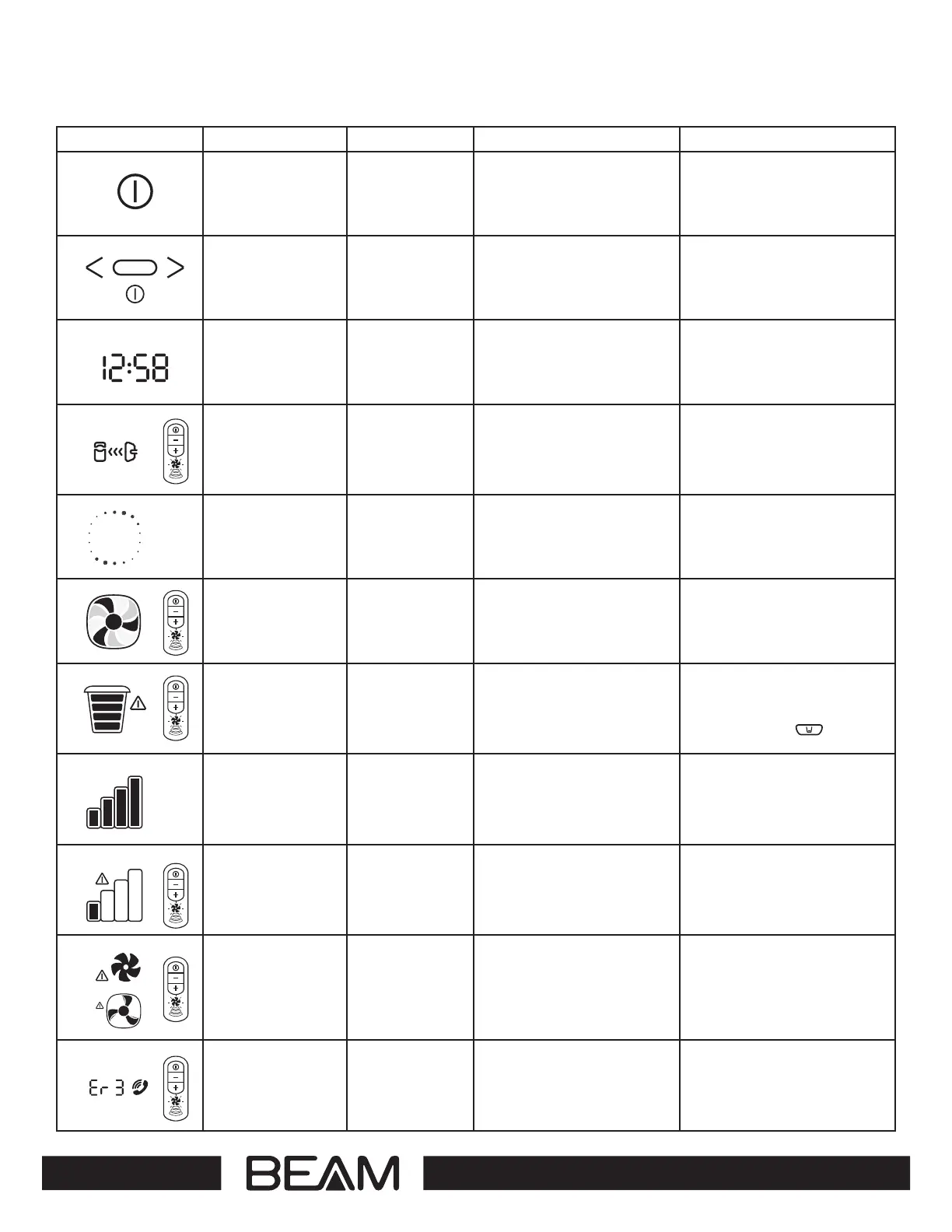
SYMBOL DESCRIPTION AVAILABILITY MEANING ACTION REQUIRED
ON/OFF Button Standard Turns power unit on or o. None
Navigation Buttons On select models These buttons are located below
the display screen. Use to modify
time or reset empty bucket
indicator.
Scroll through using Left ( < ) or
Right ( > ) buttons to appropriate
icon. When the appropriate selec-
tion is highlighted, hold the Enter
(O ) button down for 5 seconds.
Clock On select models A digital clock is located on the
top left corner of the display
screen of the power unit.
You can choose from either a 12
or 24-hour clock. To set time, use
the (<) and (>) buttons to arrive at
the correct time. Press Enter ( O)
when your selections are complete.
Communication Link On select models The communication link icon
appears at the top of the power
when the hose connection into
the inlet valve is complete and
the hose handle is communicating
with the power unit.
None
Screen Saver On select models When the power unit wakes from
sleep mode, the screen saver icon
will appear for 2-3 seconds before
disappearing and other icons will
appear.
None
Variable Speed
Indicator
On select models When the power unit is on,
the fan blades on the screen will
spin relative to the speed/suction
indicated on the hose handle.
None
Empty Bucket Indicator On select models The empty bucket indicator is
timed to remind you to empty
your dirt bucket. The power unit
will communicate with the hose
handle signalling fan blades to
flash red.
Empty dirt bucket and reset the
system by pushing one of the two
reset buttons and holding for
5 seconds
O OR
Performance Bars On select models 3 - 4 bars indicate the system is
performing at the optimum level.
Performance levels will change
depending on the variable speed
settings and during the use of
specialty attachments.
Check for blockage
if performance bars fluctuate under
normal vacuuming conditions.
Flashing Performance
Bars Alert
On select models When 2 bars or less are illuminat
-
ed, the airflow of your power unit
is exceptionally restricted. The
power unit will communicate to
the hose handle and flashing red
fan blades will display.
Check to ensure the dirt bucket
is not overloaded. Check
for blockages in the system.
Check for motor wear (contact an
authorized service technician)
Motor Fault Indicators Standard Indicates a system fault or
malfunction. This symbol may
occur due to one of the following:
1) The maximum system run time
exceeded; 2) Electronics problems;
3) Power surges; 4) Motor failure;
5) Mechanical failure.
Turn on and o the power unit. This
may reset the system. If this fails,
unplug the power unit and call an
authorized technician.
Error Codes On select models Error codes defined:
ER 1: Under current
ER 2: Over current short
ER 3: 30-minute time-out
ER 4: Over current long
ER 5: Line error or o current
Turn o and unplug the power unit
and call an authorized technician.
For further detail on error codes,
contact your authorized service
dealer.
or


 To Next Page