ORIGINAL INSTRUCTIONS
DOC-701-INTBM_EN | 13
NOTE: The BEAM Alliance hose and hose handle will only function with a BEAM Alliance central vacuum
system. If you received an Alliance hose and do not have a BEAM Alliance power unit, please contact your
local authorized BEAM dealer/distributor to obtain the proper hose for your central vacuum system.
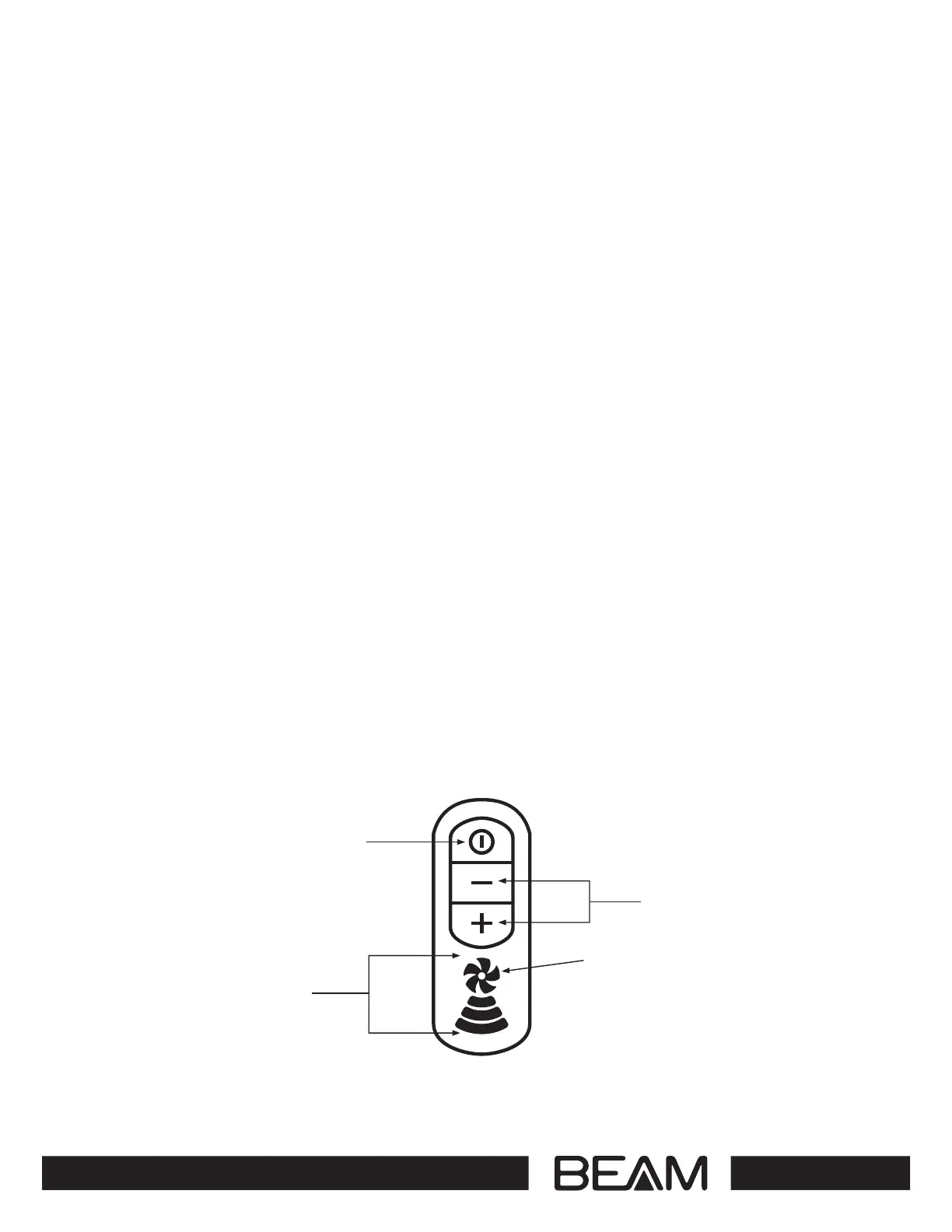
Power Button
The Power button on the top of Alliance hose handle will turn the unit ON/OFF when the hose is plugged
into an inlet valve inside the home or Quick Clean Valve located on the front of the power unit. The unit
can be activated by the Power button on the power unit screen.
Variable Speed Control
To decrease the suction, press the (-) button. To increase suction press the (+) button.
System Indicator
When the Alliance hose is connected to an inlet valve in your home or Quick Clean Valve on the front
of the power unit, the hose handle fan blade icon pulsates with a BLUE glowing light that indicates
communication between the hose handle and power unit. When the unit is turned ON from the hose
handle, the fan blade icon turns to a solid BLUE colour.
When it is time to empty the bucket, or the system indicates a performance problem, the fan blade will
turn RED. If you see a RED fl ashing fan blades, turn the system OFF immediately. Check the power unit
to identify the cause. To learn more about what can cause the hose handle fan blades to flash RED, please
read page 12
Variable Speed Indicator
The Alliance hose handle will indicate system performance and strength of suction with the Variable Speed
Indicator. When the system turns ON, all four lights of the Variable Speed Indicator will light, indicating
high speed/suction. The lowest speed/suction is indicated with a single lighted fan blade. To adjust the
speed/suction, press either the (-) or (+) buttons.
INSTRUCTIONS FOR BEAM ALLIANCE
HOSE HANDLE
Power Button
Variable Speed
Indicator
Variable Speed
Controls
System Light:
Blue pulsating light
= system ready/stand-by
Red fashing light
= check power unit
Low
High


 To Next Page