EasyManua.ls Logo

Beamz BBP60 - Page 22

Beamz BBP60
25 pages
Print Icon
To Next Page IconTo Next Page
To Previous Page IconTo Previous Page
Loading...
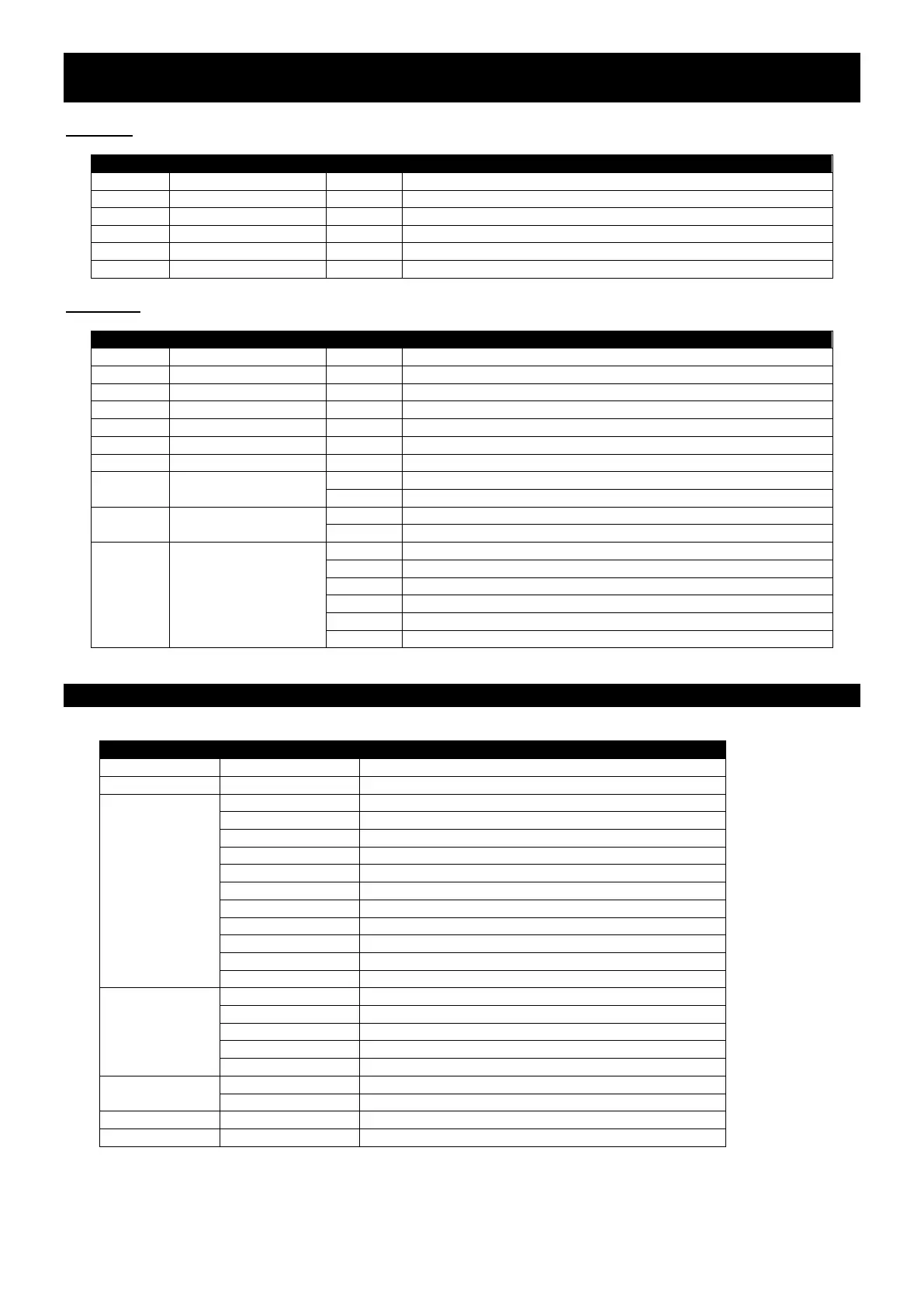
DMX CHANNELS / DMX KANALEN / DMX-KANÄLE / CANALES DMX /
CANAUX DMX
Channel 6
Channel
Function
Value
Description
1
Red
000-255
Red 0-100%
2
Green
000-255
Green 0-100%
3
Blue
000-255
Blue 0-100%
4
White
000-255
White 0-100%
5
Amber
000-255
Amber 0-100%
6
UV
000-255
UV 0-100%
Channel 10
Channel
Function
Value
Description
1
Master dimming
000-255
Dimming 0-100%
2
Red
000-255
Red 0-100%
3
Green
000-255
Green 0-100%
4
Blue
000-255
Blue 0-100%
5
White
000-255
White 0-100%
6
Amber
000-255
Amber 0-100%
7
UV
000-255
UV 0-100%
8
Strobe
000-002
No function
003-255
Strobe from slow to fast
9
Fading
000-002
No function
003-255
Fade from slow to fast
10
Macro effects
000-003
No function
004-050
Jump from slow to fast
051-100
Single colour fade from slow to fast
101-150
Bright to dark
151-200
Sound mode 1
201-255
Sound mode 2
MENU / MENÜ / MENÚ
Mode
Program
Description
D001
d001-d512
10 channel mode
A001
A001-A512
6 channel mode
Auto
At.01
Red colour
At.02
Green colour
At.03
Blue colour
At.04
White colour
At.05
Amber colour
At.06
UV colour
At.07
All colour
At.08
Jump mode
At.09
Flash mode
At.10
Fade mode
At.11
Bright to dark with fade
Edit
Pr.01
Press Enter to dim colour
Pr.02
Press Enter to dim colour and jump speed
Pr.03
Press Enter to dim colour and fade speed
Pr.04
Press Enter to dim colour and flash speed
Pr.05
Press Enter to dim colour and fade2 speed
Soud
Sd01
Sound mode 1
Sd02
Sound mode 2
Slave
Slave
Slave mode
Rest
Reset
Reset the fixture

Related product manuals