First thingsfirst
Fully charge HeadsUp before using. Plug the USB charging cable into
the USB charge port on HeadsUp located at bottom of unit and attach the
other endto the AC adapter then pluginto AC outlet.
Youmay also plug the cableinto a chargingUSBport such as a PC or
portablepower pack.Redcharging indicator light will blinkwhile HeadsUp
ischarging. HeadsUp should fully charge in2 hours.
Normal charge will last 3 hours whilerecording with Wi-Fioff and2 hours
withWi-Fi on.
Getting to know HeadsUp
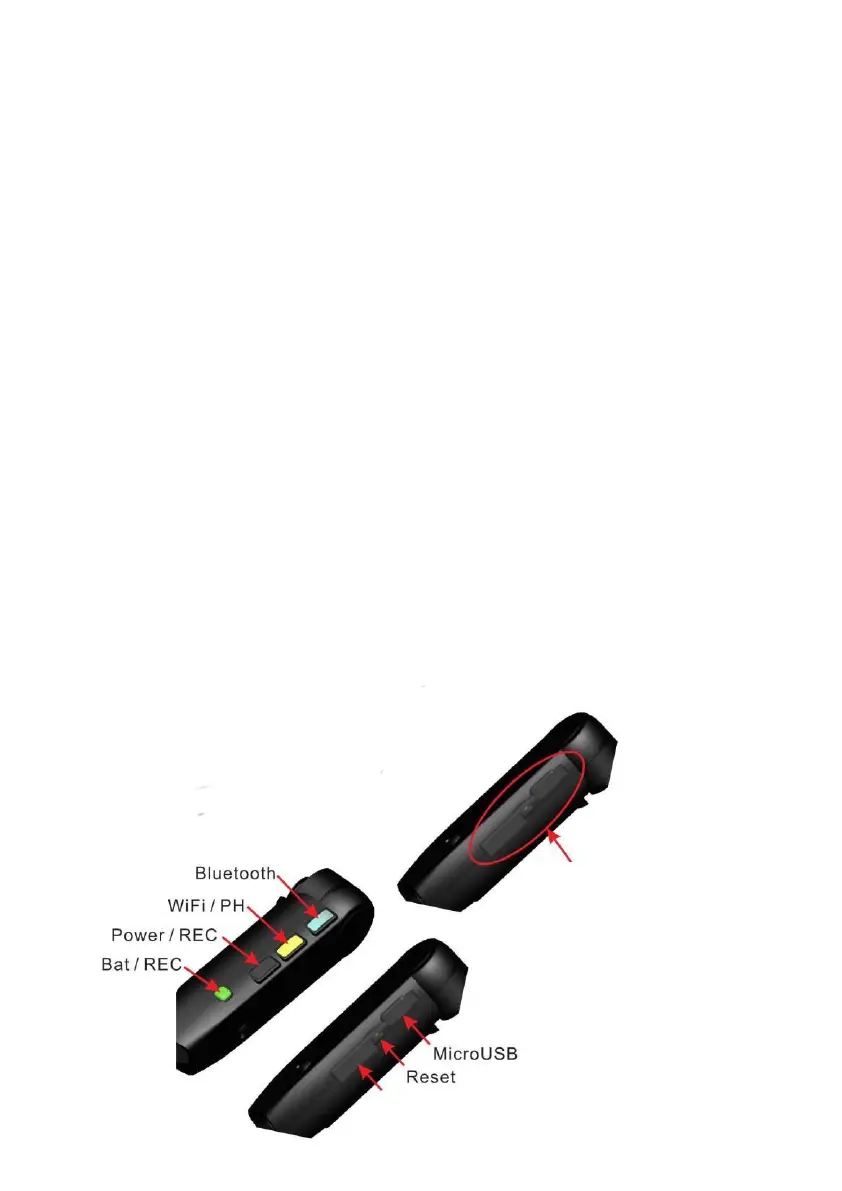
Power On - Press Power over 2 sec, Green LEDwill show when
power ison.
Power Off - Push Power over 2 sec again toPower off.HeadsUp will auto
Power off if nofunctions occur over one minute.
RecordVideo - You can control recordingfrom App ordirect from
HeadsUp.Audio confirmations will guideyour selections.Withthe
power on, press Record to Record Video.GreenLEDblinkswhile
recording,Push Record again to Stop Recording.
CaptureImage - Press PH to capture image.
Data Card
Protective
membrane
for ports


 To Next Page