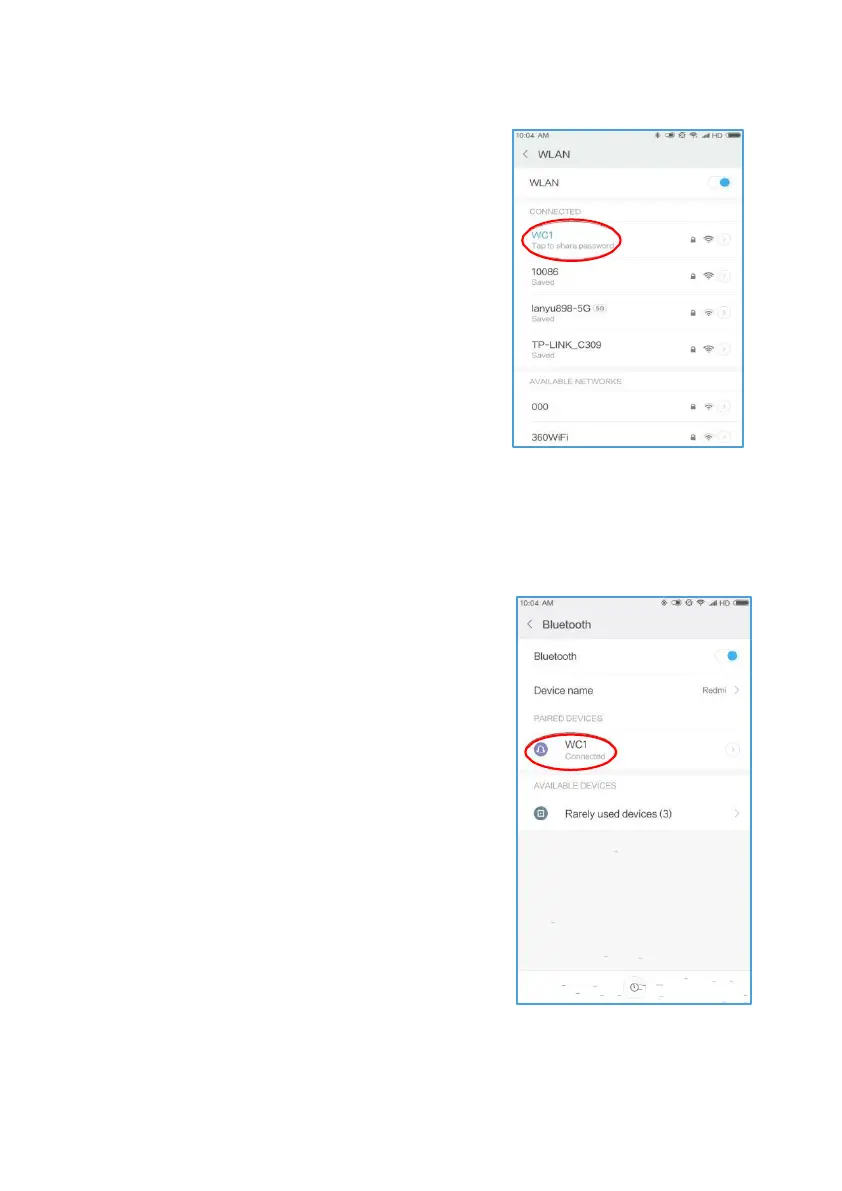
Bluetooth Connect
HeadsUp has Bluetooth. You can use it to
take phone calls and to assist with making
videos and images when choosing not to
use the phone.
■ TurnphoneandHeadsUp Bluetooth
On. Blue LED light will start blinking on
HeadsUp.
■ On PhoneBluetooth screen, select
WC1 when itappears.
■ Press Bluetoothbutton to answer
incomingcalls on HeadsUp.
■ If you wish topauseBluetoothaudio,
such as when playing music from
phone, Press Bluetooth button.
■ Use Phonevolume control toadjust
the sound.
■ Press the Bluetooth button on
HeadsUpto turn BluetoothOff.
Note:
Skip Bluetoothconnectionif do not wish toreceive phonecalls or listen
to music on HeadsUp to avoid unnecessary use of battery.
Wi-Fi Connect
Turn Wi-Fi on - With Power On, press and
hold Wi-Fi button for 2 seconds to turn on,
then turn phone Wi-Fi on. The yellow LED on
HeadsUp will blink for one minute or will turn
off when HeadsUp is connected to a phone.
Connect to Wi-Fi then enter password,
abc12345. Note: Wi-Fi password cannot be
changed.
Note: To avoid confusion with other HeadsUp
users, you can change your SSID / device
name. With Wi-Fi connected; from app, go to
Settings/Wi-Fi name, then select and change.
Name must be a minimum of 3 characters,
letters & numbers only.



 To Next Page