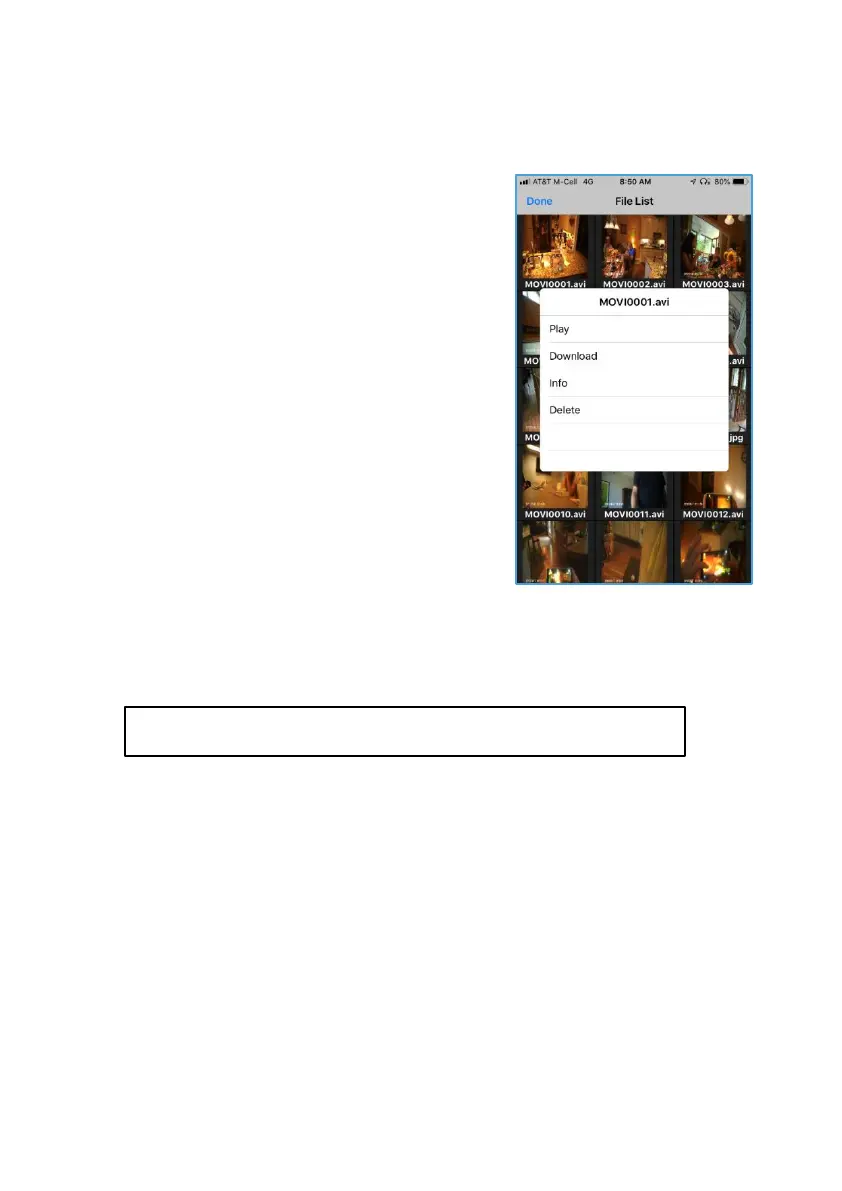
Video and image files appear in the File
Manager. From the Control Screen,open
FileManager toaccess.
Fileformats
■ Videofilesare .avi format.
■ Image filesare.jpg format.
Manage from phone
Tap desired file for menu options.
Play – Select to play on phone. Note:
You will need to download first to hear
the audio.
Download – Select download for full
AV playandfor simple posting to Social
Media.
Managing Data
Manage from PC
Option1:
1. Connect HeadsUp to PC using the USB data / charge cable.
2. Drag anddrop from the HeadsUpfile to desired fileonPC.
Option2:
1. Remove the data card from HeadsUp.
2. Use USBorfull data card adapters with data card toinput into PC
Note: When uploading to external locations such as Social Media, first
disconnect HeadsUp’s private Wi-Fi network from your phone and connect
phone to normal Wi-Fi network.
Caution: If you upload or send files via cellular signal you may
incur data charges depending on your cellular data program.
Info – Select to view title, date taken, time of video and file size.
Delete – Select to delete, then confirm deletion.


 To Next Page