9
7.2 Before Cleaning
1
2
43
5s
EN
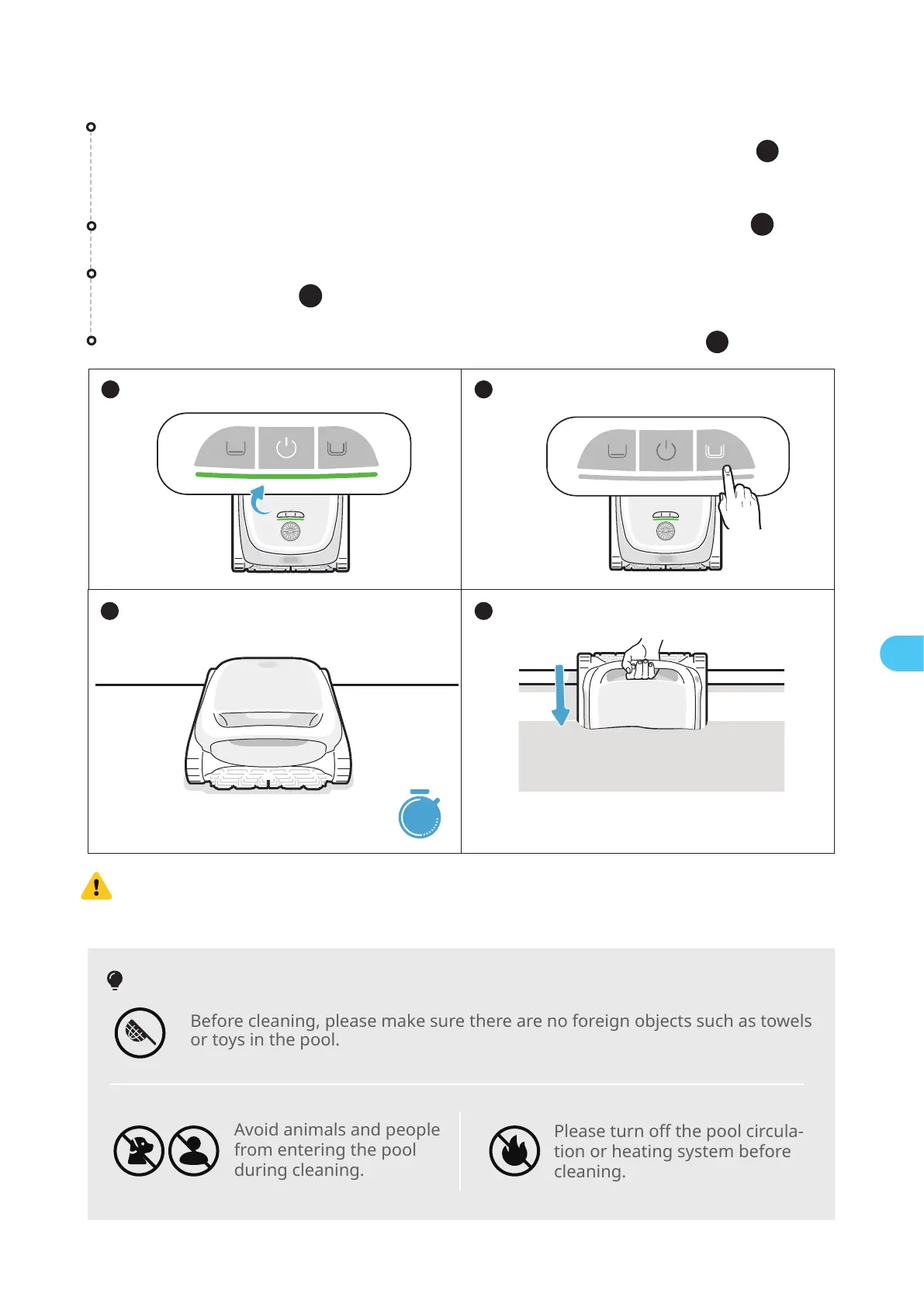
After placing the robot in the water, it will start cleaning automatically ( ).
Set the cleaning mode, and the selected mode button will show solid white ( ).
Before entering the water, place the robot on a level surface and wait for about
5s for it to calibrate ( ).
Before cleaning, make sure the robot is turned on and has enough power. The panel
indicator on the robot should be solid green when the robot is fully charged ( ).
(If you have connected the robot to the APP, you can also check the power level
within the APP).
4
3
1
2
2
Before cleaning, please make sure there are no foreign objects such as towels
or toys in the pool.
Avoid animals and people
from entering the pool
during cleaning.
Please turn off the pool circula-
tion or heating system before
cleaning.
Tips
Before entering the water, it is crucial to place the robot on a level ground and to
wait for about 5s for it to calibrate. By following these steps, you ensure maxi-
mize the effectiveness of the robot's cleaning path.


 To Next Page