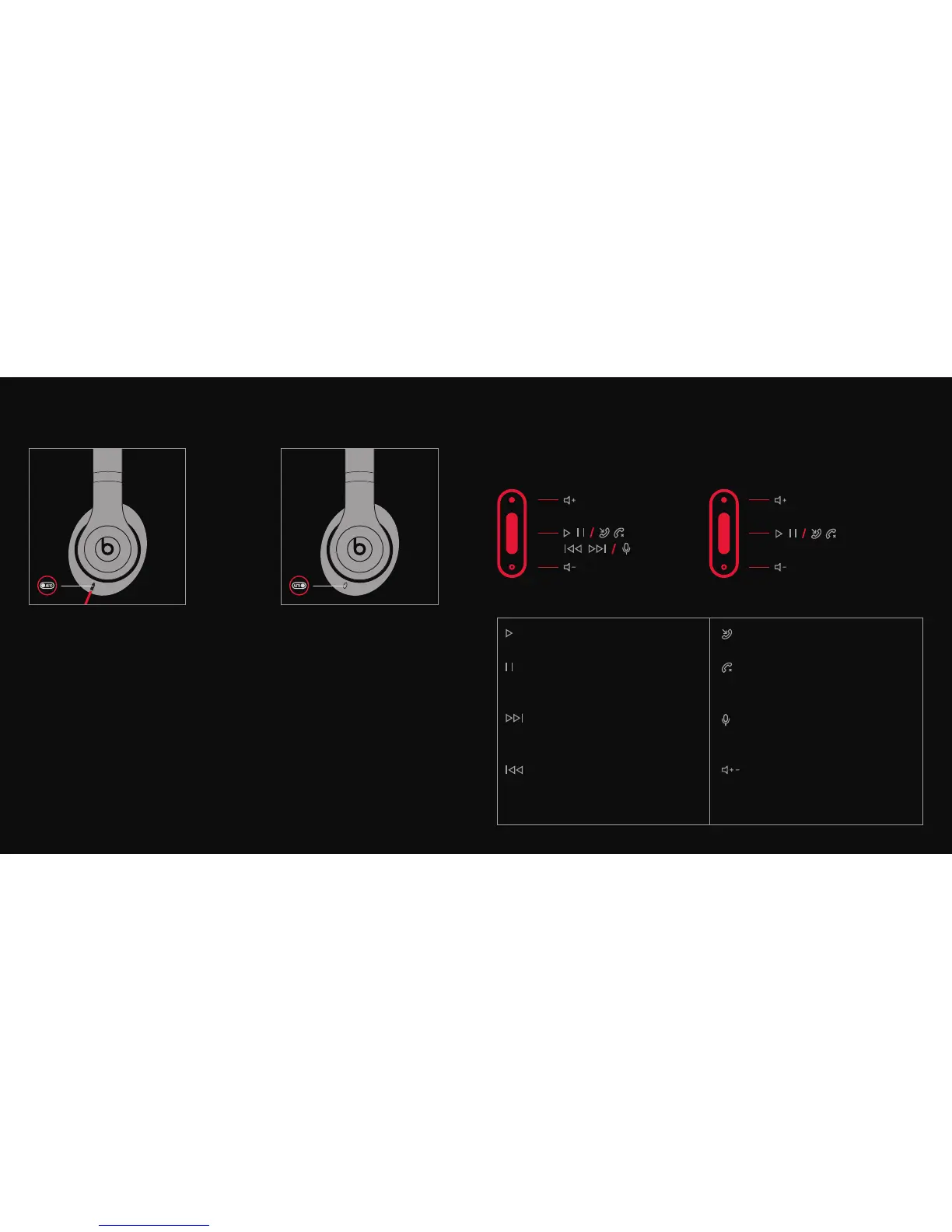
EN Plug in audio cable to turn on for
Wired mode.
NL Sluit de audiokabel aan om de
Kabelmodus te activeren.
FR Branchez le câble audio pour mettre
en marche en mode avec l.
DE Schließen Sie ein Audiokabel an,
um das Gerät im Kabelmodus
einzuschalten.
IT Conecte el cable de audio
para activar el modo de
Conexión con cable.
PT Ligue o cabo de áudio para ativar o
modo de ligação com cabo.
ES Collegare il cavo audio per attivare
la modalità cablata.
EN Remove audio cable to turn off.
NL Verwijder de audiokabel om uit
te zetten.
FR Débranchez le câble audio pour
éteindre le casque.
DE Entfernen Sie das Audiokabel, um
das Gerät auszuschalten.
IT Scollegare il cavo audio per spegnere.
PT Retire o cabo de áudio para desligar.
ES Saque el cable de audio para apagar.
WIRED MODE REMOTETALK CONTROL
iPod, iPhone and iPad Android
TM
& Other Select Mobile Devices
x 2
x 3
Play, Afspelen, Lecture, Abspielen,
Riproduci, Reproduzir, Reproducir
Pause, Pauze, Pause, Pause, Pausa,
Pausa, Pausa
Skip Forward, Vooruit Spoelen, Saut
Avant, Titel überspringen, Salta
in Avanti, Para a Frente, Saltar
Adelante
Scan Backward, Achteruit Spoelen,
Balayage Arrière, Rückwärts
scannen, Scansione Indietro, Para
Trás, Volver Atrás
Answer, Beantwoorden, Répondre,
Antwort, Rispondi, Atender, Contestar
End Call, Oproep Beëindigen,
Raccrocher, Anruf beenden, Termina
Chiamata, Terminar Chamada,
Terminar Llamada
Voice Command, Spraakopdracht,
Commande Vocale, Sprachbefehl,
Comando Vocale, Comando de Voz,
Orden de Voz
Volume Control, Volumeregeling,
Contrôle du Volume,
Lautstärkeregelung, Regolazione
Volume, Controlo de Volume, Control
de Volumen
*Functionality may vary by device
Music Controls Phone Controls













 To Next Page