5. Interface User Guide
11
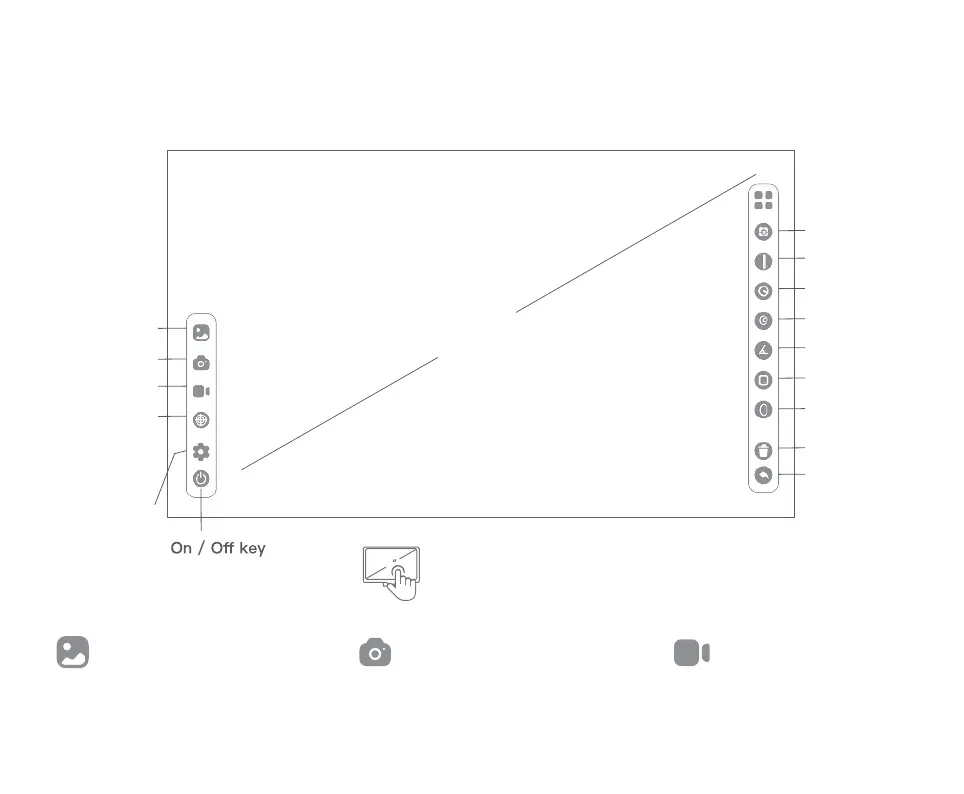
Dot
Gallery
Take A Picture
Record Video
Dimensional
calibration
Connect to the
computer
9
〃
Straight Line
Circular
Casual Painting
Angle
Rectangle With
Rounded
Ellipse
Delete
Undo / Return
Software interface function introduction:
Measure the internal
dimensions of the
calibration system
through settings
switching
Click the screen to call out / Hide the
function option interface
9
Observe, browse and edit the
photographed Pictures and videos.
Take pictures of the currently
observed objects.
Take a video of the
currently observed object
Gallery Take A Picture Record Video


 To Next Page