ABOUT WIFI
WI-FI Connecon
1. Install Zigma
A. Users can download Zigma app through googleplay or app store;
B. Users can also open the browser, scan the QR code on the right, and download the Zigma app
Zigma APP
Service
Your thermostat carries an 24 months warranty from date of purchase. Service out with the warranty period may incur a
charge. More detail please contact with us directly.
2. Configure the device
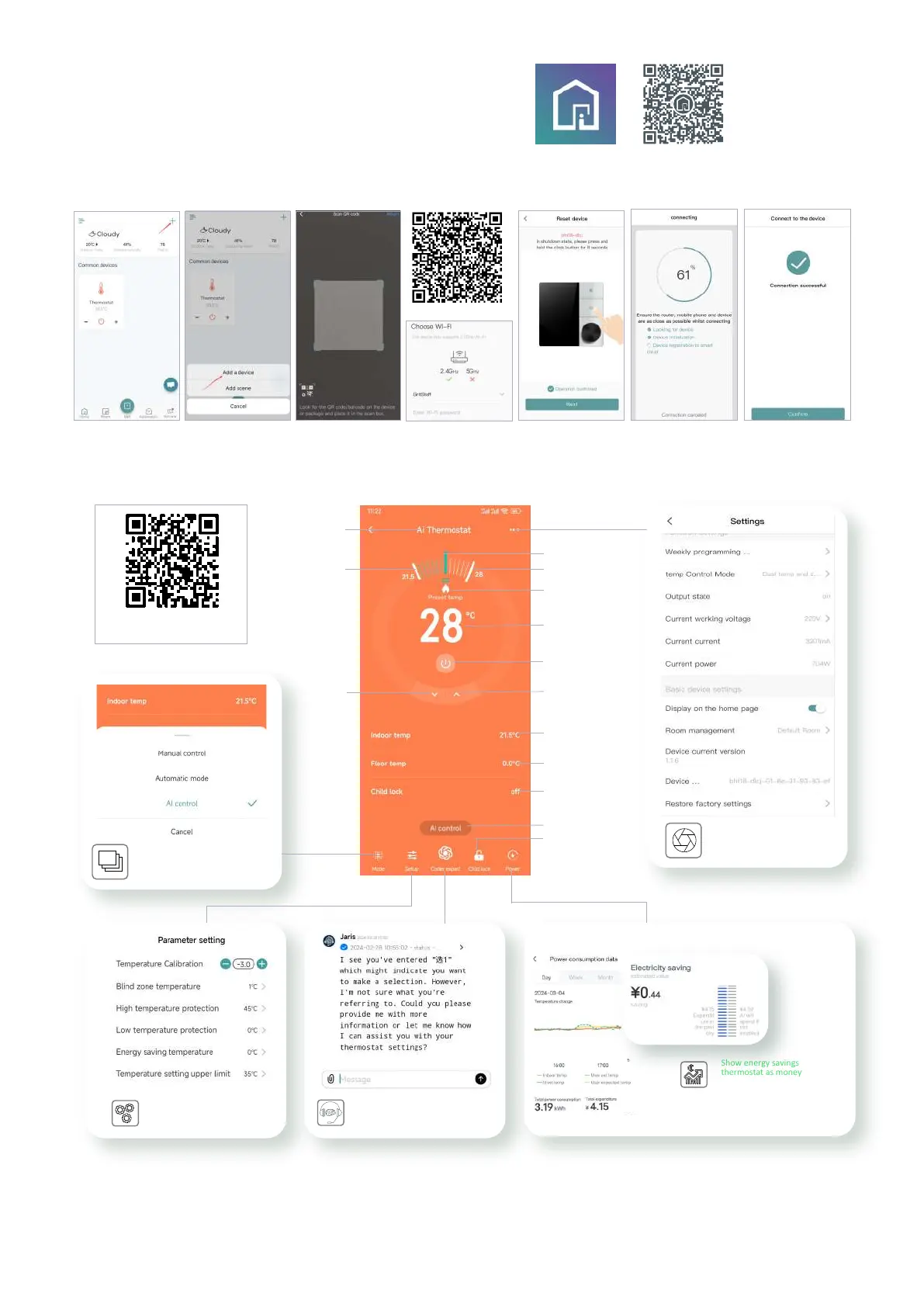
a. Open zigma app and click "+" in the upper right corner(Fig1.1); b. Click Add a device(Fig1.2); c. Scan the QR code of the thermostat on the right (Fig1.4) and turn on
the Bluetooth on your phone (Fig1.3); d. Select WiFi and input password (Requires 2.4GHz WiFi),Fig1.5; e. Put the device into pairing mode as shown (Fig1.6-Fig1.8).
Fig1.1
Fig1.2
Fig1.3
Fig1.4
Fig1.5
Fig1.6
Fig1.7
Fig1.8
Show energy savings from
thermostat as money saved,
for clear ROI
Using ChatGPT to converse with the
AI and send direct commands for
temperature control
Advanced parameter sengs
quickly
3. APP applicaon interface
Edit name
Target Temp.
Indoor temp
Room
temperature
Set the temperature
AI recommended
temperature
Down
Up
Floor temp
Child lock status
Heating
Child lock
Power consumption data
Mode
Parameter setting
ChatGPT AI
conversation
Mode status
Power
Main interface
Three control mode opons
More seng
(Name changes, groups, sharing...)
Name
Steps and operaon for
APP networking


 To Previous Page
 Loading...