To carry out settings, press the OK button repeatedly until you come to the
desired menu item.
HOLIDAY
The holiday function simulates an occupied house while you are on holiday.
If the function is active (ON), the roller shutter/venetian blind operates in a
staggered fashion at the programmed times (max. + 30 min.).
END POSITION
When the roller shutter/venetian blind is in the upper or lower position, this is
described as an end position.
INTERMEDIATE POSITION
The intermediate position is any roller shutter/venetian blind position of your
choosing, situated between the upper and lower end position. Once pro-
grammed, this position can be travelled to from the upper position.
To do so, press the DOWN button briefly twice in succession.
VENTILATION/TILT
The ventilation/tilt position is any roller shutter/venetian blind position of your
choosing, situated between the upper and lower end position. This function al-
lows you to open the roller shutter from the lower end position until the ventila-
tion slots are opened. With the venetian blind, the laths tilt.
To do so, press the UP button briefly twice in succession.
Language selection (ENGLISH)
Here you can select your own language.
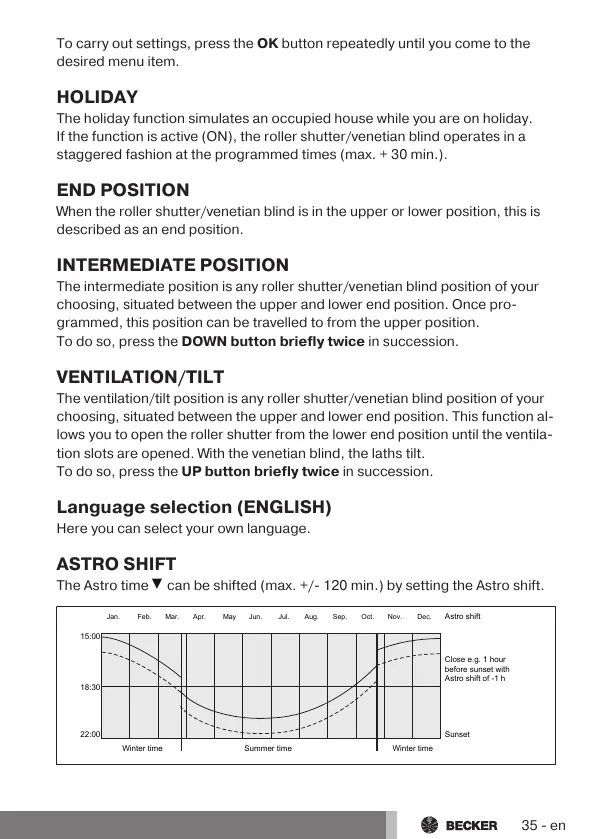
ASTRO SHIFT
The Astro time
can be shifted (max. +/- 120 min.) by setting the Astro shift.
15:00
18:30
22:00
Winter time Summer time Winter time
Sunset
Astro shift
Jan. Feb. Mar. Apr. May Jun. Jul. Aug. Sep. Oct. Nov. Dec.
Close e.g. 1 hour
before sunset with
Astro shift of -1 h
35-en



 To Next Page