fr
en
de
nl
67
REGLAGE
POS.INTERM.,AERATION/INVERSION,POSITIONFINALE
(programmation temps/position)
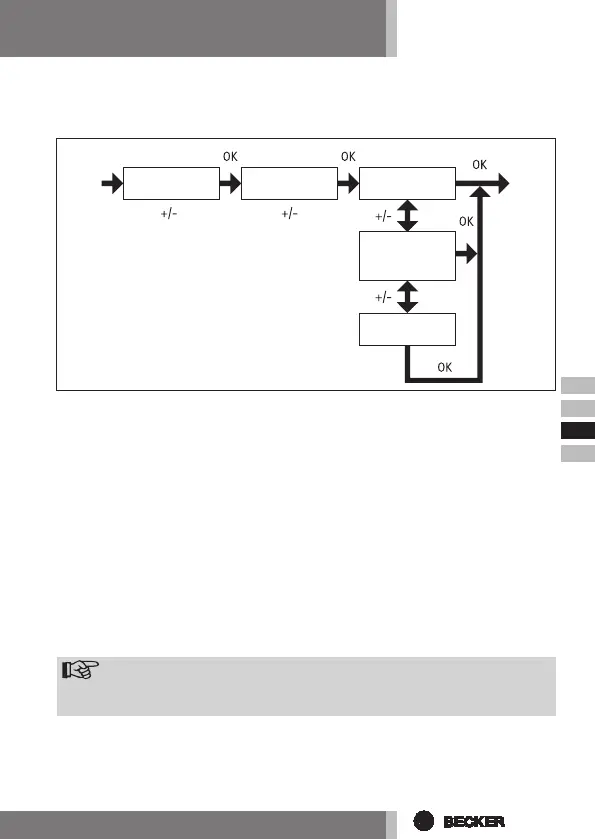
1. Vous avez conrmé la fonction VACANCES. POS. INTERM. apparaît.
2. Vous pouvez régler les horaires de marche pour la POS. INTERM. avec les touches
+/-. Le temps de marche est donné en secondes. Vous pouvez également
atteindre la POS. INTERM avec la touche DESCENTE/MONTEE à partir de la
position nale supérieure.
3. Conrmez avec OK. AERATION/INVERSION apparaît.
4. Vous pouvez régler les horaires de marche pour AERATION/INVERSION avec
les touches +/-. Le temps de marche est donné en secondes. Vous pou-
vez également atteindre AERATION/INVERSION avec la touche DESCENTE/
MONTEE à partir de la n de course inférieure.
5. Vous avez conrmé le point de menu AERATION/INVERSION. PROG POSI-
TION FINALE apparaît.
6. Vous pouvez choisir entre PROG POSITION FINALE PROG POS. INTERM et
PROG AERATION/INVERSION avec les touches +/-.
Remarque
Aveccettesélection,vousdéterminezquellepositiondoitatteindrele
tablieràl’horaireréglé.
7. Conrmez votre sélection avec OK.
8. La fonction PROG POSITION FINALE est maintenant réglée.
9. PourcontinuerlaprogrammationdanslemenuREGLAGE,veuillezlire
lasuite.
POS.
INTERM
AERATION
(INVERSION)
PROG
POS. FINALE
PROG
POS.
INTERM
PROG
AERATION



 To Next Page