BT4000 Remote Control Intructions
BT4000
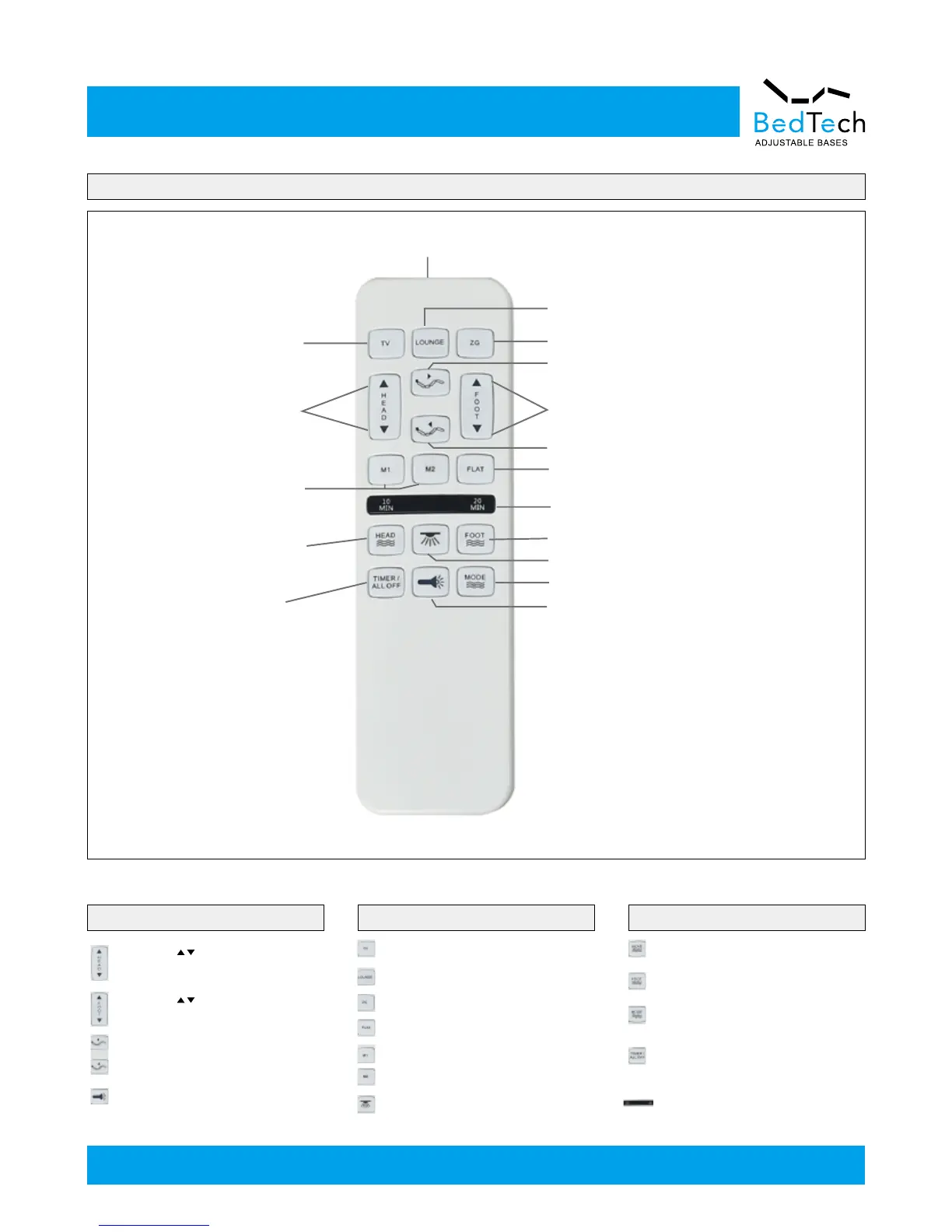
TV Preset Positon
Flash Light
Lifts and Lowers
Head
Memory Positions
Head Massage On
(3 intensities)
Head and Foot
Massage Timer/Stop
Button
Lounge Preset Positon
Zero-G Preset Positon
Lifts Headrest
Lifts and Lowers Foot
Lowers Headrest
Flat Button
10,20,30 Minute Massage
Timer Light
Foot Massage on (3 intensities)
Under Bed LED ON/OFF
Massage Modes Select (5 modes)
Flash Light ON/OFF
The HEAD arrows lift and lower
the head section of the base.
One touch TV preset position.
One touch LOUNGE preset position.
One touch ZG preset position.
One touch FLAT preset position.
One touch under bed LED light on/off.
One touch programmable preset
position.
The button will turn on the head
massage. Cycle through 3 intensities.
The button will turn on the foot
massage. Cycle through 3 intensities.
The button will change the massage
modes. Cycle through 5 intensities.
The button will select a 10, 20 ro 30
mintue setting. Pressing a fourth time
will turn off massage.
The ligh on the top of the remote
indicates a 10,20 or 30(backlit of
10&20 MIN on) minute timer setting.
The FOOT arrows lift and lower
the foot section of the base.
The headreat lift and lower
the headreat section of the base.
Press and hold the button, ash light
will be on.
ADJUST ONE TOUCH BUTTONS MASSAGE FEATURE
—10—



 To Next Page