EasyManua.ls Logo

Beetronics 27HD7M - Monitor Button Layout - Metal; Monitor Button Layout - Plastic

Beetronics 27HD7M
78 pages
Print Icon
To Next Page IconTo Next Page
To Previous Page IconTo Previous Page
Loading...
12 EN
Operating the monitor
Functions of the buttons
On/Off
Left
Decrease value
Right
Increase value
Open menu
In-menu back
Select source
Cycle options
In-menu selector
Power on: green light
Standby: red light
ON/OFF
-
+
MENU
AUTO
LED
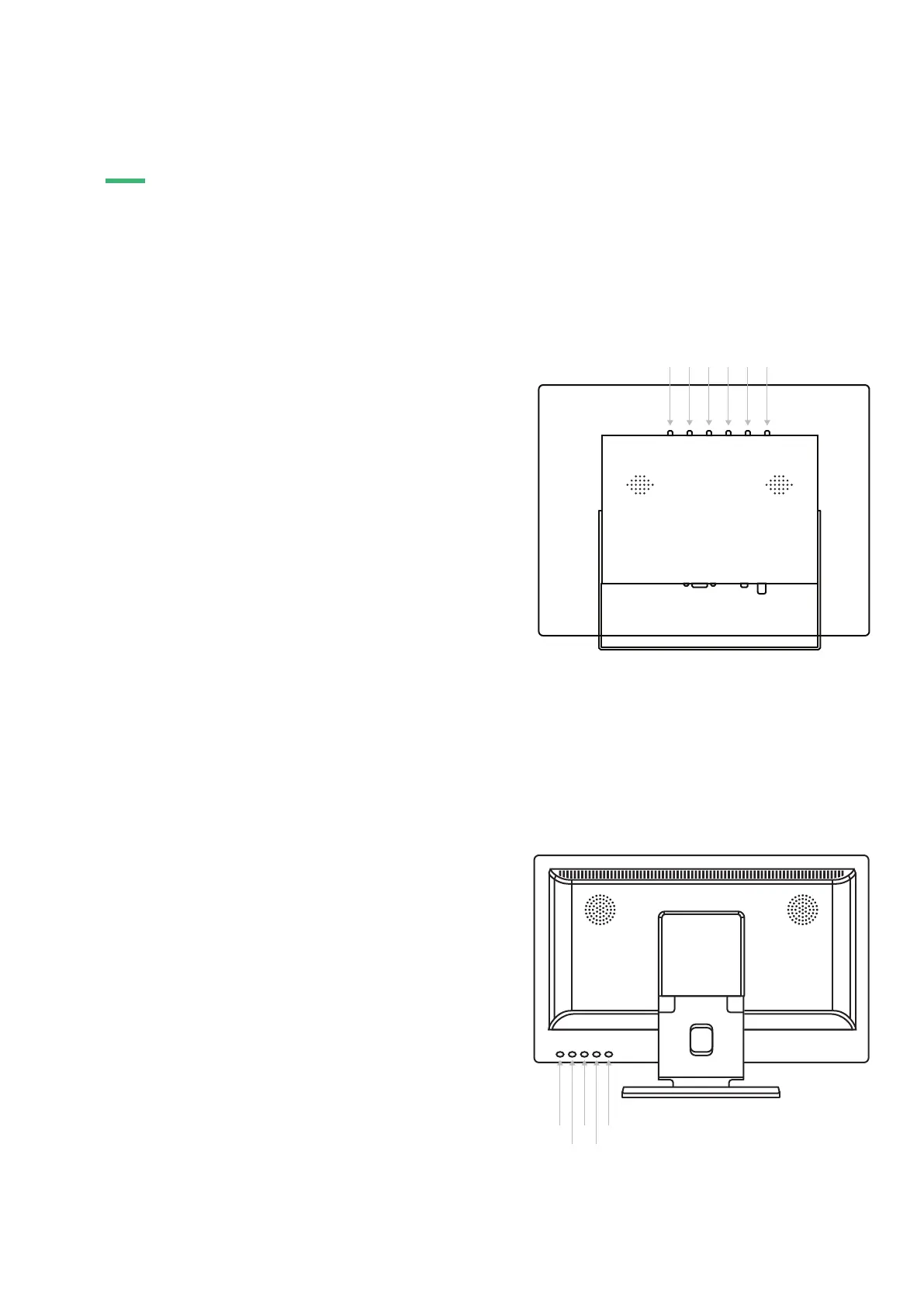
BUTTON LAYOUT METAL MONITOR
01.
02.
03.
04.
05.
06.
• On/Off
• Open menu
• In-menu back
• Right
• Increase value
• In-menu select
• Left
• Decrease value
• Select source
• Cycle options (up/down)
• Menu select
POWER
MENU
+
-
AUTO
BUTTON LAYOUT PLASTIC MONITOR
01.
02.
03.
04.
05.
01 02 03 04 05 06
01
02
03
04
05
OPERATING THE MONITOR

Related product manuals