The beFree BFS-12T is a tower speaker system designed to provide a comprehensive audio experience with various input options and control features. It is suitable for home use and events, offering powerful sound output and microphone capabilities.
Function Description:
The BFS-12T is a versatile speaker system that supports multiple audio input sources, including USB, SD card, AUX, FM radio, and Bluetooth. It features a built-in equalizer for sound customization, two microphone inputs for karaoke or public address, and a remote control for convenient operation. The speaker is designed to deliver clear and powerful audio with adjustable bass and treble effects. It also includes an LED light power button for visual enhancement.
Important Technical Specifications:
- Model: BFS-12T
- Inputs: AUX, USB, TF (SD Card), FM, Bluetooth, 2 Microphone inputs
- USB/SD Card Capacity: Maximum 64GB (supports MP3 files only)
- Equalizer Adjustments: 100 Hz, 430 Hz, 1 kHz, 4.3 kHz, 10 kHz
- Microphone Power: 2 AA Batteries (not included)
- External Power: 12V DC (for charging)
- AC Power: 110V-220V, 50Hz/60Hz
- RF Exposure: Evaluated to meet general RF exposure requirements, usable in portable exposure conditions without restriction.
- FCC Compliance: Class B digital device, Part 15 of FCC Rules.
Usage Features:
- Input Selection: Easily switch between AUX, USB, TF, FM, and Bluetooth modes using the input selection button on the control panel or remote.
- USB/SD Card Playback: Insert a USB flash drive or SD card (up to 64GB, MP3 files only) to play music. Use the "MODE" button to select the correct input.
- Microphone Use: Connect up to two microphones for karaoke or public speaking. Adjust microphone volume (Mic. Vol) and echo effect (Microphone echo feature) using dedicated knobs. The microphone has a power switch and an indicator light for low battery.
- Sound Customization:
- Equalizer: Adjust the sound frequencies at 100 Hz, 430 Hz, 1 kHz, 4.3 kHz, and 10 kHz to fine-tune the audio output.
- Bass and Treble Knobs: Control the bass and treble effects independently.
- Music Volume: Adjust the main speaker volume using the Music Vol knob.
- Playback Controls:
- Play/Pause: Pause and resume playback from USB/SD card. In FM mode, this button initiates a search.
- Previous/Next Track: Navigate between tracks or radio stations.
- Repeat Button: Repeat the current track or all tracks.
- Remote Control: A full-function remote control allows for power on/off, mode selection, volume adjustment, mute, track navigation, equalizer mode selection, and repeat functions from a distance. Point the remote towards the infrared access point on the speaker.
- LED Lights: A dedicated button controls the LED lights for visual ambiance.
- Charging: The speaker can be charged via an external 12V DC power input. A charging indicator light shows the charging status: flashing green for charging, solid green for full charge, and bright red for low charge. The power switch should be turned off for faster charging.
- Bluetooth Connection: Turn on Bluetooth, and the display will show "BLUE." Search for "bfs-12t" on your device to connect. A sound prompt will confirm a successful connection.
- Audio Auxiliary Line: Connect external audio devices using the provided 3.5mm audio auxiliary line to the AUX input on the rear panel.
Maintenance Features:
- General Care: Keep the unit clean and dry. Avoid exposing it to rain, fire, electric shock, or any liquids. Do not store or operate the product near heat sources such as radiators, heat registers, stoves, or other apparatuses (including amplifiers) that produce heat.
- Power Management: Unplug the unit during lightning storms or when unused for long periods.
- Troubleshooting:
- Read the instructions thoroughly for proper use.
- Keep the manual for future reference.
- Follow all warnings.
- Ensure proper ventilation and avoid blocking any openings.
- Do not attempt to repair the unit yourself. Refer all servicing to qualified service personnel.
- Inspect all hardware, suspension, cabinets, transducers, brackets, and associated equipment for damage. Any missing, corroded, or non-load rated components could significantly reduce the strength of the installation, placement, or array. Such conditions severely reduce the safety of the installation and should be immediately corrected. Use only hardware which is rated for rated for the loading conditions of the installation and any possible short-term, unexpected overloading. Never exceed the rating of the hardware or equipment.
- If the apparatus has been damaged in any way, such as power supply cord or plug is damaged, liquid has been spilled or objects have fallen into the apparatus, the apparatus has been exposed to rain or moisture, does not operate normally, or has been dropped, servicing is required.
- FCC Compliance: Any changes or modifications not expressly approved by the manufacturer could void the user's authority to operate the equipment. If the equipment causes harmful interference to radio or television reception, try to reorient or relocate the receiving antenna, increase the separation between the equipment and receiver, connect the equipment into an outlet on a circuit different from that to which the receiver is connected, or consult the dealer or an experienced radio/TV technician for help.
For warranty information and feedback, visit www.befreesound.com.

 Need help?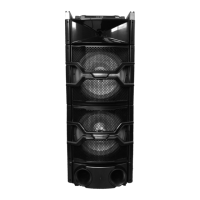

 To Next Page
 General