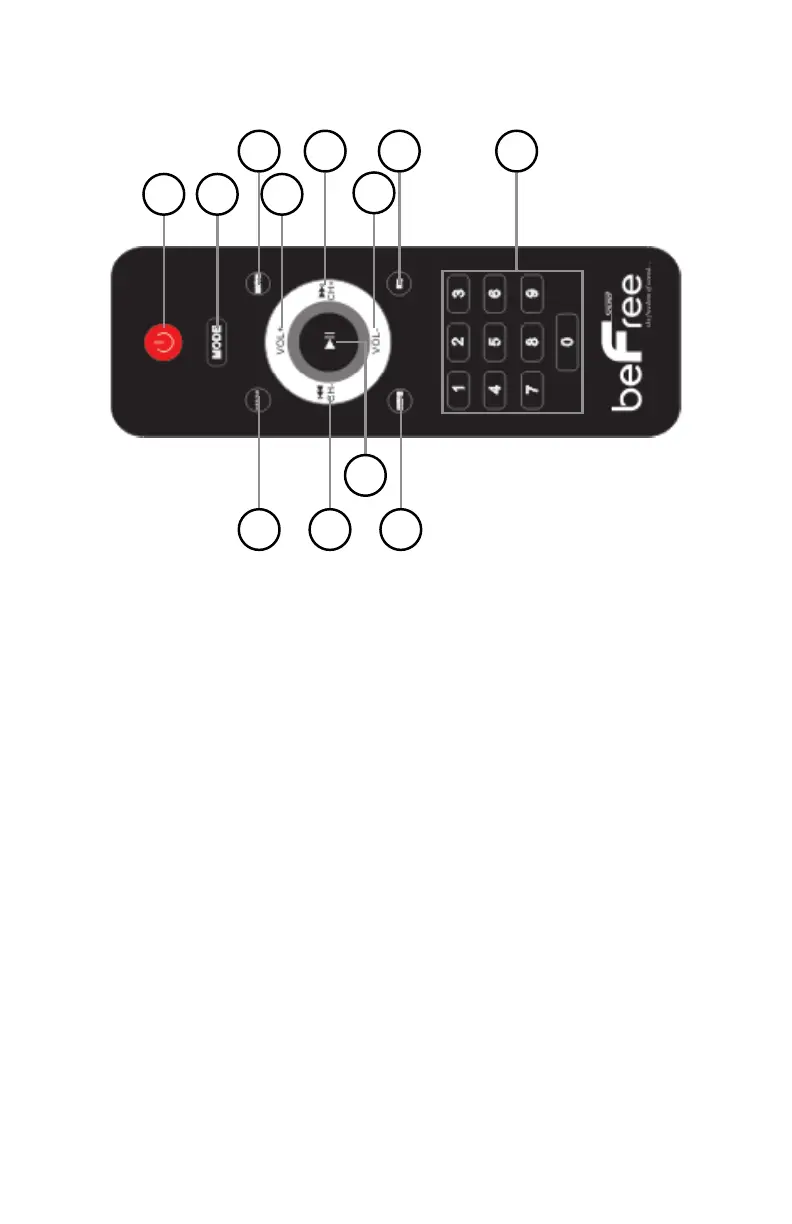
Remote Control Description
1 2
3
4
5
6
7
8
9 10
11
12
1. Power Button: Press this button to turn on and off the speaker
(Make sure the speaker is manually turned on from the back)
2. Mode Input Selector: Use this button to switch between all the
inputs. (USB, SD(TF), FM, Bluetooth)
3. Mute: Mutes the speaker volume
4/6. Vol. +/- : Press these buttons to increase or decrease the
master volume.
5/10. CH +/-: Previous and Next track in FM mode, previous and
next band.
7. EQ Mode Selector: The unit has five built-in pre-set equalization
modes. Press this button to switch among the pre-set equalization
modes when using the USB or SD(TF) Card inputs.
8. Number Keys: The number keys are used to input the track
number when using the USB/SD(TF) Card inputs. For example if you
press 9, the unit will go to track number 9 on either the USB flash
drive, SD(TF) Card. If you press 1 then 9 the unit will go to track 19.
9. USB/SD(TF) Card Mode Selector: Press this button to switch
between the USB flash drive input and SD(TF) Card input.
12. Repeat Control: Press this button to repeat the current track, all
tracks on the USB flash drive, SD(TF)Card.


 To Next Page