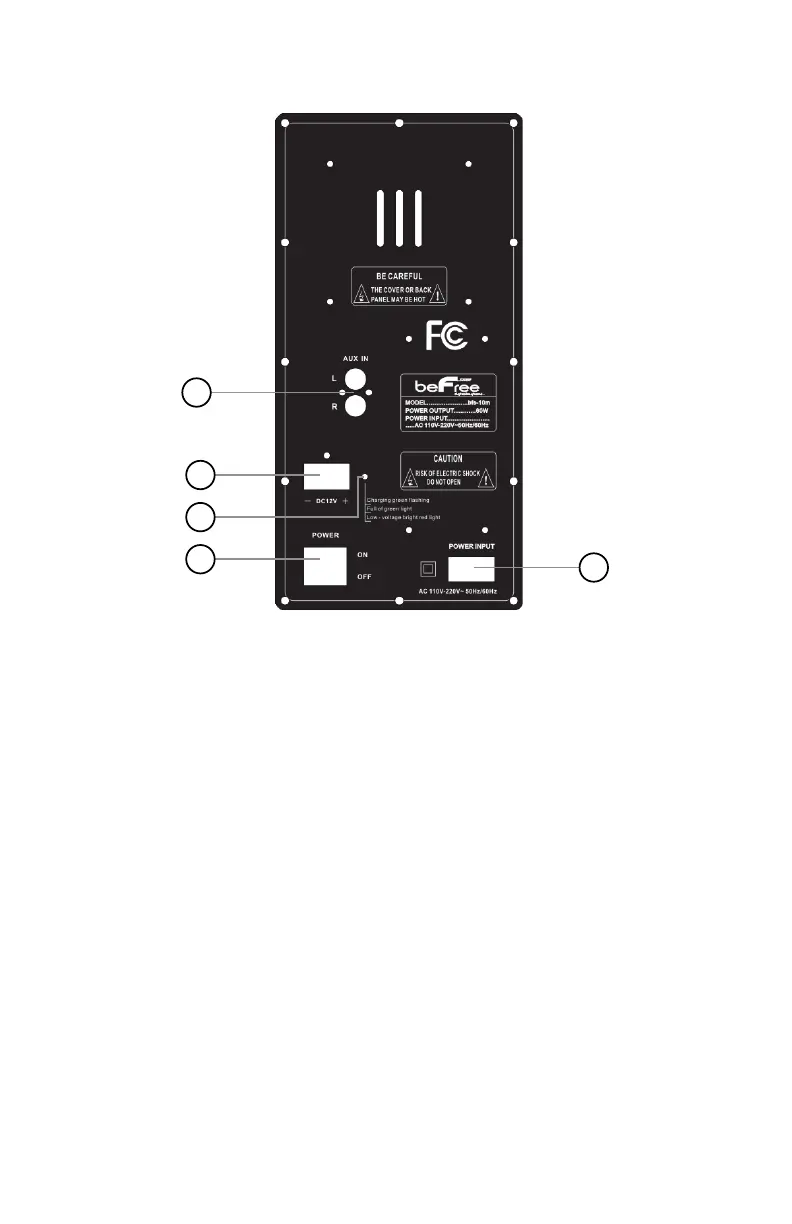
Rear Panel Description
1
2
3
4
5
1. AUX Input: When using this port, set mode (Panel setting “19” )
to “AUX/LINE“. Insert this port with #2 of Audio Auxiliary Line
2. External power port: The input voltage is 12V DC (Please make
sure the voltage is correct)
3. Charging indicator light:
While Charging - Flashing green light
Full Charge - Solid green light
Low Charge - Bright red light
4. Power switch: While charging, please turn off to charge faster.
5. AC charging port: Power cable input to charge
BLUETOOTH CONNECTION
Turn on the power, switch the input to bluetooth, and the display
will display “BLUE” and play a sound. Open the bluetooth device
to connect and turn on the bluetooth switch and find “ bfs-12t ”
to connect. There will be a sound prompt after the connection is
successful.


 To Next Page