9. Mic. Vol controls microphone volume
10. Input selection: Chooses between AUX/USB/TF/FM/BLUETOOTH
11. Previous track or the previous radio station
12. Digital display screen: Displays the corresponding operation
13. Play/Pause: Press this button to pause the signal from the USB
flash drive, SD Card, press again to play. Search when in FM
mode.
14. Next track or the next radio station
15. When using the remote control, point to this location for
infrared access
16. Repeat button: Press this button once to repeat playing the
current track, press again to repeat all tracks
17. Music Vol controls main speaker volume
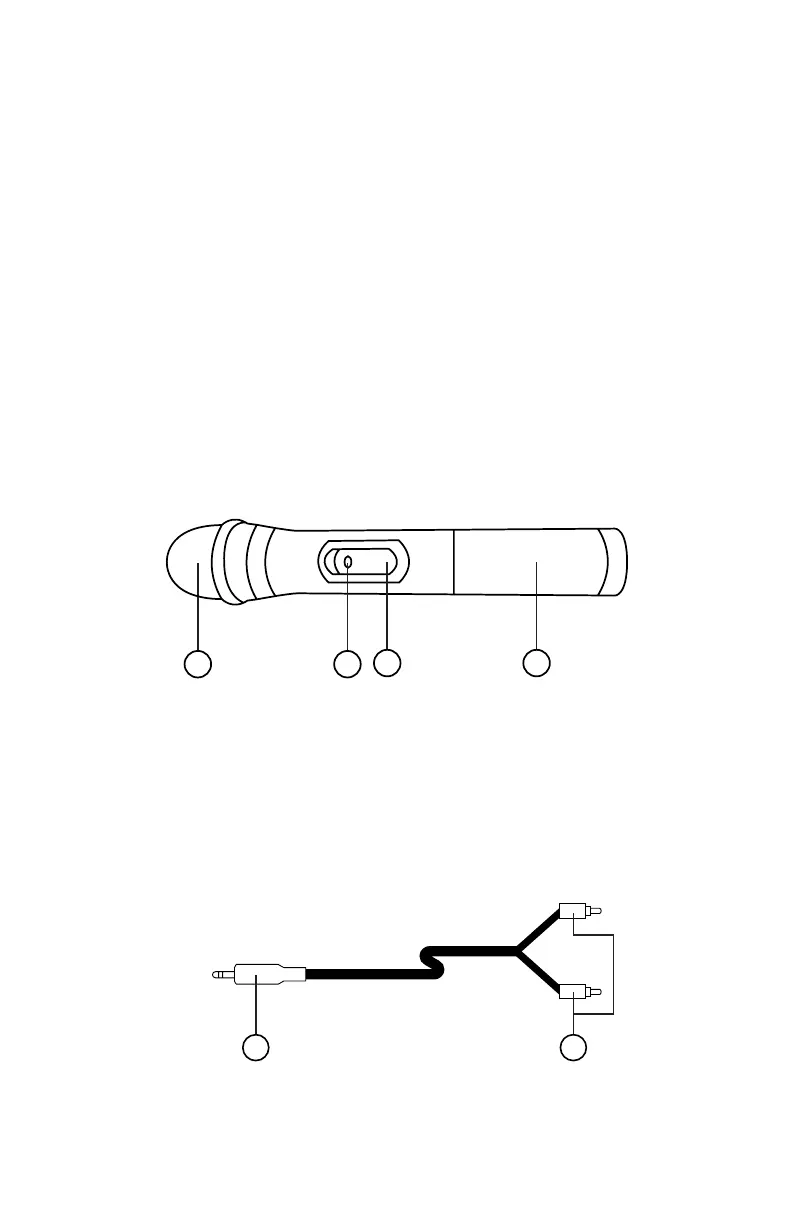
Microphone
1 2
3 4
1. Receiver: where you speak in to
2. Indicator light: The light will turn on if the battery is low.
3. Microphone power switch
4. Battery compartment: 2 AA Batteries (Not included)
Audio Auxiliary Line
21
1. Connect to AUX Input in the Rear Panel of the speaker
2. 3.5 mm: to be connected to an external audio device


 To Next Page