V7.4 Plus OP-L
Manual Mode- How to for Advanced users
The new program, once a roast cycle is begun, gives you the ability to:
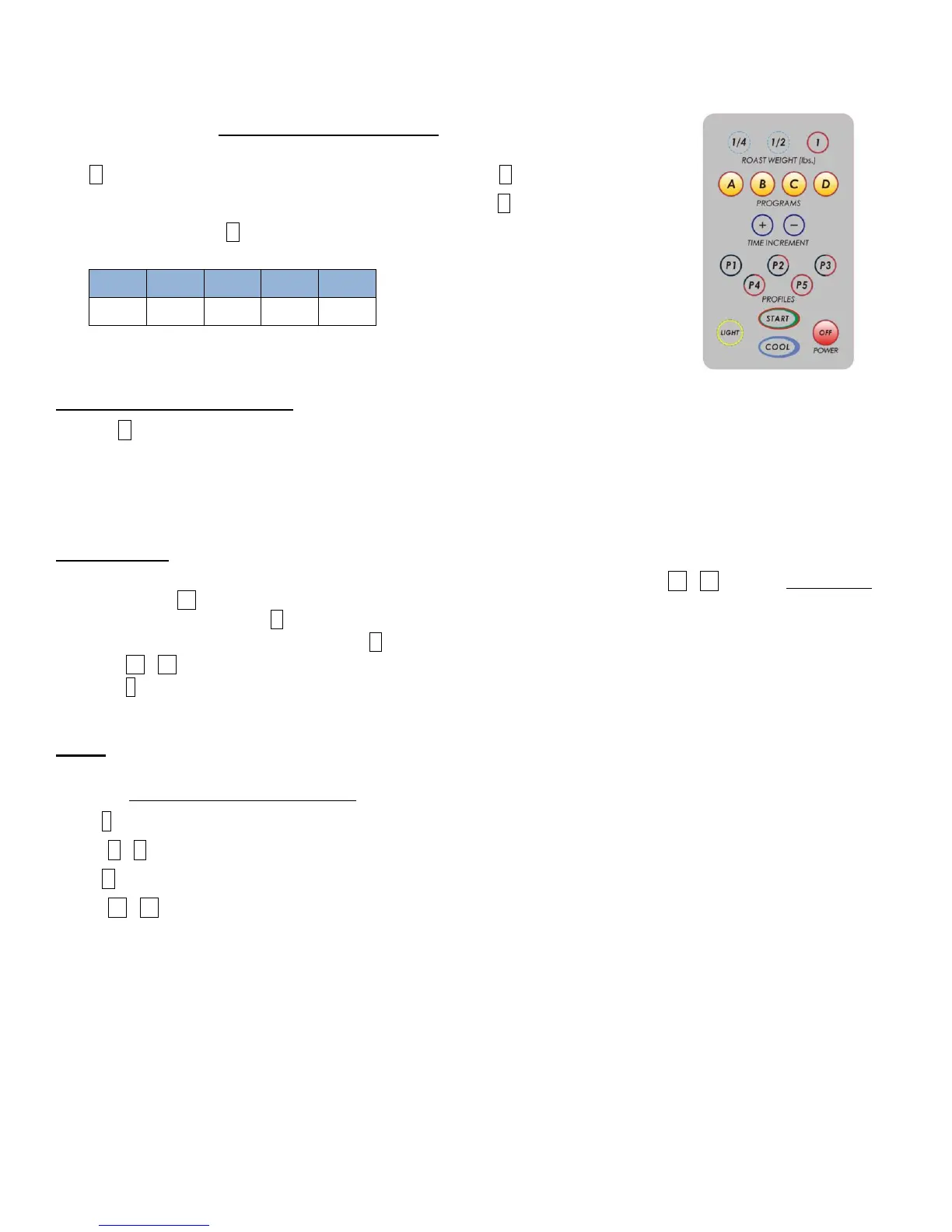
1) Read thermistors (temperatures) by pressing
A (exhaust channel temp once exhaust fan is active mid-roast) or B (chamber wall temp)
2) Reset time to Rosetta Stone times (Part V Paragraph 3 manual) – C button
3) Change motor speed (D button)
4) Change power to the elements in increments :
5) Auto Safe / Unattended switch – a safety feature
All the time: Auto or Manual
1) Press C (for crack as in first) and it will reset the timer according to weight as per our “Rosetta Stone” times which are
associated with approximate time it takes to go from the first crack of 1C to start of 2C. It is merely an approximation but
something we are going to push even harder.
2) Auto Safe/ Unattended Switch – at 75% into set time of a roast the timer will start blinking un:30..29, 28 etc.. The user has 30
seconds to press START otherwise it will automatically go into cool flashing err7.
Manual Mode
Begin a roast (Weight – desired, then Press Start), once a roast has begun at any point press either P1 - P5 to go into Manual mode (It
is best to start with P5 - 100%.)
1) Change Motor speed – press D (drum)
2) Reset time to weight (Rosetta Stone) – press C
3) Press P1 - P5 to change power- whatever is pressed “blinks” to denote which setting.
4) Press 1 at any time to return to Auto Mode (Auto mode runs simultaneously with Manual Mode- should you toggle back to Auto
the time left/ roast cycle will be the same as when you left Manual mode)
Recap- NEW features activate ONLY once a roast cycle has begun
In Auto (default) all buttons act the same as in current system except ABC, for temp readings and time reset.
In Manual (only functional after starting a roast)
Button 1: Returns system from Manual mode to Auto (defaults).
Buttons A - C same as in auto
Button D - drum / cylinder motor speed toggle from standard (8 rpm) to high (16rpm)
Buttons P1 - P5 power to elements: P1- 0, P2-25%, P3-50%, P4-75%, P5-100%
All other buttons ¼, ½, +, -, Cooling, Light, Off remain the same in either / original program.
A System Self-Test can be performed by unplugging the roaster- press and hold START, plug in and release START. The Self-Test
will display Program version, check all functions to include display. It will run a full check TWICE


 To Next Page