V7.4 Plus OP-L
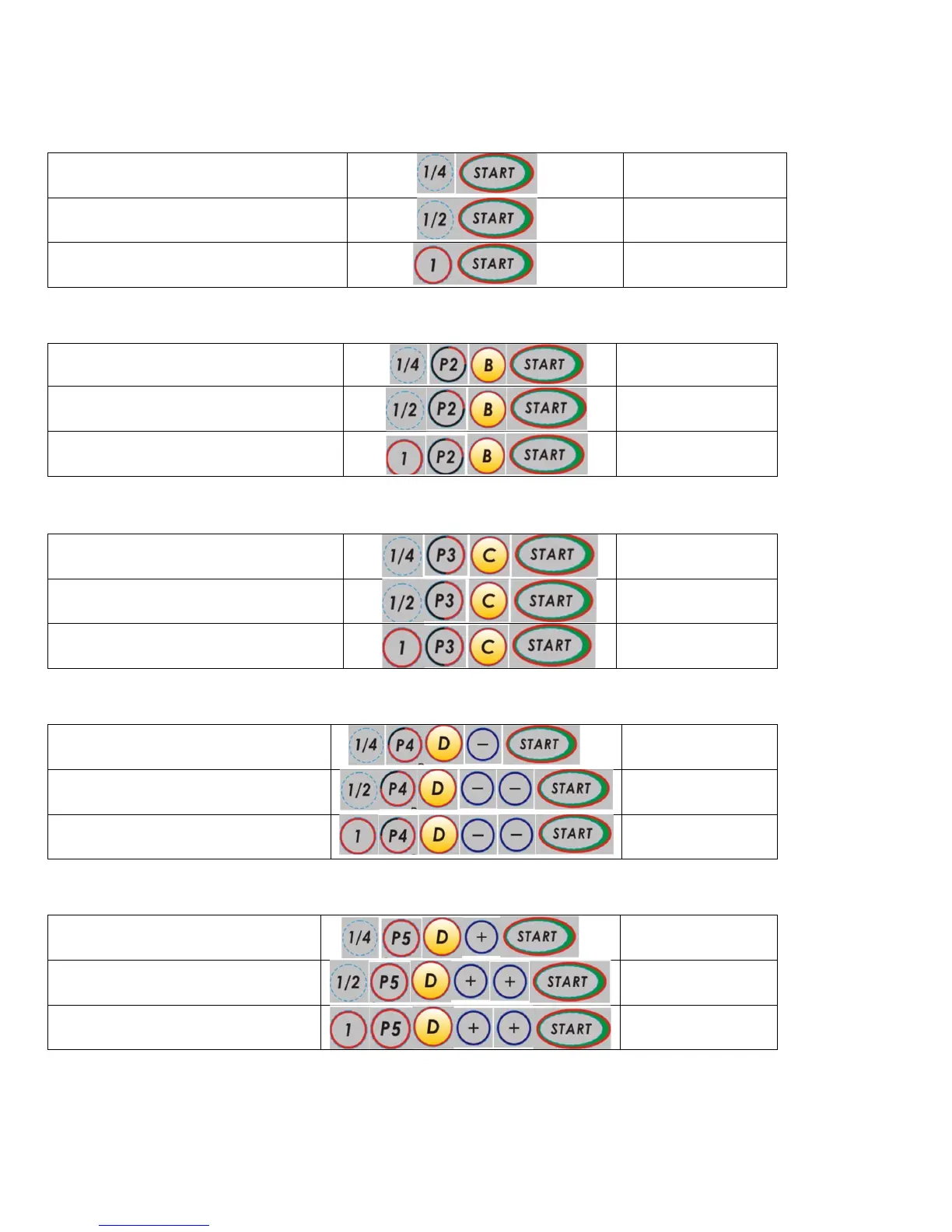
Select and Set Roasting Profile (All First time users and beginners): .
Profile P1 (Default) - Hard Bean (Highest Heat Profile)
Weight - Profile Press in following order Start Time / Max Time**
¼ Pound roast - P1
* Also used for system self-clean/dry burn
Profile P2 - Hard Bean
Profile P3 – Soft Bean, Low Grown, Espresso Blends
Profile P4 – Soft Bean, Low Grown, Espresso Blends
Profile P5 - Hawaiian/ Island Coffees- City/City+ (Lowest Heat Profile)
Roasting times will vary according to actual in-home voltage. See further data in “Part 5: Tips” on voltage/ time issues.
* System self clean/dry burn as explained in “Part 6: Maintenance.”
**Maximum Times denote the maximum allowed roast time per pre-set profile and weight. This feature is meant to limit over-roasting
the coffee beans. See further data in Part 5: Tips.”


 To Next Page