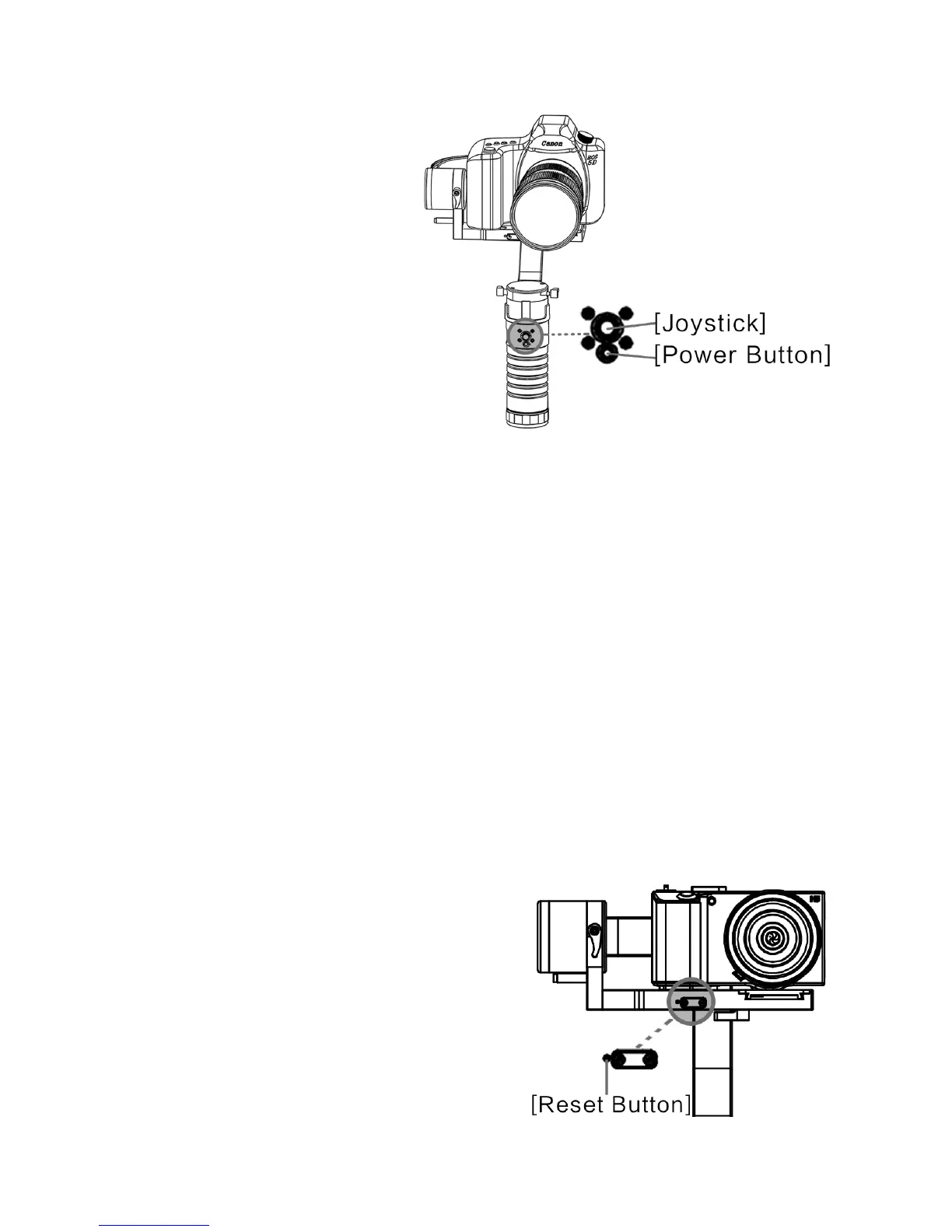
B. Semi transparent plastic button is the power button, metal joy stick is
a five ways multi mode control device.
Press the power button once
to activate the DS1 and the
"Follow Mode" (a).
Stabilizer will follow your hand
position and synchronizing with
hand movement and heading
.Tilting up and down movement or
panning side to side by activating
the joystick up down and sideway.
Other modes of operation:
Pressing the joystick horizontally one time (in follow mode) will change
the stabilizer to a lock mode. (b)
Pressing the joystick horizontally one time again will change the stabilizer
back “Follow Mode", mode(a).
Pressing the joystick horizontally hold 3 seconds change the Head- lock
and Follow panning mode (c).
Explanation of mode and limitation:
a. Follow mode (follow hand movements, joystick can control up and
down, side panning movements)
b. Lock mode (locking camera onto the subject, joystick can control up
and down, side panning movements).
c. Head- lock and yaw follow(head lock subject and YAW follow hand ,
joystick can control pitch and panning movement.)
d. gyro calibration mode:
Double- click the Reset button(d) for
gyro calibration mode will be activated.
In this mode the stabilizer with camera
should be place on flat surface and
refrain from any movement, This
mode is only needed when stabilizer
has difficulty balancing a camera after
power is turn on.
8
© 2015 Beholder All Rights Reserved


 To Next Page