2 notes: VCO1-2 (first note) and VCO3-4 (second)
3 notes: VCO 1,2,3 (no VCO4).
4 notes: VCO1,2,3,4
If more than 4 notes are played, then VCO1 will play the latest note. Use the AUTO DAMP switch to select if released
notes are sustained, or are damped.
POLY – this conventional polyphonic mode assigns the notes in the playing order to each VCO:
1 note: VCO1
2 notes: VCO1 (first note), VCO2 (second)
3 notes: VCO1 (first note), VCO2 (second), VCO3 (third)
4 notes: VCO1 (first note), VCO2 (second), VCO3 (third), VCO4 (fourth)
If more than 4 notes are played, then the lowest available VCO will play the latest note. Use the AUTO DAMP switch
to select if released notes are sustained or damped.
EFFECTS
The X-MOD, FREQ-MOD, and MODE controls are used to setup the effects, and the EFFECTS switch is used to turn
these on or off. The effects are based upon the relationship between master and slave VCOs (as set by the
SINGLE/DOUBLE switch).
X-MOD – adjusts the level of cross-modulation when in X-MOD or S & X mode. Slave VCOs are frequency-
modulated by the Master VCOs.
FREQ MOD – the knob and switch control the frequency modulation given to the slave VCOs only.
The knob controls the intensity of the frequency modulation on the slave VCOs.
The VCF EG/MG1 switch selects the source to sweep the slave VCOs, either by the triggering of the VCF envelope
generator, or by modulation generator 1.
MOD MODES –
SYNC – the slave VCOs are synchronised in tune with their respective master VCO. This can also be used to
prevent VCOs from beating in and out if they are slightly out of tune.
S & X – a combination of synchronised oscillators (S) and cross-modulation (X).
X-MOD – cross-modulation.
SINGLE – VCO1 is the master and VCO2-4 are slaves
DOUBLE – VCO1 is a master and VCO2 its slave. VCO3 is a master and VCO4 its slave.
ARPEGGIATOR SECTION
Three switches allow you to set up the arpeggiator, and the MG2 FREQUENCY knob adjusts the tempo.
ALL/2OCT/1OCT – selects the octave range.
UP/DOWN/UP-DOWN – selects the order in which notes are played back, ascending, descending, or both.
LATCH/ON/OFF – select LATCH to hold the arpeggio when all notes are released. Select ON or OFF to
engage/disengage the arpeggio.
Note: Make sure the MG2 FREQUENCY knob is not on zero when first creating an arpeggio.
The arpeggio can also be triggered by an external device, using the rear panel arpeggio input.
AUTO CALIBRATION
To enter the automatic calibration mode, hold
the EFFECTS button while powering on the unit. The VCOs will be calibrated in sequence. If successful, each
related VCO LED will flash; if not successful, they will not light up.
To return to the factory calibration, hold the HOLD and EFFECTS buttons while you power on the unit.
FIRMWARE UPDATE
The SynthTool App is available as a free download from the MONOPOLY product page of our website:
behringer.com.
The latest file can be downloaded and stored on your computer, and then used to update the MONOPOLY if
required.
HAVE FUN
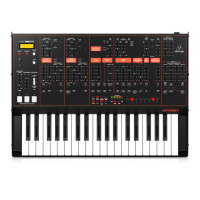
The MONOPOLY has Trigger and CV inputs and outputs that allow for further experimentation and expansion to
other MONOPOLY units and modular synthesizer equipment. Make copies of the patch sheet at the end of this
manual, and record your favorite settings. We hope that you will enjoy your new MONOPOLY synthesizer.
MONOPOLY SynthTool
The “Synthtool.exe” application allows you to select the MIDI channel number and to set and adjust various
parameters of the MONOPOLY to suit your preferences. Connect the MONOPOLY to your computer via USB and
run the application (PC or MacOS).










 To Next Page

