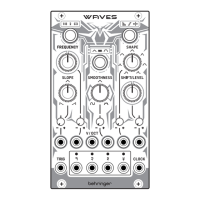
21. CLOCK – use this 3.5 mm TS jack socket to clock the
frequency from an external source. When this is in use
the FREQUENCY control (7) controls the clock division/
multiplication.
22. – 25. OUTPUTS – these 3.5 mm TS jack sockets carry
the outputs of the WAVES. 22 is the main output,
with 23 – 25 derived from it according to the
control settings.
CALIBRATION
Should it become necessary to calibrate the WAVES please
follow this procedure:
1. Disconnect all inputs except for a CV keyboard or MIDI/
CV converter to the volt/octave input (19).
2. Press buttons 1 and 2 simultaneously. The LED surround
of button 1 will ash orange.
3. Use the keyboard or MIDI/CV converter to send 1 volt to
the volt/octave input.
4. Press any button. The LED surround of button 2 will
ash orange.
5. Send 3 volts to the volt/octave input.
6. Press any button to end calibration. WAVES will return
to normal.
19Quick Start Guide18 WAVES
FIRMWARE UPDATE
As the WAVES does not have a USB socket its rmware must
be updated via an audio le. Please follow this procedure:
1. Download the new rmware from the product page of
the Behringer website, and load it onto an audio player,
such as a laptop with suitable software.
2. Connect the audio player to the SLOPE CV input (6),
while the WAVES is unpowered.
3. Adjust the audio output of the player to about 75%
of maximum.
4. Set the SLOPE control (4) to around 12 o’clock.
5. Power up the WAVES while pressing button 1.
6. Play the audio le. The LED surround of button 1 will
light orange if the audio level is optimal. If it is too quiet
then all LEDs will ash. Gain can be adjusted using
the SLOPE control. Update can be aborted by pressing
button 3.
7. If the rmware has updated successfully the WAVES will
return to normal when the audio les ends. If not then
adjust the level and try again.






 To Next Page