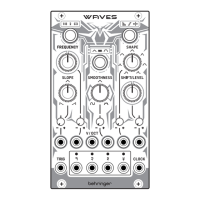
13. SHAPE – use this control to set the shape of the output
waveforms. Fully CCW gives a smoothed wave with
a long attack and short decay/release. As the control
is turned CW towards 12 o’clock the shape sharpens
until at 12 o’clock it is a perfect wave, depending on
the SLOPE settings. Turning further CW smooths
the wave out, with the bias being towards the
decay/release portion.
14. SHAPE CV ATTENUVERTER – use this control to
attenuate (CW) or invert (CCW) external control voltage
of the SHAPE from socket 15.
15. SHAPE CV – use this 3.5 mm TS jack socket to control
the SHAPE via an external CV, in the range -8 V to +8 V.
16. SHIFT/LEVEL – use this control to set the amplitude
and polarity of output 22 when the mode is OFF;
otherwise use it to adjust the osets of outputs
23 – 25 in relation to output 22.
17. SHIFT/LEVEL CV ATTENUVERTER – use this control to
attenuate (CW) or invert (CCW) external control voltage
of the SHIFT/LEVEL from socket 15.
18. SHIFT/LEVEL CV – use this 3.5 mm TS jack socket to
control the SHIFT/LEVEL via an external CV, in the range
-8 V to +8 V.
19. VOLT/OCTAVE – use this 3.5 mm TS jack socket to track
the FREQUENCY using an external volt/octave source,
such as the Behringer SWING keyboard. Range is
-3 V to +5 V.
20. TRIG – the use of this 3.5 mm TS jack socket depends on
the mode selected:
Green (AD envelope) – envelope will be triggered and
run through its full cycle.
Orange (LFO) – the LFO waveshape will be reset.
Red (ASR envelope) – the attack portion will initiate
with the start of the trigger, and hold until the trigger
ends, at which point the release portion will occur.
Red – unipolar one-shot ASR envelope, with a range of
0 V to +8 V.
The LED surround will light in the relevant color.
4. SLOPE – use this control to adjust the shape of
the rising and falling waveform. Fully CCW gives a
sawtooth wave, 12 o’clock a triangle wave and fully CW
a ramp wave.
5. SLOPE CV ATTENUVERTER – use this control to
attenuate (CW) or invert (CCW) external control voltage
of the SLOPE from socket 6.
6. SLOPE CV – use this 3.5 mm TS jack socket to control
the SLOPE via an external CV, in the range -8 V to +8 V.
7. FREQUENCY – use this control to set the base
frequency at which the WAVES works, in conjunction
with button 1. The range is -4 octaves to +4 octaves,
centered on the frequency selected.
8. FREQUENCY CV ATTENUVERTER – use this control to
attenuate (CW) or invert (CCW) external control voltage
of the FREQUENCY from socket 9.
9. FREQUENCY CV – use this 3.5 mm TS jack socket to
control the FREQUENCY via an external CV, in the range
-8 V to +8 V.
10. SMOOTHNESS – use this control to set the smoothness
of the output waveforms. Turing the control CCW
applies a low pass lter, which smooths the waveform
out. CW processes the wave using a wavefolder, which
adds peaks and troughs to the output.
11. SMOOTHNESS CV ATTENUVERTER – use this control to
attenuate (CW) or invert (CCW) external control voltage
of the SMOOTHNESS from socket 12.
12. SMOOTHNESS CV – use this 3.5 mm TS jack socket
to control the SMOOTHNESS via an external CV, in the
range -8 V to +8 V.
17Quick Start Guide16 WAVES






 To Next Page