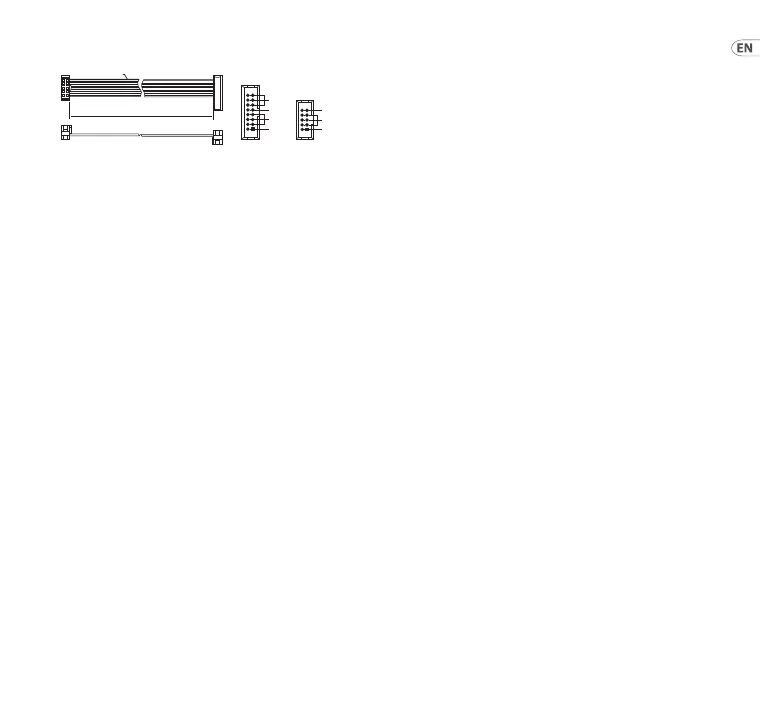
Power Connection
The module comes with the required power cable for
connecting to a standard Eurorack power supply system.
Follow these steps to connect power to the module. It is
easier to make these connections before the module has been
mounted into a rack case.
1. Turn the power supply or rack case power o and
disconnect the power cable.
2. Insert the 16-pin connector on the power cable into the
socket on the power supply or rack case. The connector
has a tab that will align with the gap in the socket, so it
cannot be inserted incorrectly. If the power supply does
not have a keyed socket, be sure to orient pin 1 (-12 V)
with the red stripe on the cable.
3. Insert the 10-pin connector into the socket on the back
of the module. The connector has a tab that will align
with the socket for correct orientation.
4. After both ends of the power cable have been securely
attached, you may mount the module in a case and turn
on the power supply.
HOT USED
Red Stripe
200 mm ± 10
15 16
21
P2P1
2
10 9
1
Connect end P1 to the module socket
Connect end P2 to the power supply
+ 12V
- 12V
GROUND
+ 12V
- 12V
GROUND
Installation
The necessary screws are included with the module for
mounting in a Eurorack case. Connect the power cable
before mounting.
Depending on the rack case, there may be a series of xed
holes spaced 2 HP apart along the length of the case, or a
track that allows individual threaded plates to slide along the
length of the case. The free-moving threaded plates allow
precise positioning of the module, but each plate should be
positioned in the approximate relation to the mounting holes
in your module before attaching the screws.
Hold the module against the Eurorack rails so that each of the
mounting holes are aligned with a threaded rail or threaded
plate. Attach the screws part way to start, which will allow
small adjustments to the positioning while you get them all
aligned. After the nal position has been established, tighten
the screws down.
21Quick Start Guide20 WAVES







 To Next Page