Dishwasher / User’s Manual
13 / 47
EN
PreparatIon
Adjustng the water softenng system
Cleaning, rinsing and drying performance of your dishwasher will increase when water
softening system is adjusted properly.
Adjust the new water hardness level according to the Water hardness level instruction in this
booklet.
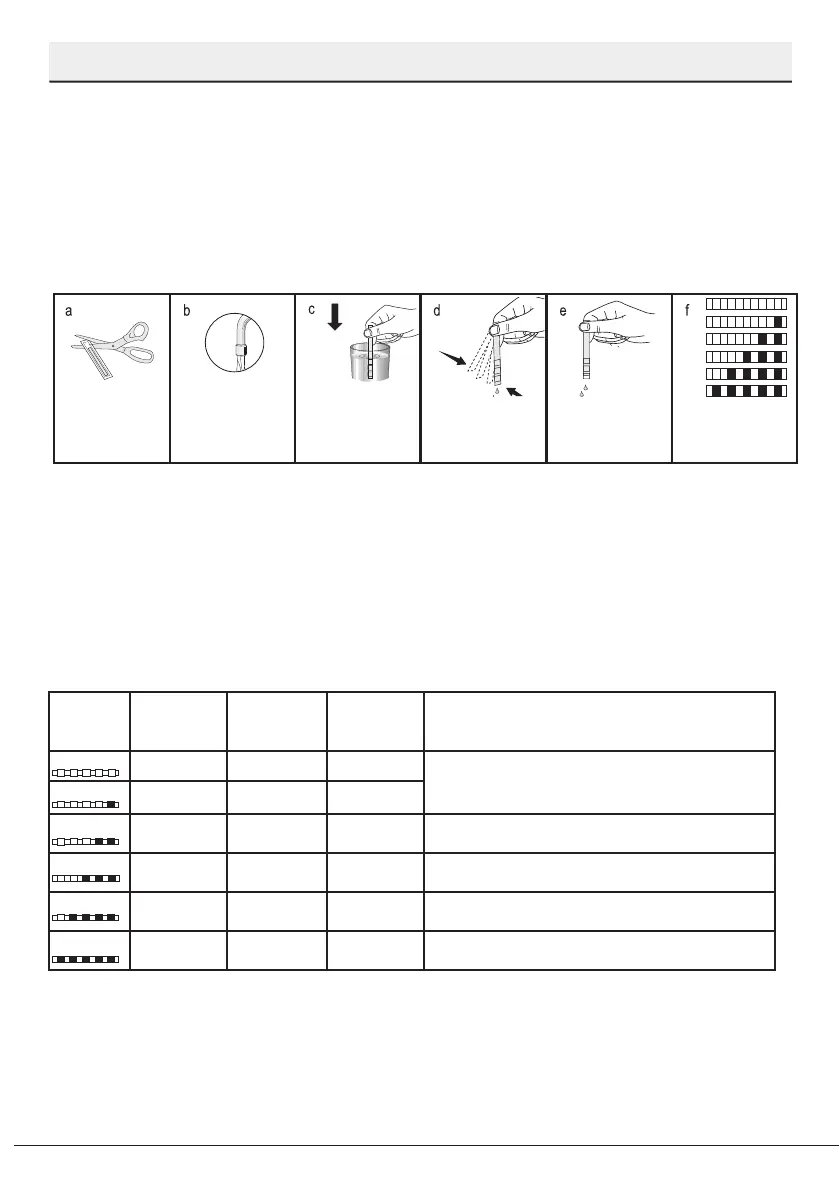
Use the test strip supplied with the product according to the steps given below to determine
hardness level of your supply water.
Remove the test
strip from the
packet.
Turn on the tap and
let the water run for
about a minute.
Hold the test strip in
the water for about
a second.
Remove the test
strip from the water
and shake it.
Wait for 1 minute. The test strip shows
you the hardness
level.
After determining hardness level of the supply water:
1. After switching on your machine, long press the Menu key
2. Pres the settings menu key for 3 seconds to enter the Settings Menu.
3. Using <- and +> keys, proceed until the water hardness setting indicator becomes on (“r”
position will be displayed).
4. Using the Selection key, adjust water hardness level according to the hardness of the
supply water. For correct setting please see “Water hardness level setting table”.
5. Press the Menu key to exit the settings menu. Your setting will be saved automatically.
Water hardness level adjustment table
Hardness
Level
English Water
Hardness °dE
German Water
Hardness °dH
French Water
Hardness °dF
Water Hardness Level Indicator
Level 0
0-5 0-4 0-8
Press the Selection key to switch the water
hardness level to position 1. (r1)
Level 1
6-9 5-7 9-13
Level 2
10-15 8-12 14-22
Press the Selection key to switch the water
hardness level to position 2. (r2)
Level 3
16-19 13-15 23-27
Press the Selection key to switch the water
hardness level to position 3. (r3)
Level 4
20-24 16-19 28-34
Press the Selection key to switch the water
hardness level to position 4. (r4)
Level 5
25-62 20-50 35-90
Press the Selection key to switch the water
hardness level to position 5. (r5)
If the hardness level of the supply water is above 90°dF or if you are using well water, then it
is recommended to use water purification devices and special filters.
Since your machine is equipped with an Automatic Water Hardness Detection System,
appropriate salt should be put in the dishwasher when “Salt indicator” illuminates.
If salt is not put in the machine, the Automatic Water Hardness Detection System will not
work properly.


 To Next Page