EasyManua.ls Logo

Belkin F5D7011 - User Manual

Belkin F5D7011
48 pages
Print Icon
To Next Page IconTo Next Page
Loading...
F5D7011
High-Speed Mode
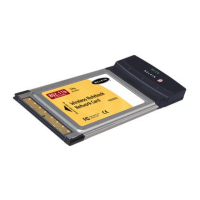
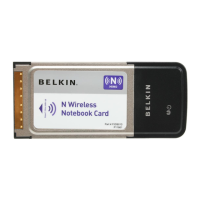
Wireless G Notebook
Network Card
Connect your laptop computer to
a FASTER wireless network
User Manual

Questions and Answers

  • T
    Tina DonovanAug 15, 2025
    How to troubleshoot Belkin F5D7011 Network Card when I can’t connect to the Internet wirelessly?
    • B
      Brandi BlankenshipAug 16, 2025
      If you can't connect to the internet wirelessly using your Belkin Network Card, verify the lights on your Wireless Router, ensure the Router power cord is plugged in, and check all cables connecting the router and modem. Also, check that all the modem’s LEDs are functioning correctly. Try rebooting both the Router and the Modem to resolve the issue.
  • C
    Christine CunninghamAug 18, 2025
    Why my Belkin F5D7011 Network Card's Link LED is solid but I cannot connect to the Internet?
    • A
      Angela ValenciaAug 18, 2025
      If the Link LED is solid on your Belkin Network Card but you cannot connect to the Internet, there may be a mismatch between the Encryption key settings on your computer and Wireless Router or Access Point. Check the WEP key settings to ensure they match.
  • E
    Earl HesterAug 21, 2025
    What to do if my Belkin F5D7011 Network Card signal strength is poor?
    • M
      Mark WalshAug 21, 2025
      If you are experiencing poor signal strength with your Belkin Network Card, it may be due to the distance between your computer and the Wireless Router or Access Point. Radio-based wireless technology means that connectivity and throughput performance decrease as the distance increases. Try temporarily moving the computer closer (five to ten feet) to the Wireless Router or Access Point. You may also try changing the wireless channel or limiting the wireless transmit rate.
  • M
    Mark MillsAug 25, 2025
    Why is the Link LED blinking slowly on my Belkin Network Card, and I cannot connect to a wireless network?
    • J
      Joshua GomezAug 25, 2025
      If the Link LED is blinking slowly on your Belkin Network Card and you cannot connect to a wireless network or the Internet, there might be a mismatch between the network name (SSID) settings in your wireless network properties. Check the SSID settings to see if they match. Double-click the Signal Indicator icon to bring up the 'Wireless Networks' screen. If you do not see the network you are trying to connect to, click 'Add' and type in the SSID.
  • S
    Stephanie DouglasAug 27, 2025
    Why is data transfer sometimes slow on my Belkin Network Card?
    • K
      Kristen HolmesAug 28, 2025
      If data transfer is sometimes slow with your Belkin Network Card, it may be because wireless technology is radio-based. Connectivity and throughput performance decrease as the distance between devices increases. Temporarily move the computer, if possible, to five to ten feet from the Wireless Router or Access Point.
  • C
    chasejonAug 30, 2025
    What to do if the name of my wireless network does not appear in the list of “Available Networks” on my Belkin F5D7011?
    • M
      Melissa MiddletonAug 30, 2025
      If the name of your wireless network does not appear in the list of “Available Networks” for your Belkin Network Card, check the SSID settings to see if they match. Double-click the Signal Indicator icon to bring up the 'Wireless Networks' screen. If you still do not see the network you are trying to connect to, click 'Add' and type in the SSID.
  • J
    jacksongarySep 2, 2025
    Why is my Belkin F5D7011 slow when my computer has a built-in Ethernet card?
    • T
      Timothy PerezSep 3, 2025
      If your Belkin Network Card does not perform well or the connection is slow when your computer has a built-in wired Ethernet card, it may be because Windows is handling two active network connections. Disable the Ethernet card from your computer under 'Network Adapters' in the Device Manager.
  • B
    Bryan HuberSep 5, 2025
    What to do if the Power LED does not come ON and Belkin Network Card is not working?
    • Z
      Zachary WilliamsSep 5, 2025
      If the Power LED does not come on and your Belkin Network Card is not working, the Card may not be connected or installed properly. Verify that the Card is plugged firmly into the CardBus slot of your computer. Also, check to see that the drivers for the Card have been installed. Right-click on the 'My Computer' icon on your desktop, choose 'Properties', and navigate to the 'Device Manager'. See if your CardBus Card is listed without any errors.
  • D
    David DeanSep 8, 2025
    What to do if the Belkin F5D7011 Network Card Installation CD-ROM does not start Setup Utility?
    • R
      Ricardo CostaSep 8, 2025
      If the Installation CD-ROM does not start the Setup Utility for your Belkin Network Card, it could be that the computer is running other applications that are interfering with the CD drive. Open up your CD-ROM drive by double-clicking on the 'My Computer' icon. You can also try double-clicking on the CD-ROM drive that the Installation CD has been placed in to start the installation, or double-click on the folder named 'Files', then double-click on the icon named 'setup.exe'.
  • D
    Dana SmithSep 12, 2025
    Why my Belkin F5D7011 Network Card does not perform well when computer has a second built-in wireless network card?
    • X
      xmaloneSep 12, 2025
      If your Belkin Network Card does not perform or the connection is unstable when your computer has a second built-in wireless network card, it may be because Windows must now handle two active wireless connections. Disable the built-in wireless card from your computer under 'Network Adapters' in the Device Manager.

Summary

Introduction to Wireless Networking

Optimal Placement for Wireless Performance

Discusses how distance and obstructions affect wireless connection strength and provides placement tips for routers.

Installing and Setting Up the Card

Software Installation Procedure

Guides the user to insert the installation CD and launch the setup utility.

Inserting the CardBus Card

Instructs on inserting the CardBus card into the laptop's slot and checking the power light.

Completing Windows Hardware Installation

Details the process of Windows detecting new hardware and installing drivers.

Using the Belkin Wireless LAN Utility

Configuring Network Security (WEP & WPA)

Introduces and explains setup for WEP, WPA-PSK, and WPA with radius server security.

Performing System Diagnostic Tests

Details how to run various diagnostic tests on the network card for troubleshooting.

Troubleshooting Common Issues

Resolving Wireless Internet Connectivity Issues

Offers troubleshooting steps for wireless internet connection failures, checking router lights and software.

Addressing Installation and Hardware Problems

Provides troubleshooting for issues like the installation CD not starting or the power LED not turning on.

Troubleshooting Link LED and Network Access

Diagnoses problems related to the Link LED blinking slowly or being solid, affecting network connection.

Belkin F5D7011 Specifications

General IconGeneral
BrandBelkin
ModelF5D7011
CategoryNetwork Card
LanguageEnglish

Related product manuals