78
Using the Web-Based Advanced User Interface
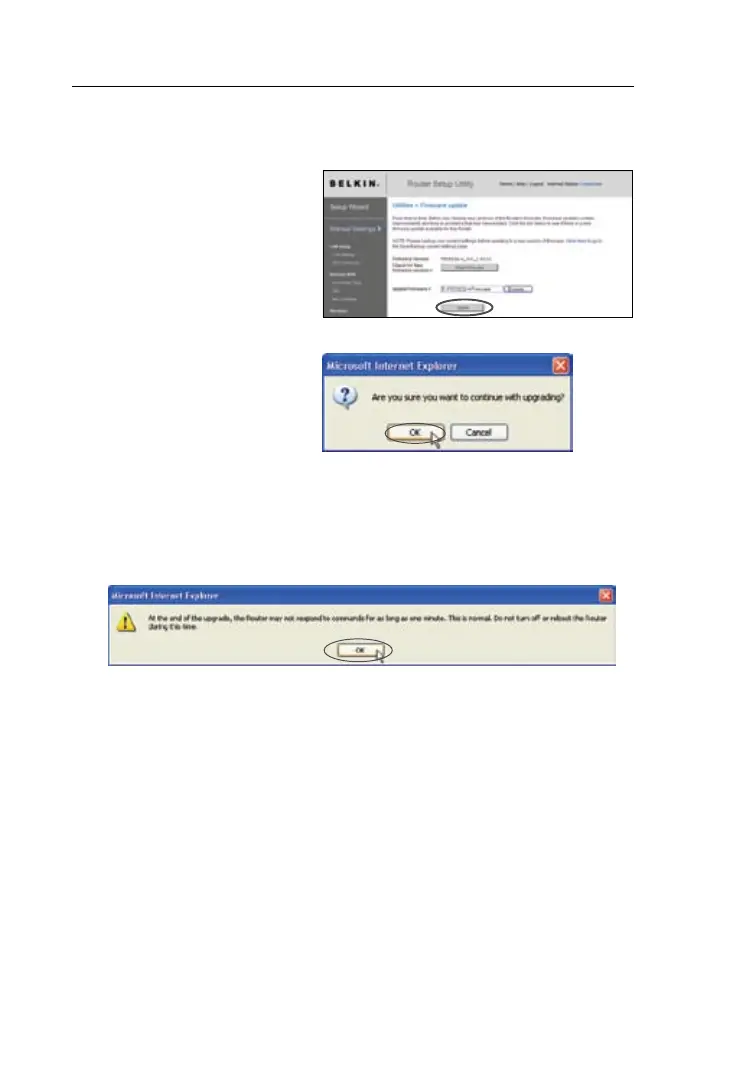
3. The “Update Firmware”
box will now display the
location and name of
the firmware file
you just selected.
Click “Update”.
5. You will see one more message. This message tells you that
the N1 Vision may not respond for as long as one minute as
the firmware is loaded into the N1 Vision and the N1 Vision is
rebooted. Click “OK”.
6. A 180-second countdown will appear on the screen. When
the countdown reaches zero, the N1 Vision’s firmware update
will be complete. The N1 Vision’s home page should appear
automatically.Ifnot,typeintheN1Vision’saddress(default=
192.168.2.1) into the navigation bar of your browser.
4. You will be asked if you
are sure you want to
continue. Click “OK”.




 To Next Page