8180
Using the Web-Based Advanced User Interface
section
1
9
2
3
4
5
6
7
8
10
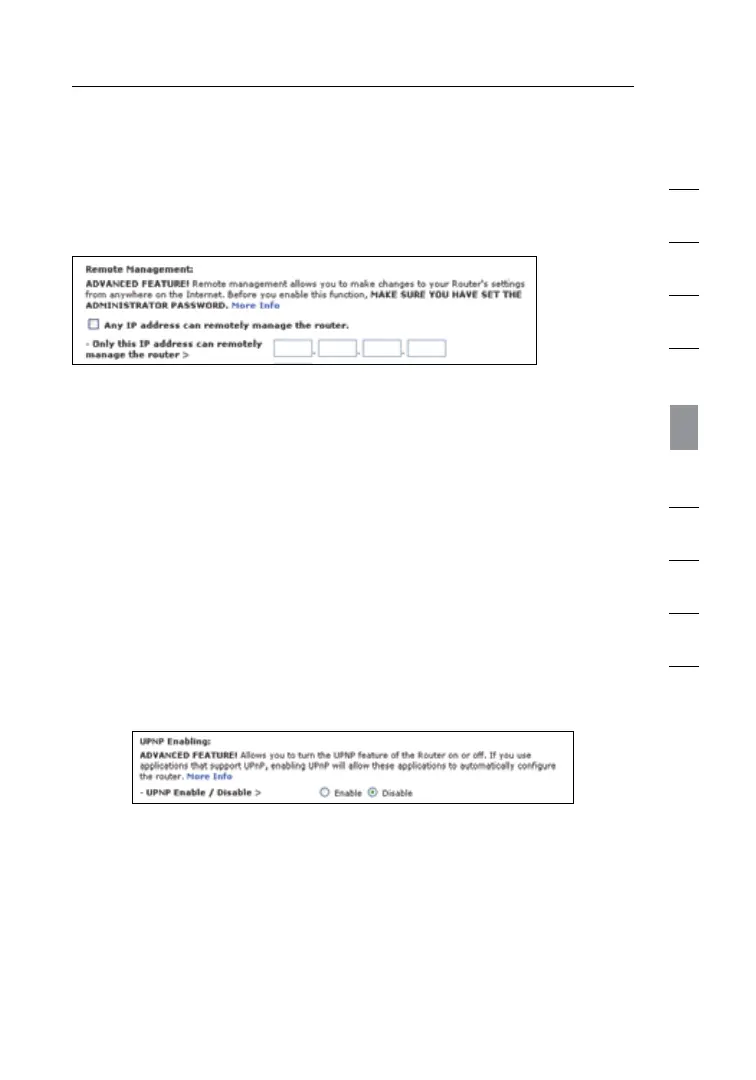
Advanced Feature: The “Remote Access Port” option allows you to
configure the desired “Remote Access Port for Remote Management”
feature
. The default access port is set to port 80.
Enabling/Disabling UPnP
UPnP (Universal Plug-and-Play) is yet another advanced feature
offered by your Belkin N1 Vision. It is a technology that offers
seamless operation of voice messaging, video messaging, games, and
other applications that are UPnP-compliant. Some applications require
the N1 Vision’s firewall to be configured in a specific way to operate
properly. This usually requires opening TCP and UDP ports, and in
some instances, setting trigger ports. An application that is UPnP-
compliant has the ability to communicate with the N1 Vision, basically
“telling” the N1 Vision which way it needs the firewall configured. The
N1 Vision ships with the UPnP feature disabled. If you are using any
applications that are UPnP-compliant, and wish to take advantage of
the UPnP features, you can enable the UPnP feature. Simply select
“Enable” in the “UPnP Enabling” section of the “Utilities” page. Click
“Apply Changes” to save the change.




 To Next Page