EasyManua.ls Logo

Belkin F7D1401 - User Manual

Belkin F7D1401
31 pages
Print Icon
To Next Page IconTo Next Page
Loading...
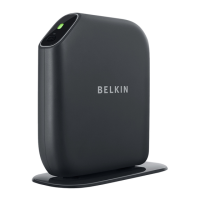
Surf WIRELESS ROUTER WITH BUILT-IN MODEM
User Manual
8820ed00388_F7D1 401_v1
English
Fraais
DEutsch
nEDErlanDs

Questions and Answers

  • R
    Ronald JohnstonAug 13, 2025
    What to do if Belkin Setup cannot connect my Wireless Router to the Internet?
    • A
      Aaron EdwardsAug 13, 2025
      If Belkin Setup is unable to connect your Wireless Router to the Internet, you can try the troubleshooting suggestions within Belkin Setup. If your ISP requires a username and password, ensure you have entered them correctly. You may also refer to 'Manually Configuring Network Settings' in this manual for an alternative setup method.
  • B
    boydscottAug 17, 2025
    What to do if Belkin Setup cannot find my Wireless Router?
    • C
      christophersandersAug 17, 2025
      If Belkin Setup cannot find your Belkin Wireless Router, ensure the wireless hardware on your computer is turned on, if available. Try connecting your computer to one of the four 'wired' ports on the Router with an Ethernet cable. Make sure the Router is powered on, indicated by the front-panel light. Try unplugging the Router’s power supply, wait 10 seconds, and then plug it back in. If you have firewall software on your computer, it may be preventing an outgoing connection; temporarily disable it before attempting setup.
  • L
    lisa25Aug 20, 2025
    How to set up WPA security on Belkin F7D1401 Wireless Router?
    • J
      John KempAug 20, 2025
      To set up WPA security on your Belkin Wireless Router, log in to your Router by visiting http://router/ with your web browser. Click 'Wireless' in the left-hand menu, then click 'Security' just below that. Select the 'WPA/WPA2' option and enter a password.
  • J
    Jason PhillipsAug 25, 2025
    How to set up WEP security on Belkin Wireless Router?
    • H
      Henry FitzgeraldAug 25, 2025
      To set up Wired Equivalent Privacy (WEP) security on your Belkin Wireless Router, log in to your Router by visiting http://router/ with your web browser. Click 'Wireless' in the left-hand menu, then click 'Security' just below that. Select the '128-bit WEP' option. You may type in a WEP key manually or generate one from a passphrase.
  • E
    Erica EricksonAug 28, 2025
    What to do if Belkin Setup completed installation, but I cannot browse the Web?
    • E
      Emily WigginsAug 28, 2025
      If Belkin Setup completed installation, but you are unable to browse the web, ensure the Router is connected to your ADSL line with an RJ11 (telephone) cable via the Router’s one gray ADSL port. Verify that the modem (ADSL) connection is connected to your broadband (ADSL) socket on the wall, using an ADSL filter if needed. Try unplugging your Router’s power supply, wait 10 seconds, and then plug it back in.
  • G
    Gina LopezAug 31, 2025
    Why is my Belkin wireless network performance slow?
    • S
      Stacy BrooksAug 31, 2025
      Slow or inconsistent wireless network performance on your Belkin Wireless Router can be due to several factors. The distance between devices may be too great; try temporarily moving the computer within 10 feet of the Router, if possible. Local wireless traffic and interference can also cause issues; try changing the wireless channel. Limiting the wireless transmit rate can sometimes improve range and connection stability.
  • M
    Mario LaneSep 4, 2025
    What to do if I can’t connect to the Internet wirelessly and my network name is not listed in Available Networks?
    • T
      Tracy PrattSep 4, 2025
      If you cannot connect to the Internet wirelessly and your network name is not listed in Available Networks, verify that your Belkin Wireless Router is on and the front-panel light shows solid green. If you are far from the Router, try moving closer. Using a computer attached to the Router via a network cable, visit http://router/ and ensure that 'Broadcast SSID' is ON.
  • H
    harry34Sep 8, 2025
    What to do if the Belkin Wireless Router Setup CD does not automatically start?
    • A
      annetownsendSep 8, 2025
      If the Setup CD for your Belkin Wireless Router does not automatically start, browse to your CD-ROM drive and open the 'Belkin Setup' icon. Alternatively, visit http://router/ and perform the setup manually.

Summary

Getting Started

Initial Setup

Provides instructions for the initial setup and placement of the router for optimal signal strength.

Advanced Tools & Settings

Adding Computers to Your Network

Connecting via Setup CD

Steps to connect devices using the provided setup CD.

Manual and WPS Device Connection

Manual Connection Method

Describes how to manually add devices to the network without using the setup CD.

WPS Button Connection

Explains the process of using the WPS button for easy wireless connections.

Technical Details

Technical Features Overview

Lists key technical features of the wireless router and modem.

Troubleshooting Setup Issues

Setup CD Not Starting

Solutions for when the setup CD does not automatically start or is not found.

Router Not Found by Setup Software

Steps to resolve issues where the setup software cannot find the router.

Troubleshooting Internet Connection

Setup Cannot Connect to Internet

Steps to troubleshoot when the setup cannot connect the router to the internet.

No Web Browsing After Setup (Amber Light)

Solutions for when setup is complete but web browsing fails, indicated by an amber light.

Troubleshooting Wireless Connectivity

Cannot Connect to Internet Wirelessly

Guidance on troubleshooting wireless connection problems when the router is online.

Network Not Listed in Available Networks

Steps to fix issues where the wireless network name is not visible.

Network Client and Security Troubleshooting

Clients Unable to Connect to Network

Steps for troubleshooting when network clients cannot connect after router installation.

WPA Security Setup Difficulties

Detailed guide for troubleshooting difficulties during WPA security setup.

Wireless Security Configuration

Setting Up WPA;WPA2 Security

Step-by-step instructions for configuring WPA/WPA2 encryption.

Setting Up WEP Security

Step-by-step instructions for configuring Wired Equivalent Privacy (WEP) security.

Belkin Limited Product Warranty

Warranty Coverage Details

Explains what the 2-year product warranty covers and the period of coverage.

How to Get Service

Service Request Procedure

Outlines the steps required to obtain service for a Belkin product.

Regulatory Information

FCC Statement of Conformity

Declaration of the device's compliance with FCC Rules for electromagnetic compatibility.

Federal Communications Commission Notice

FCC notice regarding device testing, compliance, and potential interference.

Belkin F7D1401 Specifications

General IconGeneral
Wireless Standard802.11n
Frequency Band2.4 GHz
Maximum Wireless Speed300 Mbps
Antenna TypeInternal
Number of Antennas2
Weight0.5 lbs
Ports4 x Ethernet
SecurityWPA, WPA2

Related product manuals