3
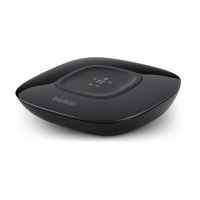
HD Bluetooth
®
Music Receiver
Table of Contents SECTIONS 1 2 4 5
PAIRING YOUR
HD BLUETOOTH
MUSIC RECEIVER
3
For NFC-enabled smart devices
1. DownloadtheBelkinBTappfromtheGoogle
Playstoreandinstallitonyourphone.
2. Runtheappanditwillautomaticallywalkyouthrough
theconfigurationprocessandgetyouconnected.
3. Oncetheappisconfiguredandinstalled,
allyouneedtodois“tap”yourphoneon
theBelkinHD
Bluetooth
Music Receiver to
connectit;yourphone’sbuilt-inNFCwillthen
automatically connect it to the receiver.
4. Nowanymusicoraudioyouplaywill
playthroughyourmusicsystem.
For non-NFC-enabled smart devices
1. Goto“settings”andmakesure
Bluetooth
is turned on.
2. Followyourdevice’snormal
Bluetooth
connection
processbysearchingfordevices;onceyou
have found the
Bluetooth
device labeled
BelkinHDBT,youshouldconnecttoit.
3. Nowanymusicoraudioyouplaywill
playthroughyourmusicsystem.


 To Next Page