13
USING YOUR SCREENCAST
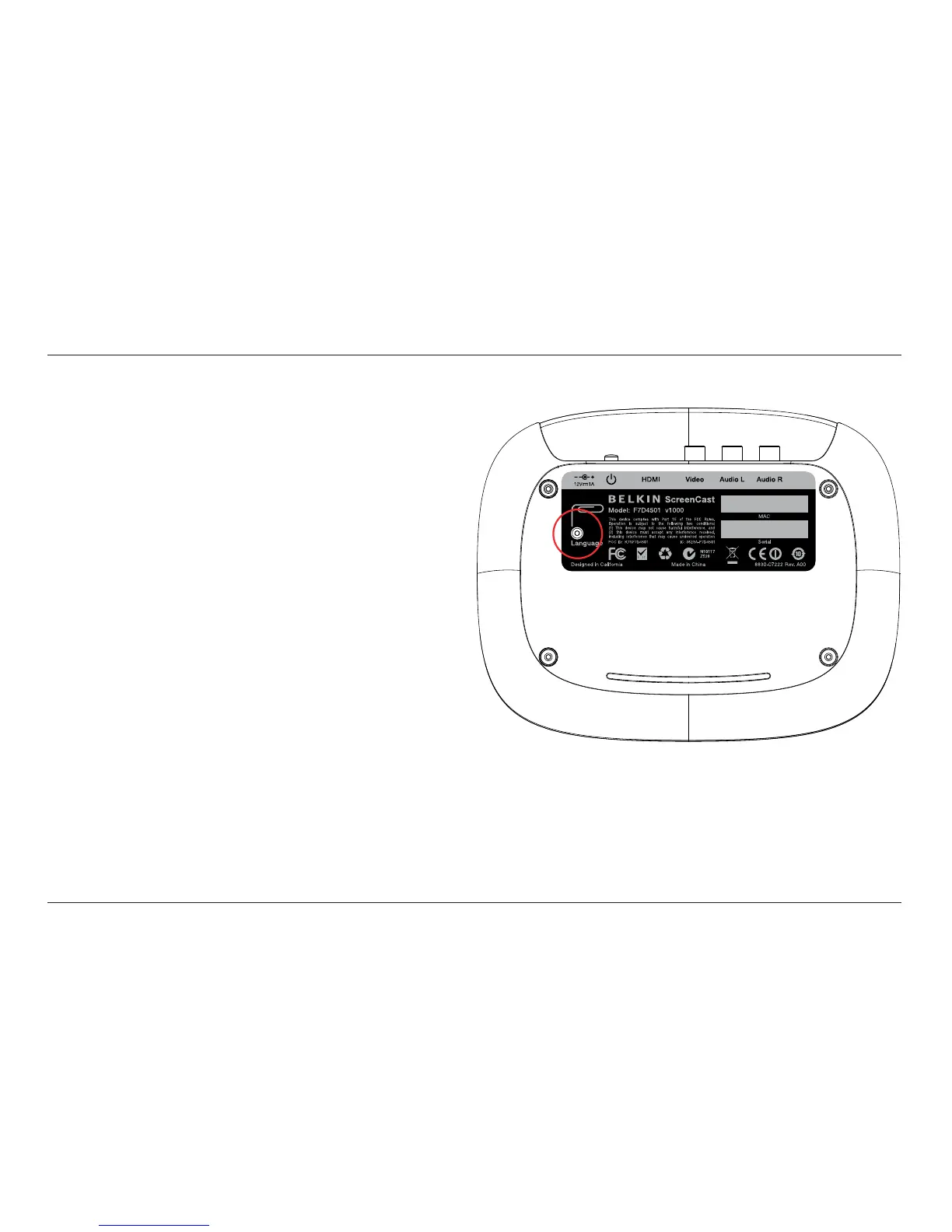
Using the Reset Button
Changing the language
the reset button shown in the diagram.
A short press of this
button
different language options for the ScreenCast TV Adapter.
Hard reset of security profile
for more than 5 seconds
,
you will reset the security profile. This will require that
you complete the setup process a second time and
re-pair your laptop and ScreenCast TV Adapter.
LABEL MATERIAL:
Mylar with matte PP finish
ELEMENTS SHOWN IN BLACK:
BLACK
ELEMENTS SHOWN IN GRAY:
PANTONE 429 C
SCALE 1:1
DESIGNER: [AH]
DO NOT MAKE CHANGES WITHOUT
PERMISSION FROM BELKIN IDG.
ALL DIMENSIONS IN MM.
INNOVATION DESIGN GROUP
DATE: 03/23/2010REVISION: A00
REVISION NOTES:
PRODUCT GRAPHICS
AGILE #: IDA-000043
SKU #: F7D4501
ScreenCast
BACK
BOTTOM





 To Next Page