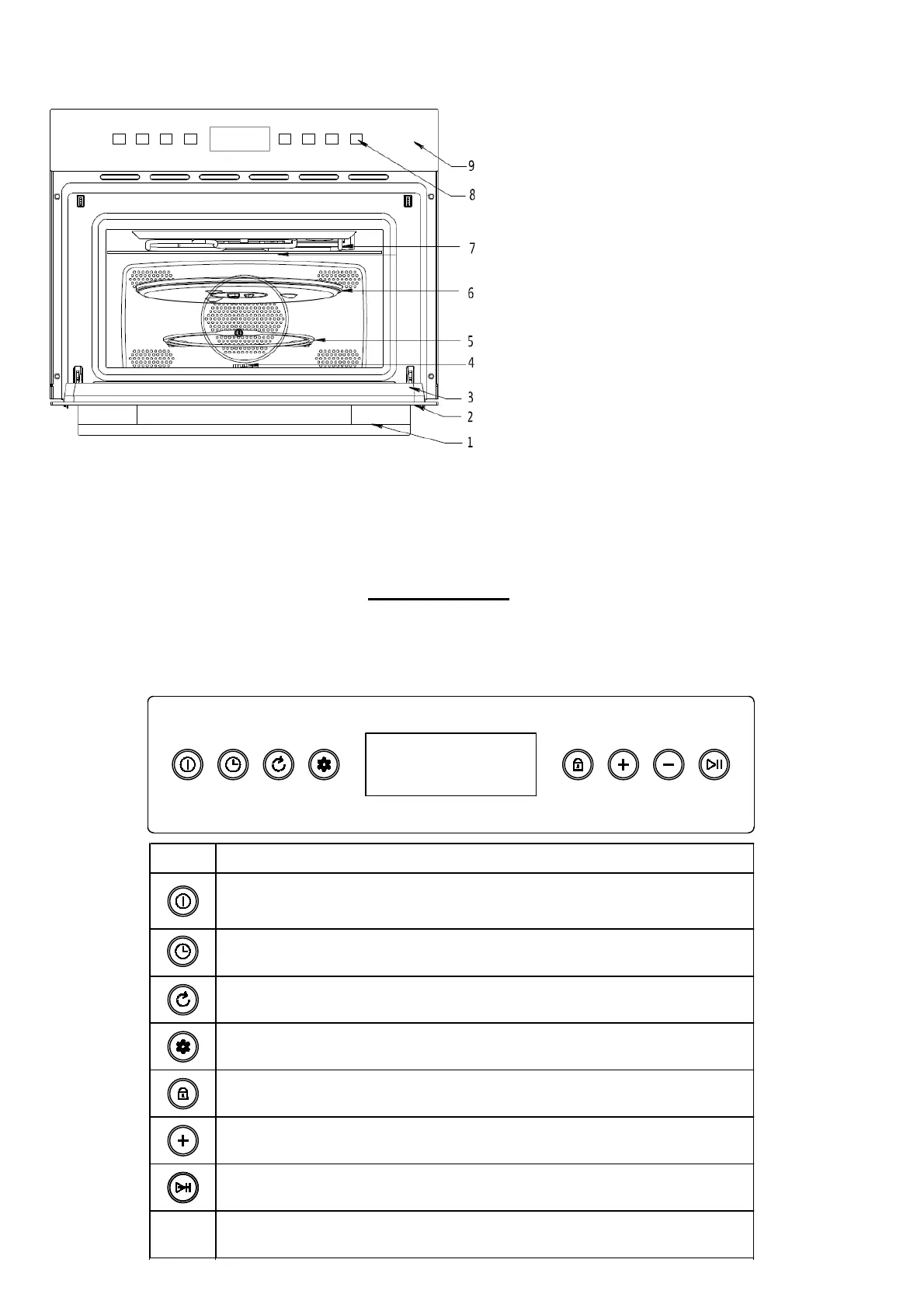
Getting to know your product
1. Door handle
2. Door window glass
3. Door seal
4. Drive sha
5. Turntable ring
6. Turntable plate
7. Grill Element
8. Controls
9. Control Panel
BEFORE INSTALLATION
The inside of the appliance should be cleaned to remove all manufacturing residues. For further informaon about cleaning, see the
cleaning and maintenance secon.
Control Panel
The appliance’s control sensors and display screen are placed together on the control panel. The table below displays. The meaning
of the icons.
Symbol Description
Power key - to 'wake up' the appliance when it is in standby mode; to cancel a cooking
programme.
Set the cooking me - for seng cooking duraon me and for delaying the start me
Adjustment - Adjust microwave power level, temperature, weight or defros
t mode
Clock seng - Set the me of day; show/hide the me of day.
Child lock - to acvate/deacvate the childlock;
to briefly display the current me of day during a cooking programme.
Increase - for selecng a cooking funcon, increasing me,
power levels, temperature or weight.
Decrease - for selecng a cooking funcon, decreasing
me, power levels, temperature or weight.
Start / Pause


 To Next Page