Quick Reference Guide
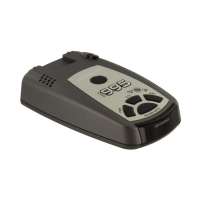
To begin using your V955,
just follow these simple steps
1 Plug the small end of the power cord
into the side jack of the detector, and
plug the large end of the power cord
into your car’s lighter socket.
2 Mount your V955 on the windshield
using the supplied windshield mount.
3 Press the PWR button, located top left,
to turn the V955 on.
4 Press and hold the Volume/Mute
button to adjust the volume.
Please read the manual to fully understand
your V955’s operation and features.
QuickMount Slot
Insert the V955’s adjustable Windshield
mount into this slot. Page 7
QuickMount Button
Press the button, and slide the Windshield
mount into one of its four locking positions.
Page 7
City Button
Switches between AutoScan, City and
Highway, settings. In general, we
recommend AutoScan. Page 9
Power
Press the PWR button to turn the V955 on
or off.
AutoMute
Your V955’s patented AutoMute
automatically reduces the volume level of
the audio alert after a brief period. Page 8.
If you prefer, you can turn AutoMute off.
Page 8
Programming
Your V955 is ready to go, just plug it in and
turn it on. But you can also easily change 6
features for your preferences. Page 12-14
4










 To Next Page