6
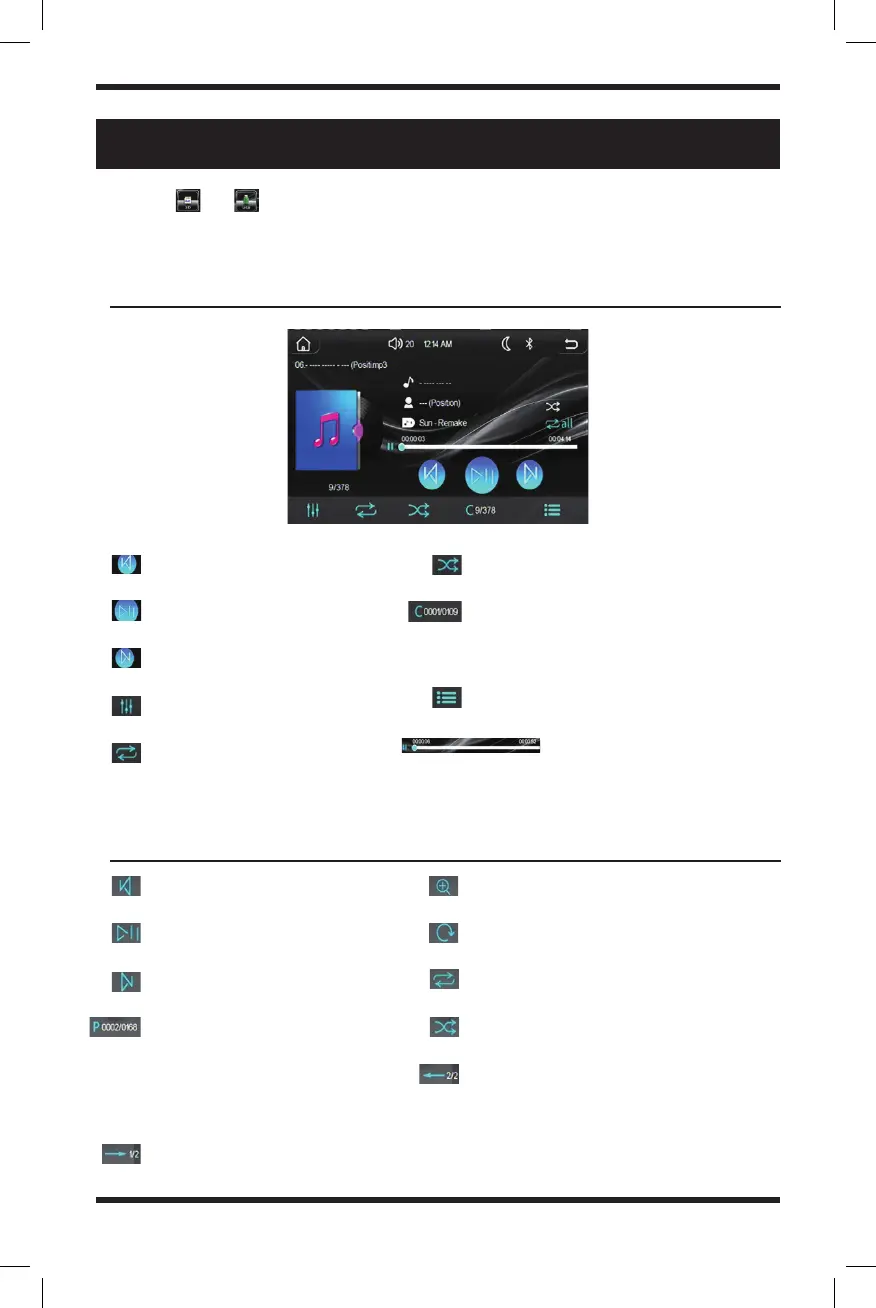
Previous song
Play/Pause music
Skip song
Digital EQ
Repeat playback
(replay song after it’s over)
Shuffle playback
File selection in folder (use the keypad
to quickly go to the file number within
the folder to start playing that file)
Song list
Play progress bar: press and
slide to quickly skip between parts of
an audio file
Previous Image
Play or Pause Image Slideshow
Next Image
File selection in folder (use
the keypad to quickly go to
the file number within the
folder to start displaying
that image)
Switch to 2/2 interface
Enlarge or zoom in on image
Rotate image
Repeat playback
Shuffle playback
Switch to ½ interface
SD Card or USB Playback
Music playback interface
Image playback interface
Choose or icon in the main interface or press the MOD (Mode) button to
upon the SD or USB playback function. This mode supports audio, video, and image
playback capabilities.


 To Next Page