6 720 611 451 GB (03.11)
Individual settings
29
6.2 Settings on the Bosch Heatronic
6.2.1 Operating the Bosch Heatronic
The Bosch Heatronic enables easy setting and check-
ing of a large number of appliance functions.
This description is limited to those functions required
for commissioning.
For a full description of all available functions, please
refer to the Service booklet for the Engineer, order no.
7-181-465-348.
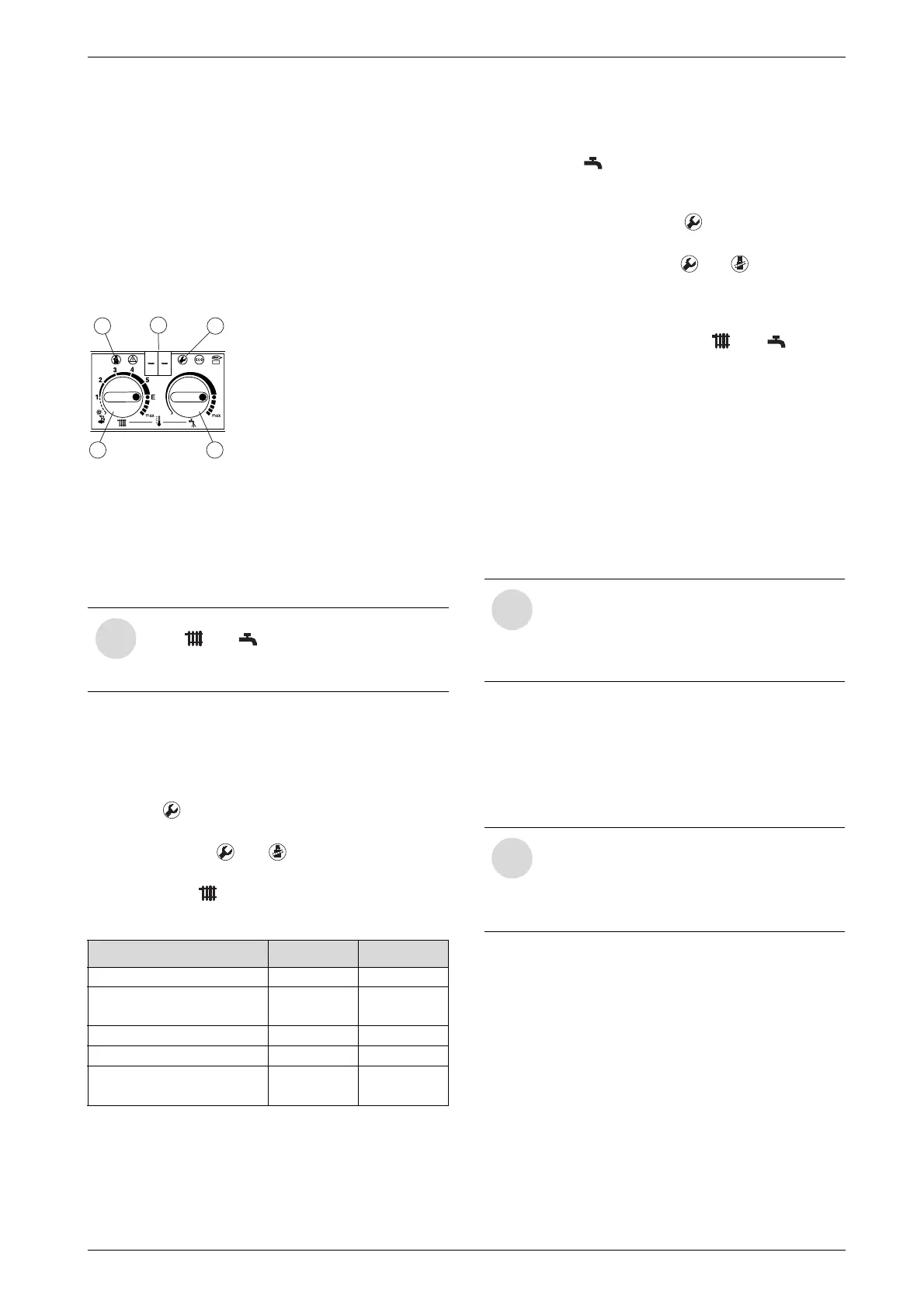
Fig. 39 Appliance controls
1 Service button
2 “Chimney sweep” button
3 Temperature control for central heating
4 Temperature control for hot water
5 Display
Selecting service function:
The service functions are subdivided into two levels:
Level 1 comprises service functions up to function 4.9,
while Level 2 consists of the service functions from 5.0
upwards.
B To select a service function on Level 1: press and
hold the button until the display shows ––.
B To select a service function on Level 2: press and
hold the buttons and simultaneously until the
display shows ==.
B Then turn the temperature control to select the
required function.
The service function 5.0 may be reset.
Entering a setting
B To enter the setting for a function, turn the tempera-
ture control .
Storing a setting
B Level 1: press and hold the button until the dis-
play shows [].
B Level 2: press and hold the and buttons simul-
taneously until the display shows [].
After completing the settings
B Reset the temperature controls and to their
original positions.
6.2.2 Setting the anti-cycle time
(Service Function 2.4)
This service function is only active if Service Function
2.7, automatic anti-cycle time, is deactivated.
The anti-cycle time can be set to between 0 and 15 min-
utes (factory setting is 3 minutes).
If the setting 0 is entered, the anti-cycle time is inactive.
The shortest possible anti-cycle time is 1 minute (rec-
ommended for single-pipe and hot-air heating systems).
6.2.3 Setting the maximum CH flow tempera-
ture (Service Function 2.5)
The maximum CH flow temperature can be set to
between 35°C and 88°C (factory setting).
6.2.4 Setting the switching difference
(Service Function 2.6)
The switching difference is the permissible divergence
from the specified CH flow temperature. It can be set in
increments of 1°C. The adjustment range is 1 to 30°C
(is factory set to 0°C). The minimum CH flow temper-
ature is 30°C.
6.2.5 Setting the heating output
(Service Function 5.0)
The heating output can be set to any level between min.
rated heat output and max rated heat output to limit it to
the specific heat requirements.
The factory setting is the max. rated heat output.
i
Note the positions of the temperature con-
trols and . After completing the set-
tings, return the temperature controls to
their original positions.
Service function Code no. See page
Anti-cycle time 2.4 29
Max. CH flow
temperature 2.5 29
Switching difference 2.6 29
Max. heating output 5.0 29
Constant hot water
cycle time 6.8 30
Table 14
6 720 610 332-30.1O
5
2 1
4
3
i
If the appliance is connected to an outside
temperature controlled heating program-
mer, the anti-cycle time does not need to
be set on the appliance and is optimised
by the programmer instead.
i
If the appliance is connected to an outside
temperature controlled programmer, the
programmer sets the switching difference.
It does not need to be set on the appli-
ance.


 To Next Page