Rev 7 Sep/2005
A-7
KMD 550/850 Appendix A
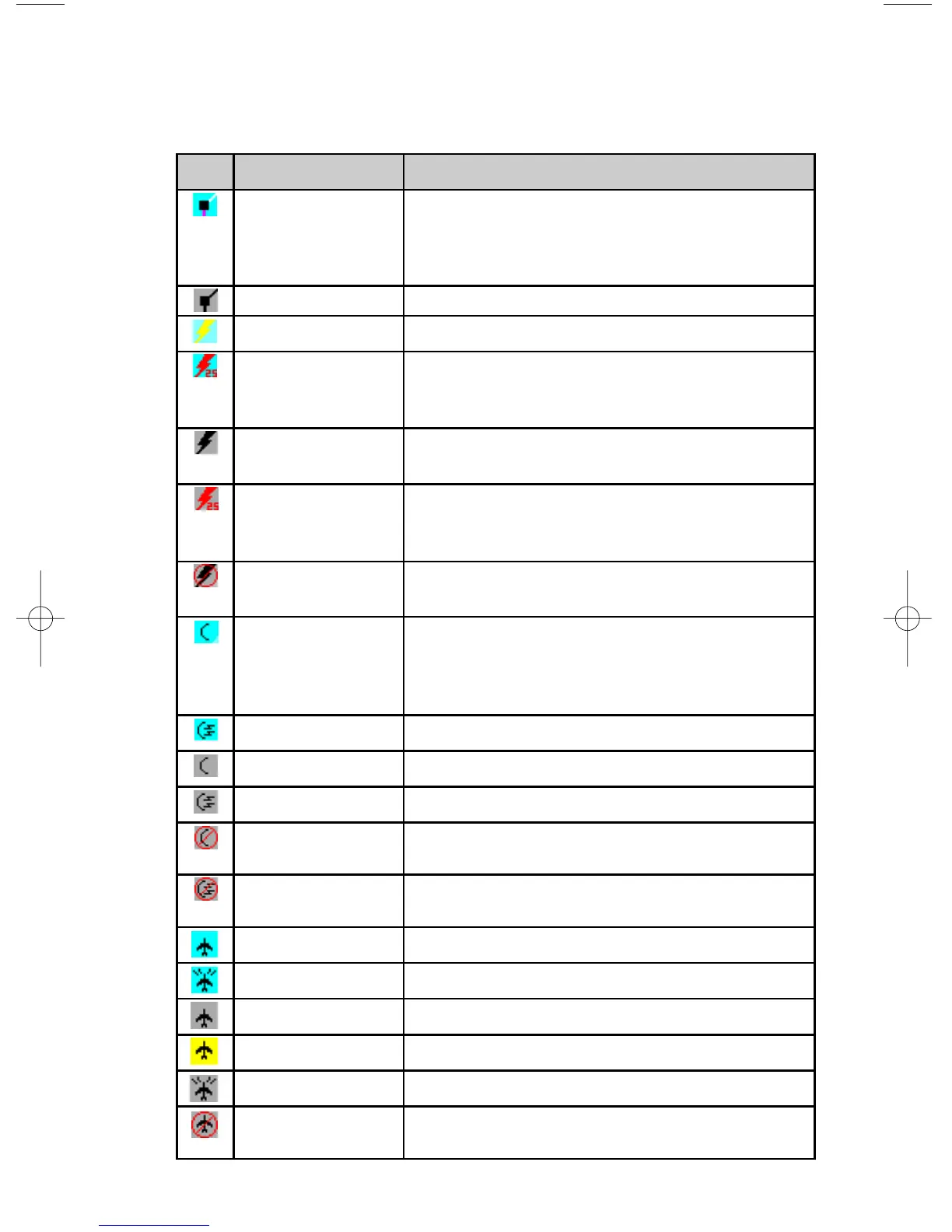
The following shows the various icons that may be seen in the functions
legend, which is displayed in the lower left of the display. Remember,
not all installations will have all available functions.
Icon Colors Description
Black symbol with a
magenta line below
and a white line above
on a cyan background
Flight plan information being received and displayed.
Black on gray Flight plan information being received but not displayed.
Yellow on cyan
Stormscope
®
information being received and displayed.
Red on cyan
Stormscope
®
information being received and displayed.
Strikes have occurred within the last 3 minutes within 25
nm.
Black on gray
Stormscope
®
information being received but not dis-
played.
Red on gray
Stormscope
®
information being received but not dis-
played. Strikes have occurred within the last 3 minutes
within 25 nm.
Black on gray with red
slash
Stormscope
®
information not being received; data is
invalid.
Black on cyan Weather radar in standby mode and being displayed.
Note that since the OVLY key is never enabled on the
WX page when the radar is in standby mode, “Hold to
Help” text is not available.
Black on cyan Active weather radar being displayed.
Black on gray Weather radar in standby mode, not being displayed.
Black on gray Weather radar in active mode, not being displayed.
Black on gray with red
slash
Weather radar data invalid / not being received.
Previously in standby.
Black on gray with red
slash
Weather radar data invalid / not being received.
Previously active.
Black on cyan Traffic sensor in standby mode being displayed.
Black on cyan Active traffic information being displayed.
Black on gray Traffic sensor in standby mode, not being displayed.
Black on yellow TIS service not available.
Black on gray Traffic sensor active, not being displayed.
Black on gray with red
slash
Traffic sensor data invalid / not being displayed.



 To Next Page