Rev 7 Sep/2005 KMD 550/850 Pilot's Guide
9
OPERATION
SELECTING A MAP DISPLAY
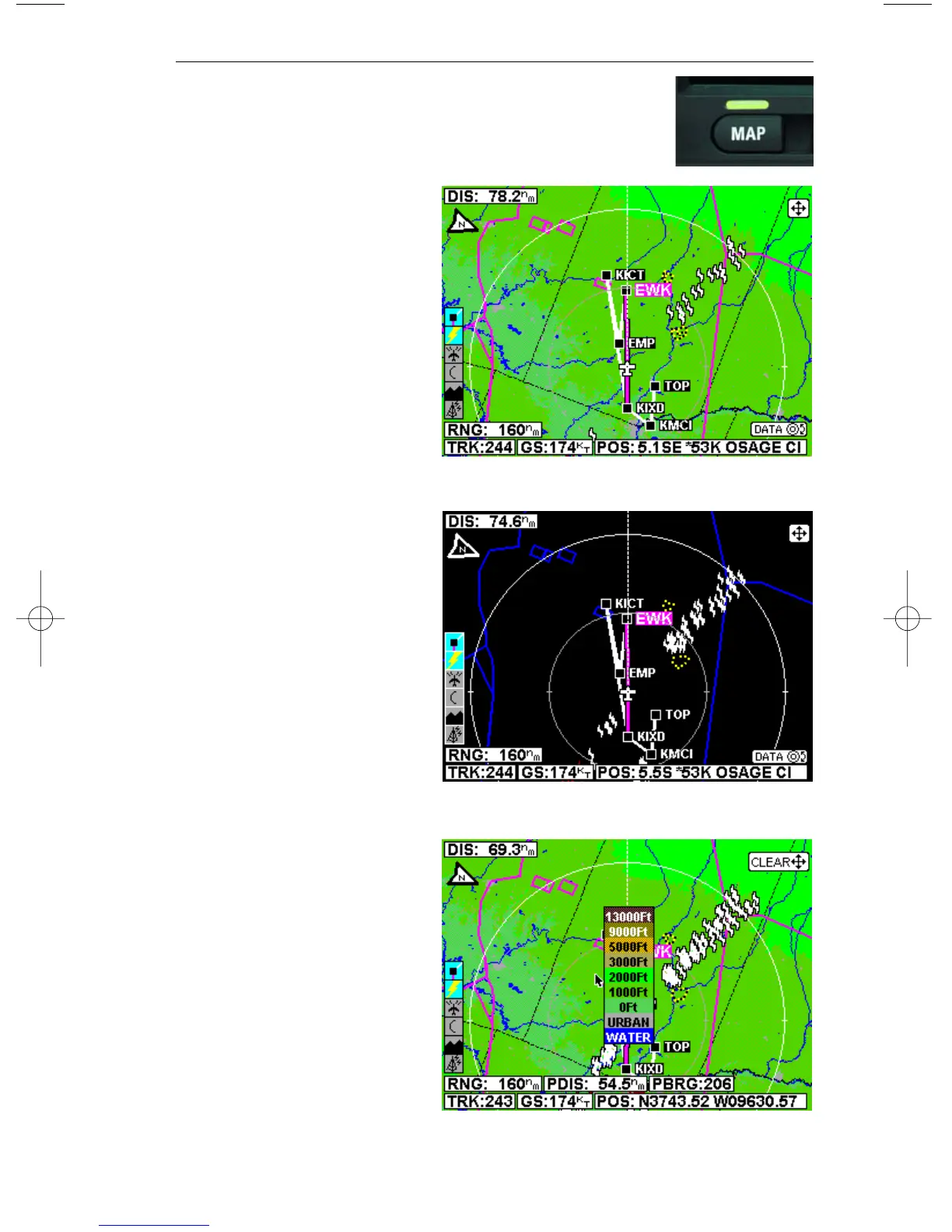
Press the MAP Function
Select Key to toggle between
TOPO ON or TOPO OFF.
With TOPO ON classes of
data are displayed as a spe-
cific color. With TOPO OFF
all cartographic data is auto-
matically removed and the
Jeppesen Nav Data is pre-
sented on a black back-
ground.
A color key can be displayed
on the Map display when in
TOPO ON mode. Move the
joystick pointer to any terrain
area away from icons or con-
trol areas and press the
MORE INFO Key. A color
key will be displayed as in
Figure 3. To exit, clear by
moving the joystick and
press the RESET STICK
Key.
NOTE: The number dis-
played in the colored boxes
of the legend in Figure 3 rep-
resent the lowest limit of the
altitude range for that color.
Refer to the chart shown pre-
viously in MAP TOPO-
GRAPHIC AND URBAN
AREAS DISPLAY to deter-
mine the altitude range for
each color.
USING THE MAP
After power-up, the map will
initially be displayed at a
range setting of 80nm.
Operation
Figure 1 - TOPO ON
Figure 2 - TOPO OFF
Figure 3



 To Next Page